Why Is My SD Card So Slow? Top Causes and Fast Fixes
Why Is My Sd Card So Slow?
You buy an SD card to store photos, videos, or files. But suddenly, it feels slow. Files take forever to copy. Photos lag when you open them. You wonder, “Why is my SD card so slow?” You’re not alone. Many people face this problem, especially beginners. In this article, we’ll explain why SD cards slow down, how to test them, and what you can do to fix or prevent it. We’ll use simple words, practical examples, and clear data.
What Makes An Sd Card Slow?
SD cards are small, but their performance depends on many factors. Let’s look at the main reasons your SD card may be slow:
- Card Type: Not all SD cards are equal. Some are faster.
- Card Age: Old cards often slow down.
- File System: The way your card is formatted matters.
- Card Class: SD cards are rated by speed class.
- Device Compatibility: Some devices limit speed.
- Card Health: Damage or wear affects speed.
Understanding these basics helps you choose and use SD cards wisely.
Types And Classes: Know Your Sd Card
Many beginners miss the importance of SD card type and class. These two things decide the maximum speed possible.
Sd Card Types
There are three main types:
- SD (Standard Capacity): Up to 2GB. Slowest.
- SDHC (High Capacity): 2GB–32GB. Better speed.
- SDXC (Extended Capacity): 32GB–2TB. Fastest.
SDXC cards are usually the fastest. But your device must support them.
Sd Card Speed Classes
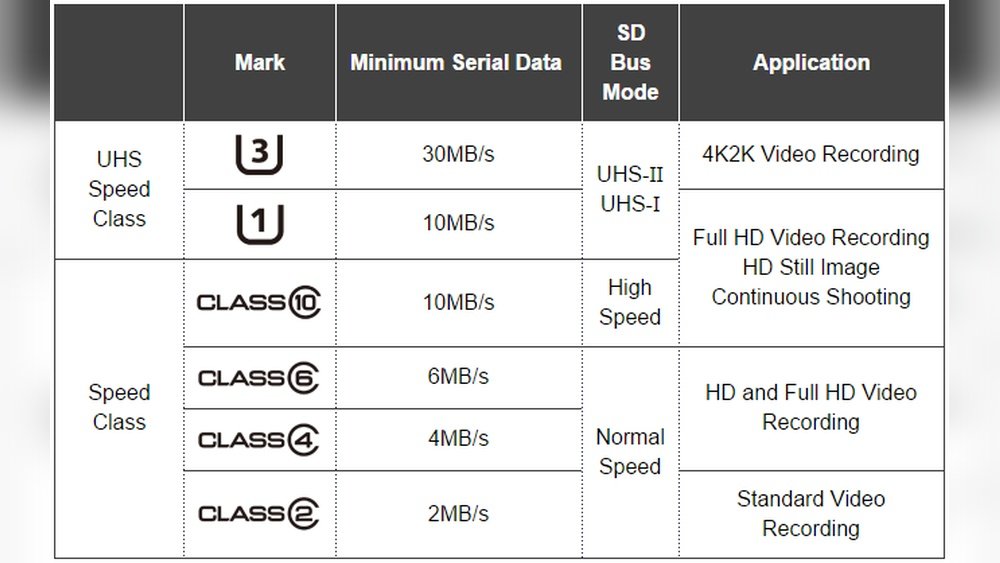
SD cards have classes printed on them. These are:
- Class 2: Minimum 2MB/s
- Class 4: Minimum 4MB/s
- Class 6: Minimum 6MB/s
- Class 10: Minimum 10MB/s
There are also UHS (Ultra High Speed) classes:
- UHS-I: Up to 104MB/s
- UHS-II: Up to 312MB/s
Look for a “10” inside a circle or a “U1/U3” symbol. The higher the class, the faster the card.
Here’s a simple comparison table:
| Type/Class | Minimum Speed (MB/s) | Common Use |
|---|---|---|
| Class 2 | 2 | Basic photos |
| Class 4 | 4 | HD video |
| Class 10 | 10 | Full HD video |
| UHS-I | Up to 104 | 4K video |
If your card is Class 4, don’t expect it to copy files as fast as a UHS-I card.
Credit: www.easeus.com
Why Sd Cards Slow Down Over Time
You may notice your SD card was fast when new, but now it feels slow. Here’s why:
- Wear and Tear: Flash memory wears out after many writes.
- Bad Sectors: Parts of the card become damaged.
- Fragmentation: Files spread out across the card, slowing access.
- Frequent Deletion: Constant deleting and re-writing reduces speed.
A real example: A 32GB SDHC card may start at 20MB/s write speed, but after two years of regular use, it drops to 10MB/s or less.
Data: Sd Card Speed Vs Age
| SD Card Age | Typical Write Speed (MB/s) | Typical Read Speed (MB/s) |
|---|---|---|
| New (0–6 months) | 20 | 40 |
| Moderate (6–18 months) | 15 | 32 |
| Old (18+ months) | 10 | 25 |
Notice how speed drops as the card ages.
File System And Formatting
The way your SD card is formatted affects speed. Most cards are formatted as FAT32 or exFAT.
- FAT32: Works with most devices. Good for small files. Slow with big files.
- ExFAT: Better for large files (like videos). Faster on modern devices.
If your card is slow, reformatting to exFAT may help. But always back up your data before formatting.
Device Compatibility: The Hidden Limiter
Sometimes your card is fast, but your device is slow. For example:
- Older cameras only support SD or SDHC. They limit speed.
- Some phones and laptops use slow card readers.
- USB 2.0 ports limit speed compared to USB 3.0.
Here’s a quick comparison:
| Device/Port | Max SD Card Speed (MB/s) |
|---|---|
| USB 2.0 Card Reader | 25 |
| USB 3.0 Card Reader | 100+ |
| Older Camera | 10 |
| Modern Smartphone | 30–80 |
If your SD card is UHS-I, but your card reader is USB 2. 0, you won’t get full speed.
Card Health And Physical Damage
SD cards can be damaged by:
- Heat
- Moisture
- Dropping
- Frequent removal/insertion
Damaged cards run slowly or even lose data. Inspect your card for cracks, bent pins, or dirt. Clean gently with a dry cloth.
How To Test Sd Card Speed
Beginners often don’t know how to check card speed. Here are simple ways:
- Use a Computer: Insert the card. Copy a large file (1GB+). Check the transfer speed (Windows shows it during copying).
- SD Card Speed Apps: Use apps like A1 SD Bench (Android), Blackmagic Disk Speed Test (Mac).
- Online Tools: Some websites let you test speed directly.
Compare your results to what’s printed on your SD card. If you get much lower speeds, something is wrong.
Common Mistakes That Make Sd Cards Slow
Even new cards can be slow if you make these mistakes:
- Using a fake SD card (many cheap cards are not real).
- Mixing up SD card types (using SDXC in SDHC-only devices).
- Not formatting the card properly.
- Using old or dirty card readers.
- Storing too many files, leaving little free space.
Always check your device’s supported SD card type and class before buying.
How To Fix A Slow Sd Card
If your SD card is slow, try these steps:
- Backup Data: Always start by saving your files elsewhere.
- Format the Card: Use exFAT for best speed, unless your device needs FAT32.
- Check for Errors: On Windows, right-click card > Properties > Tools > Check.
- Clean Card and Reader: Remove dust, dirt, or debris.
- Try Different Devices: Test in another card reader or computer.
- Update Device Drivers: Old drivers may slow down transfers.
- Leave Free Space: Fill the card only up to 80% for best speed.
These steps solve most beginner problems. If the card stays slow, it may be damaged or fake.
Real-world Example: Sd Card In Cameras
Let’s say you buy a Class 10 SDHC card for your digital camera. You want to shoot Full HD video. But your camera only supports Class 4. Even with a faster card, your camera limits the speed. You won’t get the full 10MB/s. Always match card class to your device.
Sd Card Brands Matter
Some brands make faster, more reliable cards. Popular brands include:
- SanDisk
- Samsung
- Kingston
- Lexar
Cheaper brands or unbranded cards often use lower-quality memory. They can be slow or unreliable.
According to tests, SanDisk Ultra 32GB SDXC cards average 80MB/s read speed, while cheap cards may give only 20MB/s.
How To Choose A Fast Sd Card
When buying, consider:
- Card class: Choose Class 10 or UHS-I for video.
- Card type: SDXC is fastest, but check device compatibility.
- Brand: Stick to trusted brands.
- Capacity: Higher capacity often means faster speed, but not always.
- Price: Avoid deals that seem too good to be true.
Check reviews and speed tests online before buying.
What If Your Sd Card Is Fake?
Fake SD cards look real but are slower and less reliable. Signs of a fake card:
- Unusual low price.
- Wrong logo or packaging.
- Capacity shown as 64GB, but real size is much less.
To check, use tools like H2testw (Windows) or F3 (Mac/Linux). They write and read files to verify real capacity and speed.
Sd Card Speed For Different Uses
Different tasks need different speeds. For example:
- Photos: 4MB/s is enough.
- HD video: Needs 10MB/s or more.
- 4K video: Needs 30MB/s+.
If you use a slow card for 4K video, you’ll get dropped frames and errors.

Credit: www.reddit.com
Two Insights Beginners Often Miss
- Device Matters as Much as Card: You can buy the fastest SD card, but if your device or card reader is slow, you won’t get full speed.
- Free Space Boosts Speed: Keeping your SD card at least 20% empty improves performance. Too many files slow down access.
External Link For Further Reading
For deeper technical information, see the Wikipedia page on SD cards.

Credit: www.youtube.com
Frequently Asked Questions
Why Does My Sd Card Copy Files Slowly?
This usually happens because of low card class, old card age, or a slow card reader. Check your card’s speed class and try copying files with a USB 3.0 reader.
Can Formatting Speed Up My Sd Card?
Yes, formatting removes fragmentation and errors. Use exFAT for best speed, unless your device needs FAT32. Always backup your files first.
How Do I Know If My Sd Card Is Fake?
Fake cards often show wrong capacity and slow speeds. Test with H2testw or F3, and buy from trusted stores. Look for correct branding and packaging.
Is It Safe To Use An Old Sd Card?
Old cards slow down and may lose data. If your card is over two years old and feels slow, replace it for important files or photos.
What Is The Best Sd Card For Video Recording?
For HD video, use Class 10 or UHS-I cards from trusted brands like SanDisk or Samsung. Check your camera’s supported card class.
Your SD card doesn’t have to be slow. With the right knowledge, you can pick, test, and use SD cards for best speed. Always check card class, type, and device compatibility before buying. Keep your card healthy, leave free space, and use trusted brands.
If your card slows down, try the fixes above. With these tips, your SD card will work faster and safer for years to come.