What
What Is Q Factor In Audio
Understanding sound can be tricky, especially when technical terms are involved. One common question in music production, audio engineering, and even in home theater setups is: What is the Q factor in audio? For beginners, this term might sound confusing. But knowing about Q factor can help you shape your sound better, avoid unwanted noise, and make smarter choices with your audio gear.
Let’s break down the Q factor in simple terms, using easy examples and practical tips. By the end of this article, you will know what Q factor means, why it matters, and how to use it for better sound.
The Basics Of Q Factor
The Q factor stands for “Quality Factor.” It describes how narrow or wide a filter is in audio processing. When you change the Q factor, you are controlling how many frequencies around a chosen point are affected.
- Low Q means the filter affects a wide range of frequencies.
- High Q means the filter affects a narrow range of frequencies.
Imagine you have a flashlight. A low Q is like a big, wide light beam covering a large area. A high Q is like a focused, sharp beam lighting up only a small spot.
In audio, Q factor is most often used with equalizers (EQs), filters, and resonant circuits.
Where Do You Find Q Factor?
You will see the Q factor setting in:
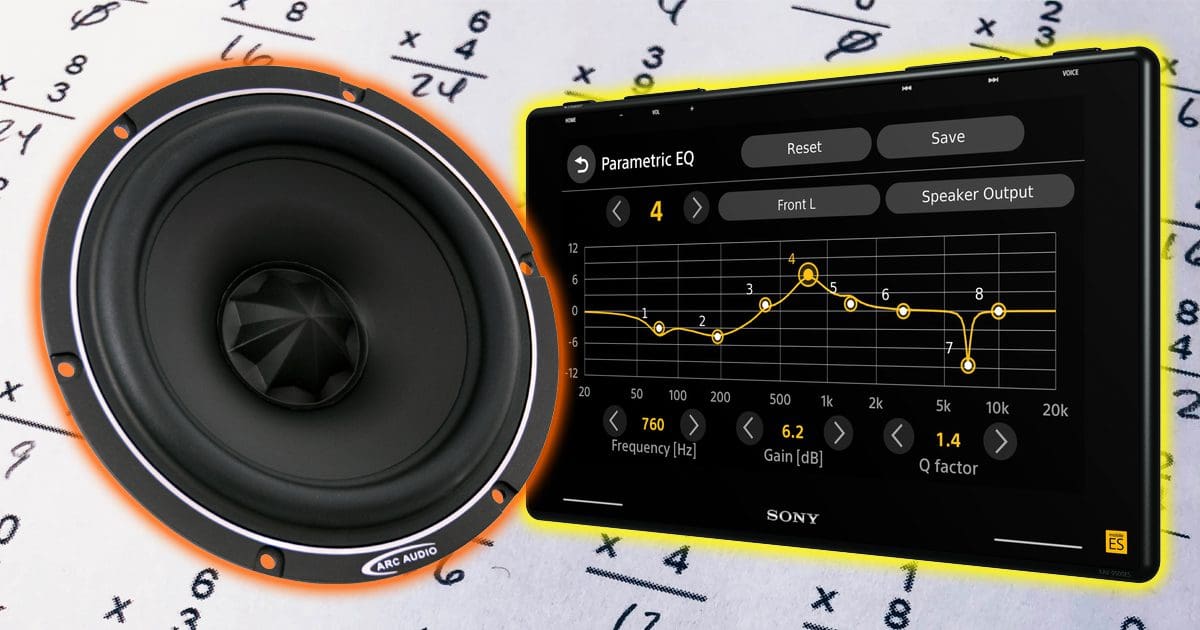
- Parametric EQs: These let you boost or cut a specific frequency and set the Q.
- Synthesizers: Filters in synths often have a Q or resonance knob.
- Crossovers: Used in speakers to split frequencies, sometimes with Q controls.
The Q factor is part of both analog and digital audio equipment. It is a standard feature in most audio software and mixing consoles.
Why Does Q Factor Matter?
Changing the Q factor lets you control the shape of your sound. Here’s why this is important:
- Surgical adjustments: High Q helps fix specific problems, like removing a hum or hiss.
- Smooth shaping: Low Q is good for gentle changes, like making a vocal warmer.
- Preventing phase issues: The wrong Q can make audio sound hollow or unnatural.
- Creative effects: Q factor can add punch or resonance to instruments.
For example, if a singer’s voice has a harsh “sss” sound at 7 kHz, you can use a high Q to cut just that frequency without affecting the rest.
How Q Factor Works In Equalizers
Most people first use Q factor in an equalizer. Let’s see how it works:
- Frequency: The main point you want to boost or cut (e.g., 100 Hz, 1 kHz, 5 kHz).
- Gain: How much you boost or cut.
- Q Factor: How wide or narrow the change is.
A common beginner mistake is to boost or cut too much with a high Q, which can make the sound sharp or metallic. A low Q can make changes too broad, affecting more of the mix than you want.

Credit: www.psaudio.com
Visualizing Q Factor: A Practical Table
To make things clear, here’s a simple comparison of Q factor values and what they do:
| Q Factor Value | Bandwidth (Octaves) | Effect on Sound |
|---|---|---|
| 0.5 | 2.7 | Very broad, gentle change |
| 1.0 | 1.4 | Moderate, smooth change |
| 2.0 | 0.7 | Narrow, precise cut or boost |
| 5.0 | 0.3 | Very sharp, surgical adjustment |
The higher the Q, the smaller the range of frequencies affected.
Real-world Example: Fixing A Snare Drum Ring
Suppose you record a snare drum, and it has an annoying ringing sound at 800 Hz. Here’s how Q factor helps:
- Use a parametric EQ.
- Set the frequency to 800 Hz.
- Use a high Q (for example, 4.0) to make the filter very narrow.
- Cut (reduce gain) to remove just the ring, not the rest of the snare.
If you used a low Q, you would remove too much and make the snare sound thin.
Q Factor In Analog Vs Digital Audio
Both analog and digital audio systems use Q factor, but there are differences:
- Analog EQs: The Q may change as you adjust gain. Some classic analog EQs have a fixed Q.
- Digital EQs: Q is usually stable, and you can set it precisely.
Digital EQs often show a graph, making it easy to see the effect of changing Q.
Comparing Q Factor With Bandwidth
In audio, bandwidth is closely related to Q factor. They are connected, but not the same.
- Q Factor: A higher value means a narrower filter.
- Bandwidth: Measured in octaves, a wider value means a broader filter.
You can use one to calculate the other. Here’s a quick reference:
| Q Factor | Approximate Bandwidth (Octaves) |
|---|---|
| 0.7 | 2.0 |
| 1.4 | 1.0 |
| 2.8 | 0.5 |
A high Q is a small bandwidth, and a low Q is a large bandwidth.
How To Choose The Right Q Factor
Choosing the right Q depends on your goal:
- Correcting Problems: Use a high Q to cut out hums, hisses, or feedback.
- General Shaping: Use a low Q for natural-sounding boosts or cuts.
- Creative Effects: Use a medium or high Q to add resonance or “bite” to a sound.
Some practical tips:
- Start with a medium Q (around 1.0–1.5) and adjust by ear.
- If the change sounds too obvious, lower the Q.
- If the change is too wide, increase the Q.
Remember: The human ear is very sensitive to unnatural changes in sound. Always listen carefully and make small adjustments.
Q Factor In Filters And Synths
In synthesizers and filters, Q factor is often called resonance. Turning up the resonance can make a filter “ring” at the cutoff point.
- Low resonance (low Q): Soft, gentle filtering.
- High resonance (high Q): Whistling, “peaky” sound.
For example, the famous “acid” bass sound in dance music uses a high Q on a low-pass filter. This gives it a sharp, squelchy character.

Credit: www.hollyland.com
Practical Uses In Mixing And Mastering
Q factor is a tool you’ll use every day if you mix or master audio. Here’s how it helps:
- Mixing vocals: Use a narrow Q to cut harsh sibilance or boost presence.
- Bass instruments: Use a wide Q to gently add warmth without muddying the mix.
- Drums: Use a high Q to remove unwanted rings or add snap to a snare.
- Mastering: Use very small boosts or cuts with low Q for subtle shaping.
One non-obvious insight: Too much high Q can make a mix sound unnatural. Always check how your changes sound in the whole mix, not just solo.
Common Mistakes With Q Factor
Beginners often make these mistakes:
- Using too high a Q: This can create “notches” that sound thin or phasey.
- Boosting with high Q: Sharp boosts can make sounds harsh or cause distortion.
- Ignoring phase issues: Extreme Q settings can shift phase, causing problems when mixing multiple sounds.
Practical advice: Cut with high Q for problems. Boost with low Q for musicality.
Credit: www.bestcaraudio.com
Measuring And Calculating Q Factor
While you don’t need math for most uses, knowing the formula can help:
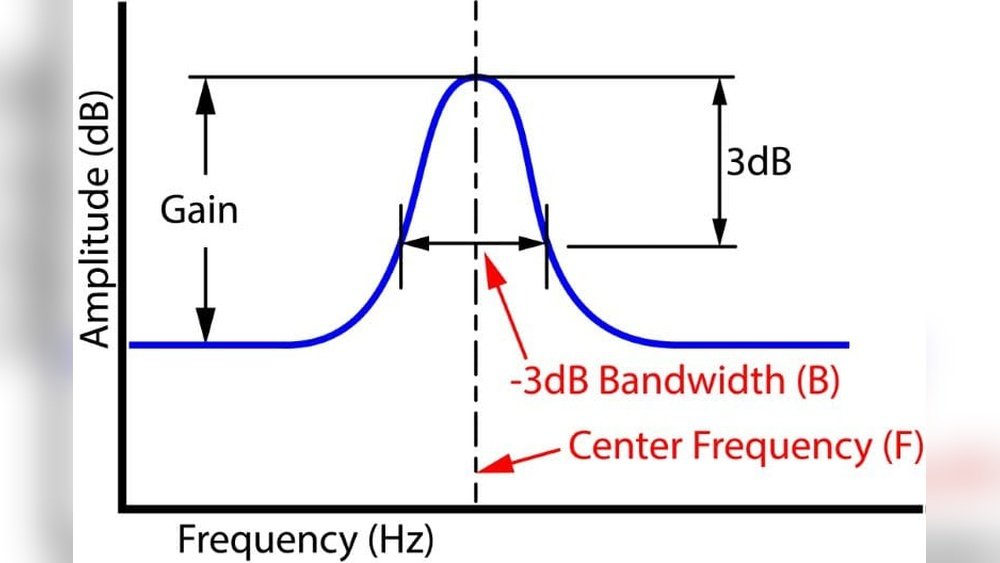
Q factor = Center frequency / Bandwidth (at -3 dB points)
For example, if your center frequency is 1000 Hz and the bandwidth is 200 Hz, Q = 1000 / 200 = 5. 0.
Modern EQ plugins show Q visually, so you rarely need to calculate manually.
Q Factor And Speaker Design
Q factor is also important in speaker design and crossovers. Here, it affects:
- How speakers handle certain frequencies
- The smoothness of the transition between drivers
- The “tightness” or “looseness” of bass response
A high Q woofer can make bass sound “boomy. ” A low Q gives tighter, more controlled bass.
Comparing Real-world Audio Examples
Here’s how Q factor affects different audio situations:
| Audio Task | Q Factor Used | Result |
|---|---|---|
| Cutting vocal sibilance | High Q (narrow) | Removes harsh “sss” without dulling voice |
| Boosting overall warmth | Low Q (wide) | Adds body to sound, stays natural |
| Reducing guitar feedback | Very high Q | Cuts feedback note precisely |
| Shaping drum group | Medium Q | Smooth control over tone |
These choices depend on your goal and the sound source.
Q Factor Vs Resonance: Are They The Same?
Many beginners think Q and resonance are always the same. They are related, but not identical:
- Q: Technical term for how narrow/wide a filter is.
- Resonance: Usually refers to “boost” at the filter cutoff frequency, often controlled by Q.
High Q increases resonance in filters. But in EQ, high Q just means a narrow band, not always a boost.
Advanced Tip: Combining Q With Gain
One insight most beginners miss: Q factor and gain interact. A narrow, high Q boost can sound harsh, while a wide, low Q cut can sound weak. Balancing Q and gain is key for good sound.
Always try different Q values with both boosts and cuts. Trust your ears, not just the numbers.
Learning More About Q Factor
Understanding Q factor can take time, but it’s worth it. Try these steps:
- Experiment with your EQ plugin or hardware.
- Change the Q and listen to the difference.
- Practice on different instruments and voices.
- Study pro mixes to hear how Q is used.
For deeper learning, check resources like the Wikipedia Q factor page.
Frequently Asked Questions
What Does Q Factor Stand For In Audio?
Q factor stands for Quality Factor. In audio, it means how narrow or wide a filter or EQ band is. Higher Q is narrow, lower Q is wide.
How Does Q Factor Affect Sound?
Q factor changes how many frequencies are boosted or cut at once. High Q affects a small range, low Q affects a wide range. This shapes the sound’s character and focus.
Is Q Factor The Same As Bandwidth?
They are related but not the same. Q factor is a ratio; bandwidth is the size of the range in Hz or octaves. Higher Q means smaller bandwidth.
Should I Use High Or Low Q When Eqing Vocals?
Use a high Q for cutting unwanted noises like sibilance. Use a low Q for gentle boosts to add presence or warmth. Always listen to the results.
Can Q Factor Cause Problems?
Yes. Using too much high Q can make sound unnatural or phasey. Too much low Q can affect too many frequencies. Always use small, careful adjustments.
Understanding Q factor in audio helps you control your sound with precision. Whether you work with music, podcasts, or home audio, using Q wisely will give you better, cleaner results. Experiment, trust your ears, and keep learning for the best sound possible.