Types of Stereo Connectors for Car: Your Ultimate Guide
Many drivers love music while on the road. But setting up a car stereo can be confusing, especially when you see so many types of connectors. If you’ve ever looked behind your car radio, you know the back is full of cables and plugs.
Each connector has a special job—some bring music from your phone, others send power to speakers, and a few even carry video signals. If you want to upgrade your car audio system, replace a head unit, or just connect your phone for better sound, it’s important to understand these connectors.
Knowing the right types helps you avoid damage, get the best sound, and even save money on installation.
This guide will explain the main stereo connectors for cars in simple terms. You’ll learn what each one looks like, what it does, and where you’ll find it. We’ll also share tips for beginners, common mistakes, and examples you’ll see in real cars. By the end, you’ll feel more confident about your car’s audio connections.
Main Types Of Car Stereo Connectors
There are several types of connectors you’ll find in car audio systems. Let’s break down the most common ones and what you need to know about each.
1. Iso Connector
The ISO connector is very popular in European cars and newer vehicles from other regions.
- What it does: It connects the car’s wiring harness to the stereo head unit.
- Shape: Usually two black plastic plugs, one for power, one for speakers.
- Why it matters: The ISO standard makes it easier to replace the stereo without cutting wires.
Example: Many Volkswagen and BMW models use ISO connectors. If you upgrade your stereo, you can buy an adapter for easy installation.
2. Din And Mini-din Connectors
The DIN connector is an older round plug, often with five or more pins.
- DIN: Used for older car radios, sometimes for microphone or CD changer connections.
- Mini-DIN: Smaller version, often for steering wheel control or some video signals.
Beginner tip: If your car is from the 1980s or 1990s, you might see a DIN plug. Most modern cars use different connectors now.
3. Rca Connectors
The RCA connector is easy to spot—usually red, white, and yellow plugs.
- Red and white: Carry left and right audio signals (for connecting amplifiers or subwoofers).
- Yellow: Used for video signals, like a backup camera.
Example: If you install an external amplifier, you’ll often use RCA cables to connect the stereo to the amp.
4. 3.5mm Aux Jack
The 3.5mm AUX jack is a small round port, just like the headphone jack on a phone.
- Purpose: Lets you plug your phone or music player directly into the car stereo.
- Why it’s useful: Almost every device has a headphone output, so this is a simple way to play music.
Practical example: Many cars have an AUX input near the dashboard. You can use a basic 3.5mm cable to connect your phone.
5. Usb Ports
USB connectors have become standard in modern vehicles.
- Use: For charging devices, playing music, or connecting to Apple CarPlay/Android Auto.
- Types: USB-A (rectangular), USB-C (smaller, oval).
Beginner insight: Not all USB ports in a car support music—some are only for charging. Check your car manual.
6. Proprietary Connectors
Some car makers use proprietary connectors—special plugs made just for their brand.
- Example brands: Ford, Toyota, Honda, GM.
- Challenge: Harder to replace stereo without an adapter.
Tip: Always check what type of connector your car uses before buying a new stereo.
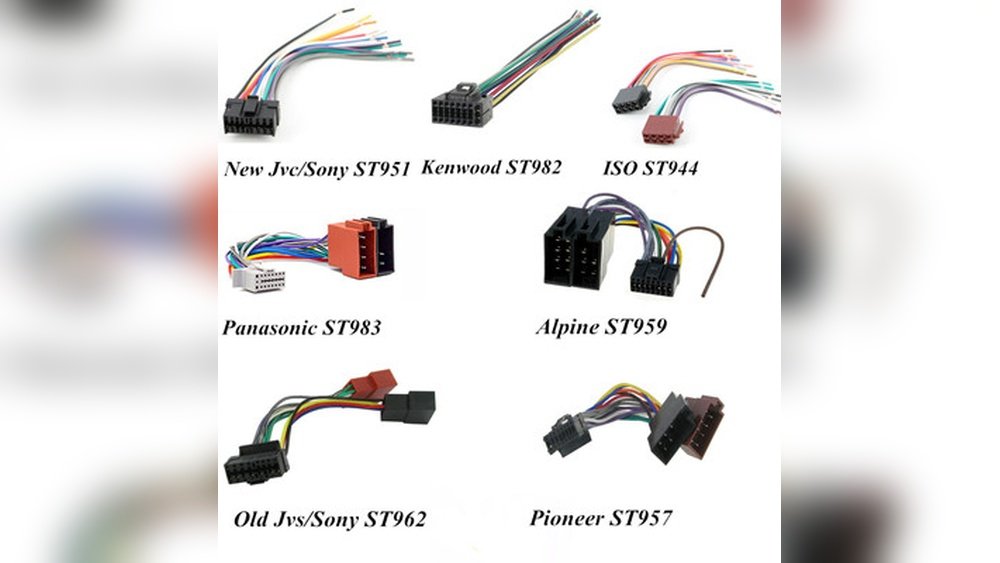
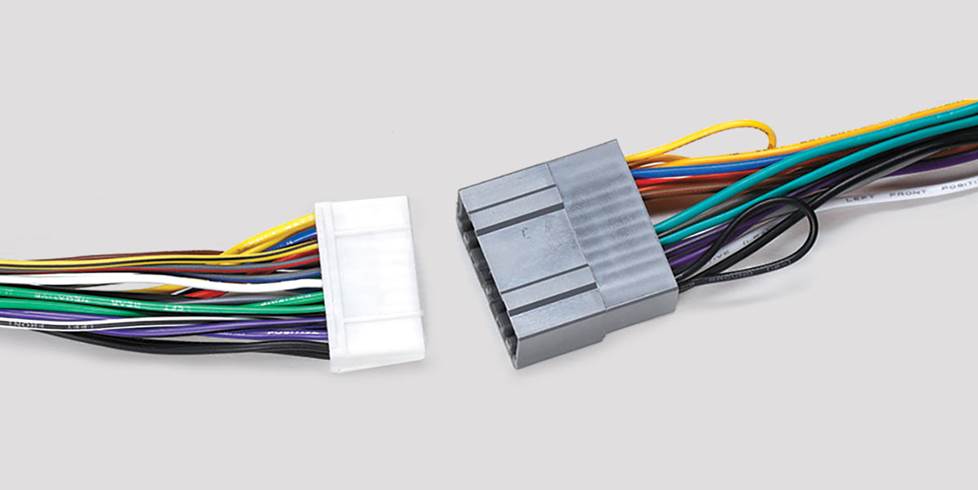
7. Wiring Harness Adapters
A wiring harness adapter is not a connector itself, but an important accessory.
- Purpose: Lets you connect a new stereo to your car’s factory wiring without cutting wires.
- Why it helps: Makes installation easier and keeps your car’s wiring safe.
Non-obvious insight: Many beginners damage their car’s wiring because they don’t use an adapter. Always use one if possible.
8. Speaker Connectors
These are special clips or plugs that connect the stereo to the car speakers.
- Types: Spade terminals, quick-release plugs, or custom connectors.
- Why it matters: Using the right speaker connector gives better sound and avoids loose connections.
Example: If you upgrade your car speakers, make sure the new speakers come with compatible connectors.
9. Antenna Connectors
The antenna connector brings radio signals to your car stereo.
- Common types: Motorola plug (round, single pin), Fakra (colored plastic, used in newer cars).
- Why it’s important: Without this, FM/AM radio won’t work.
Beginner mistake: Forgetting to plug in the antenna after installing a new stereo is common. Double-check all connections.
10. Optical And Digital Connectors
Some high-end cars use optical (fiber optic) or digital connectors for audio.
- Why: These carry high-quality sound with less interference.
- Where: Found in luxury brands like Mercedes-Benz or BMW.
Insight for beginners: If your car uses fiber optic, standard stereos won’t work without a special adapter.
11. Bluetooth Modules
Bluetooth isn’t a physical connector, but it’s now a key way to connect phones to stereos.
- How it works: Wireless link for music and calls.
- Connection: Some stereos have a Bluetooth module that plugs into a special port.
Tip: If your car doesn’t have Bluetooth, you can add a module that uses the AUX port or USB.
12. Steering Wheel Control Interfaces
Many modern cars let you control the stereo with buttons on the steering wheel.
- Connector: Usually a small plug that links to the stereo or a special interface box.
- Why it matters: Keeps controls working after upgrading the stereo.
Beginner mistake: Not all aftermarket stereos support steering wheel controls. Check compatibility before buying.
13. Video Connectors
Video connectors are used for screens, cameras, or DVD players.
- Types: RCA (yellow), HDMI, or proprietary plugs.
- Where: Backup cameras, rear-seat entertainment systems.
Practical example: When installing a backup camera, you’ll use a yellow RCA plug for the video signal.
14. Fiber Optic Most Connectors
MOST (Media Oriented Systems Transport) is a special fiber optic system in some cars.
- Purpose: Sends high-quality audio, video, and data signals.
- Brands: Mercedes, Audi, BMW.
Beginner insight: MOST connectors need special adapters if you want to upgrade the head unit.
15. Power And Ground Wires
Not exactly a connector, but every stereo system needs power and ground wires.
- Power wire: Brings electricity from the car battery.
- Ground wire: Connects to the car’s body for a complete circuit.
- Accessory wire: Turns the stereo on/off with the ignition.
Tip: Always double-check your wiring diagram to avoid blown fuses or damage.
Comparison: Common Car Stereo Connectors
To help you visualize the differences, here’s a simple comparison of the most common connectors:
| Connector Type | Main Use | Typical Location |
|---|---|---|
| ISO | Head unit power & speakers | Behind stereo |
| RCA | Amplifier/Subwoofer/Video | Back of stereo |
| 3.5mm AUX | Music input | Dashboard/Console |
| USB | Music, charging, CarPlay/Android Auto | Dash/Armrest/Glovebox |
| Bluetooth | Wireless phone/music | Built-in or add-on |
| Antenna | FM/AM radio | Back of stereo |

Credit: m.made-in-china.com
Choosing The Right Connector For Your Car
Not sure which connector you need? Here are some steps and practical examples:
1. Check Your Car Manual
Your car’s manual lists the types of connectors behind the stereo.
2. Inspect The Stereo’s Back Panel
Remove the trim and look for labels on plugs—most are marked or color-coded.
3. Use An Adapter If Needed
For example, if your car has an ISO connector but your new stereo uses a proprietary plug, get an ISO-to-proprietary adapter.
4. Ask At A Car Audio Shop
If you’re unsure, take a photo of your car’s wiring and ask for advice.
Example:
You buy a new Pioneer stereo for your Honda. The Honda uses a proprietary connector. You’ll need a wiring harness adapter to match Honda’s plug to Pioneer’s input.
Practical Tips For Beginners
- Label all wires before disconnecting
Use tape and a pen to label each wire. This avoids mistakes during reinstallation.
- Test connections before final assembly
Play music and check all speakers, radio, and features before putting the trim back.
- Avoid twisting wires together
Use proper connectors or crimp tools for safe, long-lasting connections.
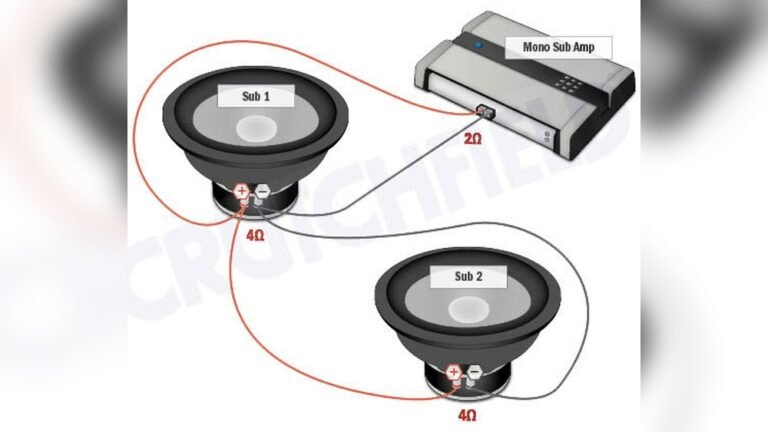
- Double-check polarity on speakers
Mixing up positive and negative wires can cause poor sound or damage.
- Keep old connectors
Don’t throw away old harnesses—they might be useful if you switch back to the factory stereo.
Credit: www.crutchfield.com
Advanced Connectors: When To Upgrade
Sometimes, upgrading your car’s audio system means using advanced connectors.
- Adding an amplifier:
You’ll need RCA cables or a high-level input adapter.
- Installing a backup camera:
Use the yellow RCA plug for video and run a wire to the reverse light for power.
- Adding Apple CarPlay/Android Auto:
Make sure your car’s USB port supports data, not just charging.
Non-obvious insight:
Some advanced features, like steering wheel controls or factory amplifiers, require special interface modules. Skipping these can cause features to stop working.
Car Stereo Connector Compatibility Table
Here’s a quick way to see which connectors work with common car brands:
| Car Brand | Typical Connector | Special Notes |
|---|---|---|
| Honda | Proprietary, ISO (newer models) | Adapter needed for aftermarket stereos |
| Volkswagen | ISO | Easy to upgrade |
| Ford | Proprietary, ISO (some models) | Check for CAN bus integration |
| BMW | ISO, Fiber Optic, MOST | High-end systems need special adapters |
| Toyota | Proprietary | Speaker wiring may differ by model |

Credit: www.starconnect.com.cn
Common Mistakes When Handling Car Stereo Connectors
1. Not Disconnecting The Battery
Always remove the negative battery terminal before working. This prevents short circuits or blown fuses.
2. Mixing Up Wire Colors
Wire colors don’t match across all brands. Use a wiring diagram, not just colors.
3. Forcing Connectors
If a plug doesn’t fit, don’t push harder. Forcing can break the pins or housing.
4. Ignoring Ground Connections
A poor ground wire can cause noise or stereo not powering on.
5. Skipping The Harness Adapter
Cutting factory wires can make future upgrades harder and reduce resale value.
When To Seek Professional Help
- Complex factory systems:
Cars with fiber optic audio or advanced computer integration often need a pro.
- Multiple amplifiers or screens:
Large upgrades with several devices may require custom wiring and programming.
- Airbag or safety system risks:
Some cars route safety systems through the stereo wiring. Mistakes can trigger warning lights or disable features.
If you’re ever unsure, it’s best to get advice from an experienced installer or visit a certified car audio shop.
Where To Find More Information
For detailed wiring diagrams and connector guides, the Wikipedia Automotive Head Unit page is a valuable resource for both beginners and experts.
Frequently Asked Questions
What Is The Most Common Car Stereo Connector?
The ISO connector is the most common in many European and newer vehicles. In North America and Asia, proprietary connectors are also popular. Always check your car’s specific setup before buying new equipment.
Can I Use Any Stereo With My Car’s Connectors?
Not always. Many cars use unique plugs. You often need a wiring harness adapter to connect an aftermarket stereo without cutting wires. Check compatibility before purchasing.
What Happens If I Mix Up Power And Ground Wires?
Mixing these up can blow fuses, damage your stereo, or even cause electrical fires. Always follow a wiring diagram and disconnect the battery before starting work.
How Do I Add Bluetooth If My Car Doesn’t Have It?
You can install a Bluetooth module that connects to the AUX or USB port, or replace the stereo with one that has built-in Bluetooth. Some adapters also use the FM radio signal.
Why Won’t My Radio Work After Installing A New Stereo?
The most common reason is a disconnected or loose antenna connector. Make sure the antenna plug is firmly attached to the new stereo’s input.
Upgrading your car stereo is easier when you understand the connectors. With some research and the right tools, you can enjoy better sound and new features without hassle.