Tips to Setting Equalizer for Best Sound in Car: Expert Guide
When you step into your car and play your favorite song, you expect it to sound clear, powerful, and enjoyable. But often, even with a good sound system, the music feels flat or too sharp, with missing details or too much bass. That’s where the equalizer (EQ) comes in. Setting your car’s EQ the right way can transform an ordinary listening experience into something truly impressive. But for many drivers, the equalizer looks confusing—with all those sliders and numbers. The good news is, you don’t need to be a sound engineer to get great results. With the right tips, anyone can tune their car’s audio to match their taste and get the best sound possible.
This guide will show you how to set your car’s equalizer for the best sound, step by step. We’ll cover the basics, common mistakes, and advanced tricks. You’ll also see real examples, comparison tables, and answers to the most common questions.
Whether you’re a casual listener or a car audio fan, you’ll find practical advice to help you enjoy your music the way it was meant to be heard.
Understanding The Car Equalizer
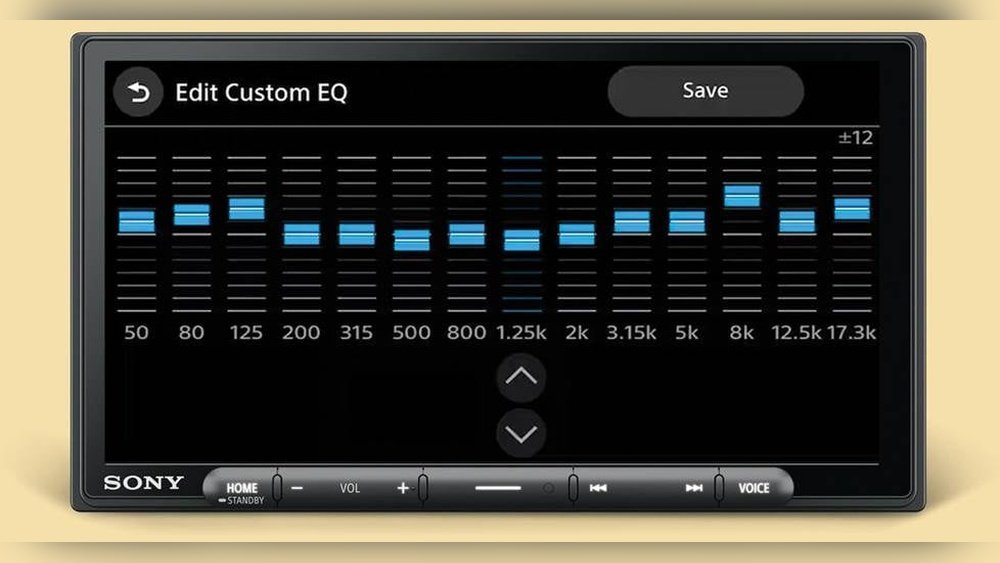
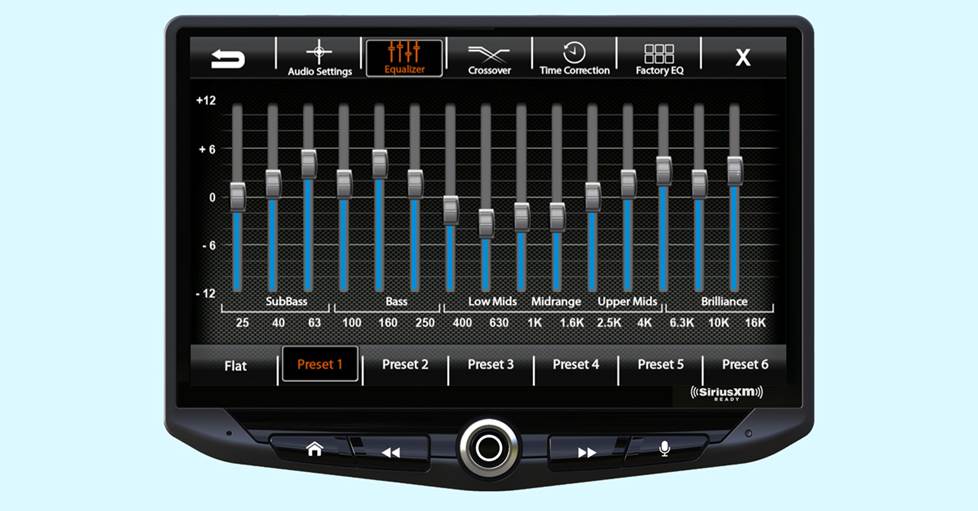
Before adjusting anything, it helps to know what an equalizer actually does. An equalizer splits sound into different frequency bands. Each slider or knob on the EQ controls a specific range of sound frequencies. By changing these, you can boost or reduce bass, midrange, or treble, shaping the music to your liking.
Most car stereos have one of these types of EQs:
- Graphic Equalizer: Uses fixed bands (like Bass, Mid, Treble or more detailed 5- to 10-band sliders).
- Parametric Equalizer: Lets you pick the frequency, bandwidth (width of the effect), and how much to boost/cut.
- Preset Equalizer: Offers ready-made settings like Rock, Jazz, or Classical.
Each type gives a different level of control. Knowing which one your car has will help you follow the right steps.
Frequency Bands Explained
Sound is made up of frequencies, measured in Hertz (Hz). Here’s what the main ranges mean for car audio:
- Sub-bass (20–60 Hz): Deep rumble you feel, not hear.
- Bass (60–250 Hz): Kick drums, bass guitar, warmth.
- Midrange (250 Hz–2 kHz): Most vocals, guitars, piano.
- Upper mids (2–4 kHz): Attack on drums, vocal clarity.
- Presence (4–6 kHz): Crispness, some sibilance (“S” sounds).
- Treble (6–20 kHz): Air, shimmer, cymbals.
If you boost or cut one band too much, the sound can become unbalanced or tiring. The goal is to find a natural, clear sound that’s fun to listen to.
Preparing To Set Your Car Equalizer
Good results start with good preparation. The steps below will make sure your adjustments actually improve your sound.
1. Use High-quality Audio Sources
The best EQ settings won’t fix poor-quality music files. Use high-bitrate MP3s (at least 256 kbps), CDs, or lossless formats (like FLAC). Streaming services like Spotify or Apple Music usually offer good quality if you select “high quality” in settings.
2. Turn Off Extra Sound Effects
Most car stereos offer features like Loudness, Surround, or Bass Boost. Turn these off before you start. They change the sound in ways that make EQ adjustments harder to judge. Once your EQ is set, you can try turning them on again if you like.
3. Set All Eq Bands To Flat
Start with all EQ sliders or dials set to zero (the flat, center position). This gives a natural baseline. From here, you’ll adjust only what’s needed.
4. Set Volume To Normal Listening Level
Don’t set EQ at very low or very high volumes. Pick your usual listening level. Too loud or too quiet makes it hard to judge the real effect.
5. Know Your Car’s Acoustics
Every car is different. Small cars, SUVs, and trucks all sound unique because of their interior shape, materials, and speaker locations. For example, leather seats reflect sound more than cloth. Rear speakers in a hatchback might sound boomy compared to a sedan. Knowing this helps you adjust the EQ for your specific car.
6. Sit In The Driver’s Seat
Always tune your EQ from your normal driving position. What sounds good in the passenger seat may not be right for you as the driver.

Credit: eliteautogear.com
Step-by-step: Setting Your Car Equalizer
Now you’re ready to start adjusting. Follow these steps for the best results.
1. Identify Your Eq Type
Check your car stereo’s manual or touchscreen menu. Are there 3 bands (bass, mid, treble), 5 bands, or more? If you have a parametric EQ, you’ll have even more control.
2. Listen To Familiar Music
Pick a well-produced song you know well. Use one with clear vocals, bass, and instruments. This lets you hear changes more easily.
3. Adjust Bass First
The bass (60–250 Hz) gives music warmth and punch. Start with small increases or decreases—move the slider just a little, then listen. Too much bass can make music muddy; too little feels weak.
Tip: In most cars, boosting bass slightly works well, but avoid turning it up all the way. Try to find a balance where you feel the beat but voices and instruments are still clear.
4. Set The Mids
The midrange (250 Hz–2 kHz) is where most vocals and main instruments live. If the sound is harsh or “boxy,” lower the mids slightly. If it’s thin or distant, raise the mids a little.
Common mistake: Beginners often cut mids too much, thinking it will sound “clearer.” This can make music lose energy and feel hollow.
5. Fine-tune The Treble
The treble (6–20 kHz) adds sparkle and detail. Boosting treble makes cymbals and vocals shine, but too much can cause hiss or make the sound sharp and tiring.
Tip: Increase treble just enough to hear details, but not so much that “S” sounds become harsh.
6. Tweak Upper Mids And Presence (if Available)
If your EQ has upper mid or presence bands (2–6 kHz), use them to bring vocals forward or soften a piercing sound. A slight cut here can reduce harshness; a small boost adds clarity.
7. Compare Changes
After each adjustment, switch between your new setting and the flat (zero) setting. Notice what sounds better or worse. Trust your ears—if something sounds “off,” reset that band and try again.
8. Save Your Settings
Many car stereos let you save presets. Save your favorite so you can return to it later. You might want different EQs for rock, hip-hop, or podcasts.
Example: 5-band Graphic Equalizer Settings
To give you a starting point, here’s a typical 5-band EQ setup for balanced car sound:
| Frequency Band | Suggested Setting | Effect |
|---|---|---|
| 60 Hz (Bass) | +2 dB | Adds warmth and punch |
| 230 Hz (Low Mid) | 0 dB | Natural midbass |
| 910 Hz (Mid) | -1 dB | Reduces boxiness |
| 3.6 kHz (Upper Mid) | +1 dB | Adds clarity |
| 14 kHz (Treble) | +2 dB | More detail and air |
This is just a guideline. Your car, speakers, and taste may lead you to different numbers. Always adjust by ear.
Advanced Equalizer Tips For Best Car Sound
If you want to go beyond the basics, these advanced tips can help you fine-tune your sound even more.
Use Small Adjustments
Big boosts or cuts can make music sound unnatural and may damage your speakers. Try to keep each slider within +/- 3 dB of center. Small changes can make a big difference.
Adjust For Road Noise
Cars are noisy places. Engine sounds, tires, and wind often cover up bass and lower mids. You may need a slight bass boost to compensate, especially at highway speeds.
Use Different Eqs For Different Music
If your stereo allows, save different EQ settings for various types of music:
- Hip-hop/R&B: More bass, smooth mids, clear highs.
- Rock/Metal: Balanced bass, boosted mids, lively treble.
- Classical/Jazz: Flat or neutral EQ, focus on natural sound.
Compensate For Speaker Quality
Factory car speakers often lack deep bass and crisp highs. If you notice weak bass, try a small boost, but don’t overdo it. If highs sound dull, a gentle treble lift can help. If you add aftermarket speakers or a subwoofer, you may need to retune your EQ.
Balance Front And Rear Speakers
Many cars let you adjust fader and balance (left/right). Center the soundstage so it feels like music is coming from the front, not just the doors or behind your head.
Consider Car Size And Shape
A small hatchback may get boomy bass, while a large SUV may lose some punch. Adjust bass and mids to suit your car’s acoustics.
Use A Test Track
Some audio fans use “test tracks” with known sounds to check their EQ. Look for songs with clear vocals, wide frequency range, and steady volume. Popular test tracks include:
- “Hotel California” (Eagles)
- “Billie Jean” (Michael Jackson)
- “Don’t Know Why” (Norah Jones)
Compare With Reference Headphones
If you have good headphones, listen to your favorite song with them first. Use this as a reference for how the music “should” sound, then adjust your car’s EQ to match as closely as possible.
Don’t Forget About Subwoofers
If your car has a subwoofer, it may have its own EQ or gain knob. Set your main EQ first, then adjust the sub separately. Too much sub can overpower everything else.
Check At Different Volumes
Some EQ settings sound great at low volume but harsh or muddy when loud. Test your settings at both quiet and normal driving levels.
Common Mistakes When Setting Car Equalizer
Many people make the same errors when adjusting their EQ. Avoid these to get the best results.
- Boosting All Bands: Raising every slider makes music louder, not better. It can cause distortion and hurt your speakers.
- Cutting All Mids: Removing mids can make music sound empty and lifeless.
- Too Much Bass: This can drown out vocals and details, and may rattle your car.
- Ignoring Road Noise: What sounds good parked may disappear when driving.
- Setting EQ for One Song Only: Test with several songs to be sure your settings work for all music.
- Not Saving Presets: You might lose your perfect sound if you can’t recall your settings.
- Forgetting Speaker Quality: Cheap speakers won’t sound great, no matter how you set the EQ. Upgrade speakers for bigger changes.
Credit: www.crutchfield.ca
Comparison: Flat Vs. Custom Eq In Common Cars
To see the real impact of EQ settings, here’s a comparison of “flat” and “custom” EQ in two common car types:
| Car Type | EQ Setting | Bass | Mids | Treble | Overall Sound |
|---|---|---|---|---|---|
| Sedan | Flat (0 dB) | Weak | Clear | Okay | Neutral, lacks punch |
| Sedan | Custom (+2, 0, +2) | Strong | Natural | Bright | Full, lively |
| SUV | Flat (0 dB) | Boomy | Muddy | Weak | Bass-heavy, unclear |
| SUV | Custom (0, -2, +2) | Tight | Clear | Detailed | Balanced, detailed |
As you can see, small EQ changes make a big difference, especially in different types of cars.
How Car Acoustics Affect Equalizer Settings
Every car’s shape and materials affect how sound travels. Here are some examples:
- Hard Surfaces: Glass and plastic reflect sound. This can cause harsh highs or echoes.
- Soft Surfaces: Cloth seats and carpets absorb sound, making the music sound warmer but sometimes dull.
- Speaker Placement: If your car has speakers low in the doors, bass may disappear unless boosted. Tweeters near the windshield can make highs too bright.
If you change anything inside your car—like adding seat covers or changing the floor mats—the sound can change. Retest your EQ after big changes.
Upgrading Your Car Audio For Better Results
While EQ can improve your sound, sometimes the real limit is your hardware. If you want a bigger upgrade, consider these changes:
- New Speakers: Aftermarket speakers can add clarity, deeper bass, and better highs.
- Add a Subwoofer: For real low-end power, a subwoofer makes a big difference.
- Install a DSP (Digital Signal Processor): Lets you fine-tune EQ, timing, and balance for the best sound.
- Sound Deadening Material: Adding special mats to doors and floors reduces road noise and improves clarity.
Remember, the best EQ settings can only do so much if the speakers are poor quality.
Real-world Example: Eq Settings For Different Genres
Here’s how you might adjust your EQ for various music styles:
| Genre | Bass (60 Hz) | Mids (1 kHz) | Treble (10 kHz) | Sound Goal |
|---|---|---|---|---|
| Hip-Hop | +3 dB | 0 dB | +1 dB | Deep, punchy |
| Rock | +1 dB | +2 dB | 0 dB | Energetic, present |
| Classical | 0 dB | 0 dB | +2 dB | Natural, airy |
| Jazz | +1 dB | +1 dB | +1 dB | Smooth, balanced |
Again, use these as starting points. Your own ears and car will decide the final result.

Credit: mobileaudioconcepts.com.au
Two Insights Beginners Often Miss
- Less Is More: Many think more bass and treble always sound better. But the best sound comes from subtle, balanced changes. Overdoing any frequency usually leads to fatigue and poor clarity, especially on long drives.
- The Car Changes Everything: Settings that work in headphones or at home won’t sound the same in your car. Road noise, seat material, and speaker placement all change the sound. Always tune your EQ in your own car, not by copying someone else’s numbers.
Additional Tips For Everyday Use
- Recheck your EQ when the seasons change. Open windows or air conditioning can change how sound moves.
- If you share your car, save each driver’s favorite EQ as a preset.
- Try not to adjust the EQ every day. Set it once, then enjoy your music for a while before changing again.
- Be careful with your hearing. Extremely loud music, especially with boosted treble, can cause ear fatigue or damage.
Frequently Asked Questions
How Do I Know If My Car’s Speakers Are Limiting My Sound Quality?
If your music sounds distorted, dull, or lacks detail even after careful EQ tuning, your speakers may be the weak link. Factory speakers are often built to save cost, not to deliver great sound. Upgrading speakers or adding a subwoofer usually brings the most noticeable improvement.
Is It Better To Boost Or Cut Frequencies On The Eq?
It’s usually better to cut frequencies rather than boost. Boosting can cause distortion or stress your speakers. Start by cutting problem areas (like harsh mids or booming bass) before adding boosts.
Should I Use Eq Presets Or Set It Manually?
Presets are a quick way to try different sounds, but manual settings let you tailor the EQ for your car, your music, and your ears. Use presets as a starting point, then fine-tune each band for the best results.
Can Eq Settings Damage My Speakers?
Large boosts (especially in bass) at high volume can damage speakers or your car’s amplifier. Keep changes within +/- 3 dB and avoid turning up the volume too high for long periods.
Where Can I Learn More About Car Audio Tuning?
For a deep dive, check out resources like Crutchfield’s Car Stereo Tuning Guide. You’ll find expert advice, how-to videos, and tips for all skill levels.
Great car sound is about more than just numbers or software—it’s about how your music makes you feel. With the right EQ settings, your car can become your own private concert hall, wherever you drive. Take your time, listen carefully, and enjoy the sound.