How to Set the Equalizer for Best Sound: Ultimate Guide for Clarity
Have you ever felt like your music just doesn’t sound quite right, no matter how loud you play it? The secret to unlocking rich, clear, and vibrant sound lies in how you set your equalizer.
But where do you start? How do you know which frequencies to boost or cut without turning your favorite tunes into a confusing mess? This guide will walk you through simple, effective steps to adjust your equalizer for the best sound possible—whether you’re listening at home, in your car, or on your headphones.
By the end, you’ll have the confidence to tailor your audio perfectly to your ears and the music you love. Ready to make your sound experience truly unforgettable? Let’s dive in.

Credit: www.reddit.com
Basics Of Equalizers
An equalizer helps you control sound by adjusting different frequencies. It shapes the audio to match your taste or environment. Understanding the basics lets you set the equalizer for the best sound.
Equalizers are common in music players, car stereos, and home audio systems. They allow you to boost or cut certain parts of the sound. This improves clarity, bass, or treble depending on what you want.
Types Of Equalizers
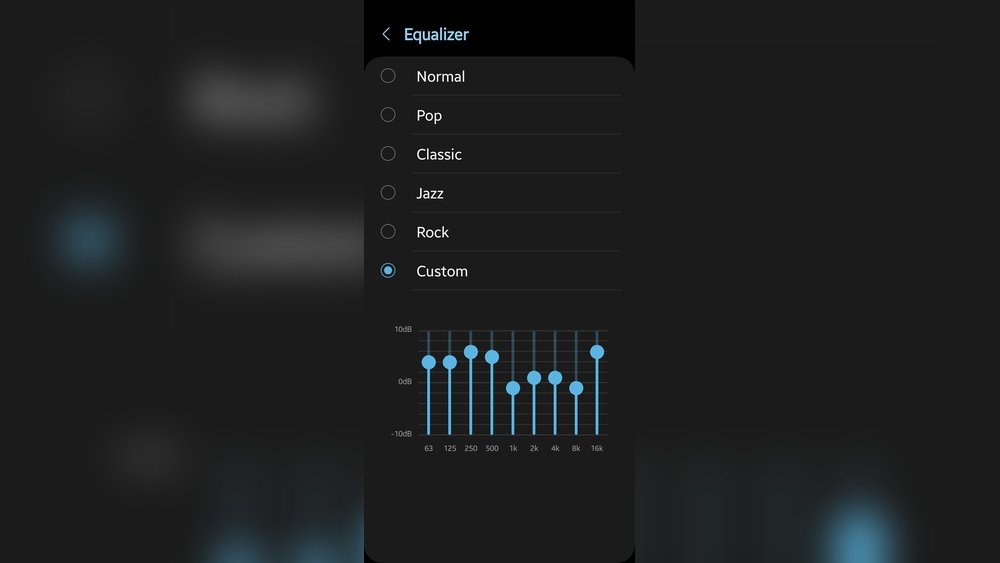
There are several types of equalizers. The graphic equalizer shows sliders for fixed frequency bands. It is easy to use and common in many devices.
The parametric equalizer gives more control. You can adjust frequency, gain, and bandwidth. This lets you fine-tune the sound more precisely.
The shelving equalizer boosts or cuts all frequencies above or below a set point. It is great for quick adjustments of bass or treble.
Frequency Bands Explained
Frequency bands divide sound into ranges, like bass, midrange, and treble. Bass covers low sounds, such as drums and bass guitar. Midrange handles vocals and most instruments. Treble includes high sounds like cymbals and some vocals.
Each band can be adjusted separately. This helps balance the sound. For example, boosting bass adds more depth, while cutting midrange can reduce muddiness.
Role Of Q Factor
The Q factor controls the width of the frequency band you adjust. A high Q narrows the band, affecting fewer frequencies. A low Q widens the band, affecting more frequencies around the target.
Using a narrow Q is good for fixing specific problems. A wide Q works well for general tone shaping. Learning to use Q helps you make precise changes to your sound.
Preparing Your Setup
Setting your equalizer depends on the music genre you enjoy. Each style has unique sounds and tones. Adjusting the EQ for specific genres enhances your listening experience. It brings out the best in your favorite tracks. Below are tips for popular genres and their EQ settings.
Rock And Pop Adjustments
Rock and pop music often feature strong vocals and electric guitars. Boost the midrange frequencies around 1kHz to 3kHz for clear vocals. Increase the low end near 60Hz to 120Hz for punchy bass and drums. Add a slight boost at 5kHz to 7kHz to enhance brightness and presence. Avoid over-boosting highs to prevent harshness. Keep the sound lively but balanced.
Classical And Jazz Preferences
Classical and jazz music focus on natural, warm sounds. Reduce bass frequencies slightly to avoid muddiness. Emphasize midrange tones between 250Hz and 800Hz for instrument clarity. Boost highs gently around 8kHz to 12kHz to bring out details like cymbals and strings. Keep the EQ subtle to preserve the music’s natural dynamics. This approach helps maintain a clean and smooth sound.
Electronic And Hip-hop Tips
Electronic and hip-hop tracks rely on deep bass and sharp beats. Increase the bass frequencies from 50Hz to 100Hz for a fuller, richer sound. Raise the upper mids around 2kHz to 4kHz for clearer vocals and synths. Boost the highs between 8kHz and 10kHz to add sparkle to hi-hats and effects. Avoid excessive boosting to prevent distortion. Focus on rhythm and bass impact for the best effect.
Adjusting Frequencies For Clarity
Advanced EQ techniques help refine your sound beyond basic adjustments. These methods allow you to target specific problems and enhance audio clarity. They work well for music lovers and audio professionals alike. Understanding these techniques improves your listening experience and mixing skills.
Using Dynamic Eq
Dynamic EQ changes frequency levels based on the input signal. It reduces harsh sounds only when they become too loud. This keeps the overall sound balanced without constant adjustments. Use dynamic EQ to control sibilance in vocals or tame booming bass.
Smart Eq Features
Smart EQ uses software to analyze your audio and suggest settings. It adapts to different music types and listening environments. This tool saves time and helps beginners achieve better sound. Smart EQ is useful for quick fixes and fine-tuning complex mixes.
Mixing In Mono
Mixing in mono ensures all sounds blend well together. It reveals frequency clashes and phase issues that stereo might hide. This technique helps balance your track before adding stereo effects. Always check your mix in mono for a clear, full sound.

Credit: www.wikihow.com
Genre-specific Eq Settings
EQ tips help shape the unique sound of each instrument and vocal. Adjusting frequencies improves clarity and balance. Focus on the important frequency ranges for each source. This approach makes the overall mix clear and pleasant.
Drums And Percussion
Boost the low end around 60-100 Hz for punch in the kick drum. Cut muddiness near 250-400 Hz to clear up the drum sound. Add brightness by boosting 5-8 kHz on snare and cymbals. Remove harshness by cutting 2-4 kHz if needed.
Electric Guitar
Cut low frequencies below 80 Hz to remove rumble. Boost 100-250 Hz for warmth and body. Cut midrange 300-500 Hz if the guitar sounds boxy. Add presence by boosting 3-6 kHz for attack and clarity.
Piano And Keys
Boost bass around 80-120 Hz for fullness in lower keys. Cut 200-400 Hz to reduce muddiness in the midrange. Add sparkle by boosting 5-8 kHz on higher notes. Avoid harshness by cutting 2-3 kHz if necessary.
Vocals And Harmonies
Cut low frequencies below 100 Hz to remove rumble and breath. Boost 1-3 kHz to enhance vocal presence and clarity. Add air by boosting 8-12 kHz for a natural shine. Reduce nasal tones by cutting around 400-500 Hz.

Credit: mobileaudioconcepts.com.au
Frequently Asked Questions
What Is The Best Equalizer Setting For Best Sound?
The best equalizer setting balances bass, mids, and treble without distortion. Use a slight “V-shape” boost for clarity. Adjust gently, avoid extreme boosts, and test with familiar tracks for optimal sound.
What Is The Best Eq To Be On On Your Sound System?
The best EQ setting depends on your sound system and music genre. Generally, use a slight “V-shape” curve: boost bass and treble, reduce mids. Avoid extreme boosts to prevent distortion. Test with familiar tracks and adjust gently for clarity and balance.
How To Set Car Equalizer For Best Sound?
Set your car equalizer by slightly boosting bass and treble while reducing mid frequencies for clarity. Use a familiar song to fine-tune. Avoid excessive boosts to prevent distortion. Keep adjustments subtle and test different settings to match your music genre and personal preference.
How To Properly Eq A Sound System?
Set EQ bands by selecting target frequencies, then gently boost or cut using gain control. Reduce mids for clarity. Use a familiar track to test. Avoid extreme boosts to prevent distortion. Aim for a balanced, natural sound suited to your music genre.
Conclusion
Setting the equalizer correctly improves your listening experience. Start by adjusting one frequency at a time. Keep changes small to avoid distortion. Use the “V-shape” for clearer sound in many genres. Remember, different music styles need different EQ settings. Trust your ears and take your time.
Good sound is about balance, not extremes. Enjoy the music the way it was meant to be heard.