2008 Honda Accord Radio Code: Unlock and Reset Your Stereo Fast
Getting locked out of your car’s audio system can be frustrating. If you own a 2008 Honda Accord, you might face this problem after changing the battery or doing electrical work. Suddenly, your radio asks for a radio code. Many drivers panic at this moment, but the solution is simple once you know the steps. This guide will help you find, enter, and protect your radio code, so you can get back to enjoying your music and news without stress.
Why Does The 2008 Honda Accord Need A Radio Code?
Honda added radio codes to protect against theft. When power is lost, the radio locks itself until you enter the right code. This safety feature:
- Stops thieves from using your radio if they remove it.
- Keeps your system secure after battery changes or repairs.
You’ll see a message like “CODE” or “ENTER CODE” on the radio screen. This means the system needs your unique code to work again.
Where To Find Your 2008 Honda Accord Radio Code
Locating the code takes only a few minutes if you know where to look. Here are the most common sources:
1. Owner’s Manual
Check the radio section or the quick reference card inside the manual. Many manuals have a sticker or a handwritten code.
2. Glove Box Or Trunk Sticker
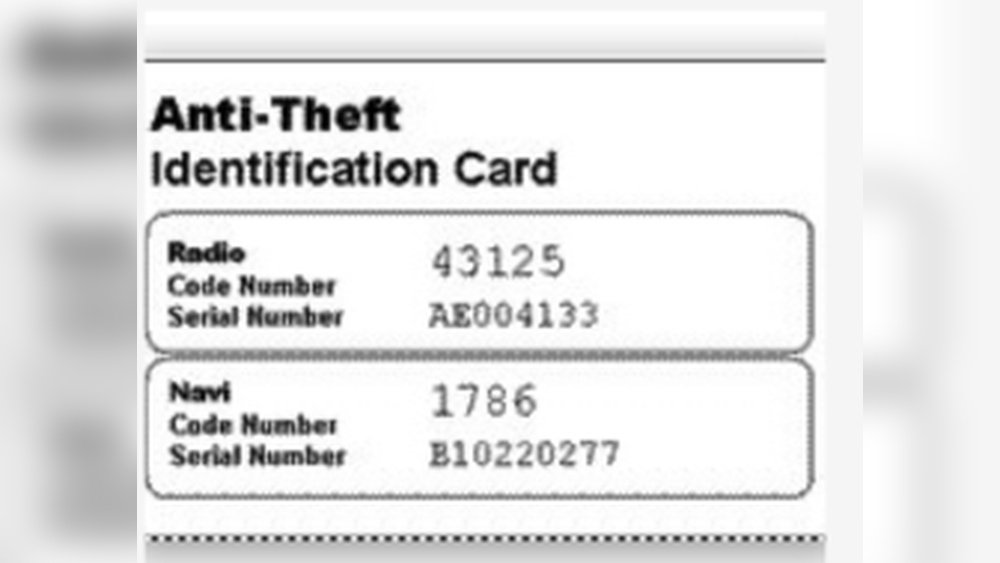
Some Hondas have a small sticker in the glove box or trunk. Look for a 5-digit number labeled “Radio Code”.
3. Honda Website
Visit the official Honda radio code retrieval page. You’ll need your VIN (Vehicle Identification Number) and the radio serial number.
honda Radio Code Lookup
4. Dealership
If you can’t find the code, call your local Honda dealer. They may ask for your VIN and proof of ownership.
How To Get Your Radio Serial Number
Before you can retrieve your code online or at a dealership, you’ll need the radio serial number. Here’s how to find it:
- Press and hold the preset buttons 1 and 6.
- Turn on the radio while holding these buttons.
- The serial number will appear on the screen as a series of numbers.
Write down this number carefully. It’s required for Honda’s online lookup tool.
Entering The Radio Code In Your 2008 Honda Accord
Once you have the code, entering it is easy:
- Turn on your car and radio.
- Use the radio preset buttons to enter each digit.
- The radio should unlock right away.
If you enter the wrong code three times, the radio will lock. Wait one hour before trying again.

Credit: www.reddit.com
Common Mistakes When Handling The Radio Code
Many drivers make mistakes that cause more problems. Avoid these issues:
- Losing the code: Store it somewhere safe.
- Forgetting the serial number: Write it down before starting repairs.
- Entering wrong codes: Be careful and double-check before pressing buttons.
Real Examples: What Owners Experience
Drivers often share stories about sudden radio lockouts. Here’s a typical situation:
- You change your car battery.
- The radio asks for a code when you restart.
- You find the code on a glove box sticker.
- Enter the code, and the radio works again.
Some owners visit a dealer because they cannot locate the code. This can take more time and may cost money.
Practical Tips For Keeping Your Radio Code Safe
You don’t want to face the same problem twice. Use these tips:
- Store the code in your phone or email.
- Write it on a card and keep it in your wallet.
- Take a photo of the glove box sticker.
If you sell your car, pass the code to the new owner.
Data Table: Common Places To Find Your Radio Code
Here’s a quick reference for where most owners locate their radio code:
| Source | Percentage of Owners | Notes |
|---|---|---|
| Owner’s Manual | 50% | Most common place |
| Glove Box Sticker | 25% | Easy to access |
| Honda Website | 15% | Needs VIN and serial number |
| Dealership | 10% | Usually last resort |
Comparing Radio Code Recovery Methods
Different methods of getting your code have their own benefits and drawbacks. Here’s a comparison:
| Method | Speed | Cost | Ease |
|---|---|---|---|
| Manual/Sticker | Immediate | Free | Very easy |
| Website | Minutes | Free | Needs info |
| Dealership | Hours | Possible fee | Easy, but slower |
What To Do If You Can’t Find Your Radio Code
If all the usual places fail, don’t worry. Here’s what you can do:
- Contact a Honda dealership with your VIN and proof of ownership.
- Use the Honda website to request help.
- Check with previous owners if you bought the car used.
A dealer may charge a small fee for code recovery, but most will help for free if you prove ownership.

Credit: www.youtube.com
Radio Code And Security: Why It Matters
Many people ignore the radio code until they need it. But it’s important for security:
- It protects your radio from theft.
- Keeps your car electronics safe.
- Helps prevent unauthorized access to your audio system.
Some thieves target older cars for parts. The radio code makes stealing your system less attractive.
What If You Lost The Radio Code Forever?
If you can’t find the code or sticker and the dealer cannot help, you have options:
- Replace the radio with a new unit.
- Install an aftermarket stereo.
- Use a professional service to reset the code.
These solutions are more expensive. Keep your original code safe to avoid these steps.
Radio Code Myths: What Beginners Need To Know
Many beginners believe some common myths about radio codes:
- Myth: The code is on the radio itself.
Fact: It’s rarely printed on the radio; you need the serial number.
- Myth: Any code will work.
Fact: Each code is unique to your radio.
- Myth: Changing the battery always erases the code.
Fact: Sometimes the radio remembers, but not always.
Understanding these facts will save you time and trouble.
Example: Step-by-step Radio Code Retrieval
Let’s walk through a real example:
- Car battery dies and is replaced.
- Radio asks for code.
- Owner checks glove box and finds a 5-digit sticker.
- Owner enters code using radio preset buttons.
- Radio unlocks and plays music again.
If the sticker isn’t there, try the Honda website or dealership.
Data Table: Battery Changes And Radio Lockouts
How often do battery changes cause radio lockouts? Here are some numbers:
| Event | Chance of Lockout | Time to Recover |
|---|---|---|
| Battery Replacement | 70% | Minutes to hours |
| Jump Starting | 40% | Minutes |
| Electrical Work | 60% | Hours |
Advanced Tips: Avoiding Future Radio Lockouts
You can prevent problems before they start:
- Use a memory saver tool when changing the battery. This keeps power to the radio.
- Ask a mechanic to save your settings during repairs.
- Keep a backup of your radio code in multiple places.
These steps save you time and hassle.

Credit: www.youtube.com
Frequently Asked Questions
How Many Digits Is The 2008 Honda Accord Radio Code?
The code is usually a 5-digit number. Each code is unique to the radio and car.
What If The Radio Code Doesn’t Work?
Double-check the code and serial number. If you enter the wrong code three times, wait an hour before trying again. If it still fails, contact your Honda dealer.
Can I Reset The Radio Code Without The Serial Number?
No. The serial number is required to retrieve your code. You can find it by holding preset buttons 1 and 6 while turning on the radio.
Do I Need The Radio Code For Every Battery Change?
Not always. Sometimes the radio remembers the code. But if it loses power completely, you’ll need the code.
Is There A Charge For Getting The Radio Code From Honda?
Most dealers provide the code for free if you show proof of ownership. Some may charge a small fee for extra services.
Getting locked out of your radio is annoying, but the solution is simple. Keep your radio code safe and know where to find it. With these tips, your 2008 Honda Accord radio will stay secure and easy to unlock. If you follow the steps here, you’ll save time and avoid frustration. For more details on Honda’s official policy, visit Honda Radio Code Lookup.