Best External CD Player for Car: Top Picks for 2024
Want to play your old CDs in your car but don’t have a built-in CD player? You’re not alone. Many modern vehicles skip CD drives and focus on streaming or USB audio. But for music fans who still love CD quality sound or have a collection of classic albums, an external CD player for car is a smart solution. The good news: adding one is easier than you think.
This guide will help you pick the best external CD player for your car. You’ll learn how they work, which features actually matter, and what mistakes to avoid. If you’re a beginner or just want a simple answer, you’ll find clear explanations and real examples here.
Why Use An External Cd Player In Your Car?
Many car manufacturers stopped adding CD players after 2015. Instead, they focus on Bluetooth, USB, and streaming. But CDs still offer:
- Better audio quality than most MP3 files
- A chance to enjoy your music collection
- No need for internet or phone data
If your car doesn’t have a built-in CD player, an external unit is a practical fix. Most models connect through USB, aux-in, or even Bluetooth adapters.
How External Cd Players For Cars Work
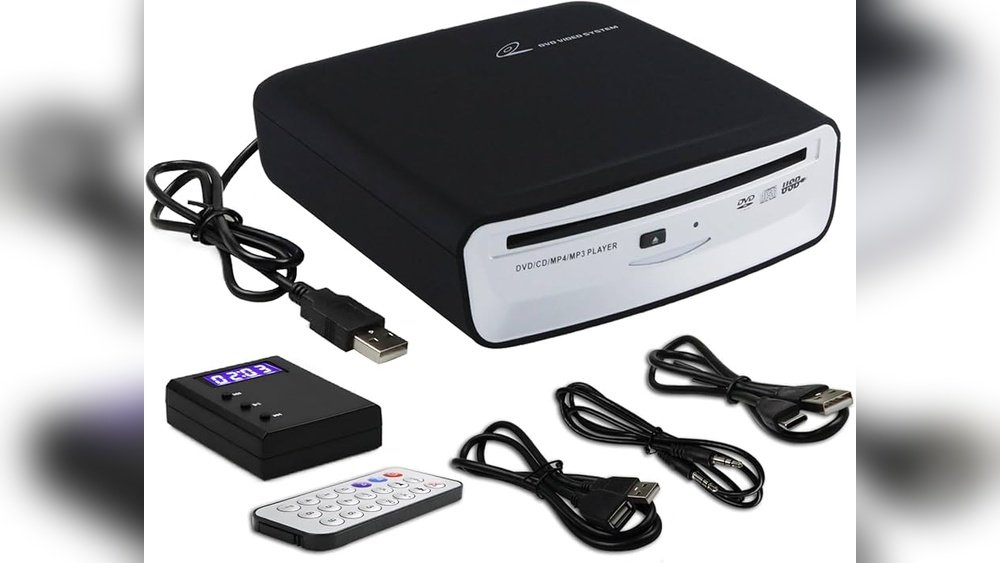
An external CD player is a small device, often powered by USB, that reads your CDs and sends music to your car’s speakers. Here’s how it usually works:
- Connect the player to your car’s audio system (using aux, USB, or Bluetooth)
- Insert a CD
- Music plays through your car speakers
Some players are plug-and-play, while others may need a small adapter or setup.
Example
Let’s say you have a 2020 Honda Civic with no CD slot. You buy an external USB CD player. It plugs into a USB port or a USB-to-aux adapter. After connecting, you can play your favorite CDs during any drive.

Credit: www.youtube.com
Key Features To Look For
Choosing the right external CD player can be confusing. Not all models work with every car, and some offer features you might not need. Focus on these important points:
- Compatibility: Check if it works with your car’s audio system (USB, aux, Bluetooth)
- Power source: Some need a USB port, others use batteries or a 12V car adapter
- Skip protection: Keeps music playing smoothly over bumps
- Playback controls: Easy access to play, pause, skip tracks
- Audio quality: Look for models that support lossless playback
- Build quality: A sturdy design lasts longer in a car environment
Top 5 External Cd Players For Cars
Here are five top-rated external CD players for cars, with features and example use-cases.
| Model | Connection Type | Skip Protection | Power Source | Price Range |
|---|---|---|---|---|
| Bose Portable CD Player | Aux/USB | Yes | USB | $60-90 |
| HOTT CD711T | Bluetooth/USB | Yes | Rechargeable | $50-80 |
| GPX PC332B | Aux | Yes | 2 AA Batteries | $30-50 |
| SONY ZSRS60BT | Bluetooth/Aux | Yes | AC/Battery | $70-120 |
| Yamaha CD-S300 | USB | Yes | 12V Adapter | $100-150 |
1. Bose Portable Cd Player
- Known for rich sound quality
- Connects easily via aux or USB
- Slim design fits most car spaces
- Good skip protection
Best for: Drivers wanting top audio and easy controls.
2. Hott Cd711t
- Supports Bluetooth streaming to your car stereo
- Rechargeable battery lasts 8-10 hours
- Lightweight for travel
Best for: Cars with Bluetooth or users who want wireless.
3. Gpx Pc332b
- Basic, affordable model
- Runs on AA batteries (no need for car power)
- Simple aux cable connection
Best for: Budget shoppers or older cars with aux-in.
4. Sony Zsrs60bt
- Plays CDs and streams via Bluetooth
- Includes radio and USB playback
- Portable, but larger size
Best for: Versatility—if you want radio and Bluetooth.
5. Yamaha Cd-s300
- High-end audio
- Needs car with USB-in or adapter
- Reliable skip protection
Best for: Audiophiles who want the best sound.
Compatibility: Will It Work In Your Car?
Before buying, check your car’s audio inputs. Most cars have at least one of these:
- Aux-in jack (3.5mm): Most common, works with basic CD players
- USB port: Newer cars; some players need special drivers to work
- Bluetooth: For wireless models or adapters
If your car stereo is aftermarket, make sure it supports external input. Not all USB CD players are compatible with car infotainment systems—some only work with computers. Always read the product details.
Example
A 2017 Toyota Camry with an aux-in port works with basic CD players. But a 2022 Ford F-150 with only USB may need a model that supports USB audio specifically.
How To Install And Use An External Cd Player
Most external CD players are easy to set up. Here’s a step-by-step for beginners:
- Choose connection type: Determine if you’ll use aux, USB, or Bluetooth.
- Plug in or pair: Connect the CD player to your car’s input port or pair via Bluetooth.
- Power up: Insert batteries or connect to car power/USB.
- Insert CD: Place your favorite CD in the player.
- Select source: On your car stereo, switch to the correct input (AUX, USB, or Bluetooth).
- Play: Use the player’s controls to play, pause, or skip tracks.
Practical Tips
- Keep the player on a flat surface to avoid skipping.
- Store the CD player when not in use to prevent overheating.
- Use a short, high-quality aux cable for best sound.
Common Mistakes To Avoid
Beginners often overlook these points:
- Assuming all USB CD players work in cars: Many are for computers only.
- Ignoring power needs: Some models drain car batteries if left plugged in.
- Not checking audio format support: Some players can’t read MP3 or burned CDs.
- Forgetting skip protection: Cheap models may skip during bumps.
Comparing Playback Quality And Features
Sound quality can vary between models. Here’s a quick look at how the top picks compare for key features:
| Model | Audio Quality | CD-R/RW Support | Wireless Option | Portability |
|---|---|---|---|---|
| Bose Portable CD Player | Excellent | Yes | No | High |
| HOTT CD711T | Very Good | Yes | Yes (Bluetooth) | Very High |
| GPX PC332B | Good | No | No | High |
| SONY ZSRS60BT | Very Good | Yes | Yes (Bluetooth) | Medium |
| Yamaha CD-S300 | Excellent | Yes | No | Low |
Insight: Wireless models like HOTT and Sony give more flexibility if you don’t want extra cables.

Credit: www.amazon.com
Price Vs. Value: What Should You Spend?
External CD players range from $30 to $150. Here’s how price usually relates to features:
- $30-$50: Basic models, manual controls, aux-in only, decent sound
- $50-$90: Bluetooth support, better skip protection, rechargeable batteries
- $90-$150: Premium sound, sturdy build, more format support
For most drivers, a model around $50-$80 offers the best balance of quality and cost.
Real-world Example: Connecting A Cd Player In A 2018 Nissan Altima
Suppose you have a 2018 Nissan Altima with only USB and Bluetooth, no aux. A basic aux CD player won’t work. But the HOTT CD711T can connect via Bluetooth. After charging the player:
- Turn on Bluetooth on the Altima’s infotainment.
- Pair the HOTT player.
- Insert a CD and press play.
You’ll hear your CD music through the car’s speakers—no wires needed.
Practical Maintenance Tips
- Keep CDs clean: Dust and scratches cause skipping.
- Avoid heat: Don’t leave the player or CDs in a hot car.
- Unplug when not in use: Saves battery and reduces wear.
- Store safely: Use a case for both player and CDs.
Two Insights Beginners Often Miss
- Not all CD players are car-compatible: Many USB models are made for laptops, not cars. Always check if the player is designed for automotive use.
- Bluetooth adapters can help: If your car lacks aux or USB, a small Bluetooth FM transmitter can let you use almost any CD player wirelessly.
When Not To Buy An External Cd Player
An external CD player is great for CD fans. But you may not need one if:
- You only have a few CDs (consider ripping them to digital files)
- Your car’s audio system is incompatible and you don’t want adapters
- You prefer streaming services for convenience
Where To Find More Information
If you want to learn more about CD player technology, car audio standards, or compatible adapters, visit the Wikipedia page on Compact Disc Digital Audio.

Credit: www.youtube.com
Frequently Asked Questions
Is It Easy To Add An External Cd Player To Any Car?
Most cars with aux, USB, or Bluetooth can use an external CD player. Some cars need an adapter. Always check your car’s input options before buying.
Will An External Cd Player Damage My Car’s Battery?
No, if you unplug it after use. Most players use little power, but some can drain the battery if left connected for days.
Can I Use A Laptop External Cd Drive In My Car?
Usually not. Most laptop drives need drivers or extra power, and won’t work with car stereos. Use CD players made for car or portable use.
Does Cd Sound Better Than Bluetooth Streaming?
Yes, in most cases. CDs have higher audio quality and no compression. But your car’s speakers and player quality also affect sound.
What If My Car Only Has A Radio?
You can use a Bluetooth FM transmitter. Connect your CD player (with Bluetooth or aux), and play CDs over an unused FM radio frequency.
Adding an external CD player for car is a simple way to enjoy your classic albums without replacing your car stereo. With the right model, you can have both modern features and the warm sound of your favorite CDs during every drive.