Whining Noise from Speakers When Accelerating: Causes & Fixes
A whining noise coming from your speakers when accelerating can be distracting and frustrating. It often ruins the joy of driving and makes you worry about possible electrical problems. Many car owners, especially beginners, feel confused when they hear this sound for the first time.
The good news is, most causes of this noise are not dangerous, and you can fix them once you understand the basics.
This article explains why your speakers make a whining noise when you step on the gas, how to find the cause, and how to stop it. You will learn practical steps, common mistakes, and simple solutions, so you can enjoy music or podcasts in your car again.
Why Do Speakers Whine When Accelerating?
The whining noise is usually linked to your car’s electrical system. As you press the accelerator, the engine and alternator work harder, and the electrical current changes. This change can enter your car’s audio system and create an annoying sound.
The technical term for this is alternator whine or engine noise. It’s a type of interference that travels from the car’s electrical parts to the audio cables and speakers.
Common Signs Of Alternator Whine
- The noise changes pitch with engine speed (higher RPM = higher pitch)
- The sound comes from all speakers or just some
- The noise is not affected by the radio volume
- The noise starts when the engine runs and gets louder as you accelerate
Understanding these signs helps you know that the noise is not a mechanical problem but an electrical one.
Main Causes Of Whining Noise From Speakers
To fix the problem, you need to know what causes it. Here are the most common reasons:
1. Ground Loop Problems
If your audio system’s ground wire is poorly connected, it can create a ground loop. This means your audio equipment and the car’s electrical system have two different ground points, causing electrical noise.
2. Bad Rca Cables Or Connections
Low-quality or damaged RCA cables (which connect your head unit to the amplifier) can pick up interference.
3. Alternator Issues
A failing alternator or voltage regulator can create more electrical noise than normal, which enters the sound system.
4. Poor Amplifier Installation
If the amplifier is installed near power cables, it might pick up interference.
5. Faulty Head Unit
Sometimes, the radio or stereo unit itself has a problem that lets noise into the system.
6. Other Electrical Accessories
Devices like phone chargers or LED lights can add to electrical noise if not installed properly.
Example: Car Audio Noise Scenario
- You install a new amplifier, but use the car’s seat bolt as a ground.
- The bolt is rusty, so the ground connection is weak.
- When you accelerate, the alternator sends more current, and a whine enters the speakers.
This example shows how a simple installation mistake can cause a big annoyance.

Credit: www.team-bhp.com
Diagnosing The Whining Noise
Finding the real cause saves you time and money. Here’s a beginner-friendly way to diagnose the problem:
Step-by-step Diagnosis
- Turn Off Accessories
- Switch off phone chargers, air conditioning, and any extra lights.
- If the noise stops, you found the source.
- Check When the Noise Happens
- Does it only happen with the engine on?
- Does it change with engine speed?
- If yes, it’s likely alternator whine.
- Test the Audio Head Unit
- Turn the volume down to zero.
- If you still hear the whine, it’s not the music but electrical interference.
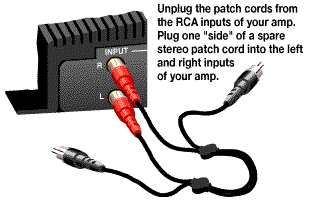
- Unplug RCA Cables
- Disconnect the RCA cables from the amplifier.
- If the noise stops, the problem is before the amp (head unit or cables).
- If the noise stays, the amp or its power supply is the problem.
- Test Different Grounds
- Run a temporary ground wire from the amplifier to a new metal spot.
- If the noise goes away, the old ground was bad.
Practical Tools
- Multimeter: Checks voltage and ground quality.
- Test Speaker or Headphones: Helps find which part of the system has noise.
Common Beginner Mistakes
- Using paint or rusted metal for ground
- Running RCA cables next to thick power wires
- Not checking all possible sources (like chargers or dash cams)
How To Fix Whining Noise From Car Speakers
Once you find the cause, you can use these solutions:
Improve Ground Connections
- Use clean, bare metal for ground points.
- Make sure the ground wire is as short as possible (under 18 inches).
- Use thick enough wire (at least the same size as the power wire).
Upgrade Cables
- Replace old or cheap RCA cables with shielded, high-quality ones.
- Keep RCA cables away from power wires (run them on opposite sides of the car).
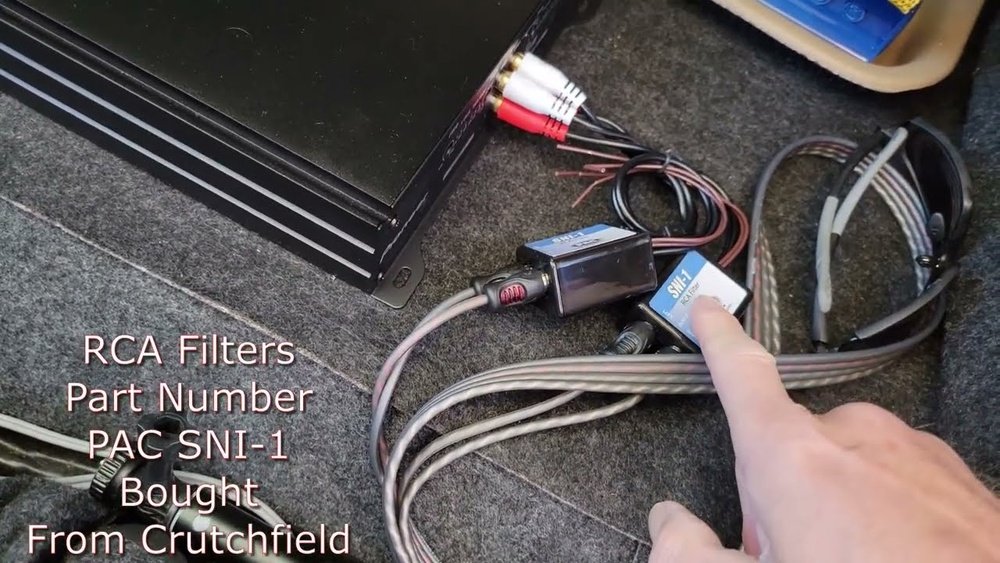
Install A Ground Loop Isolator
- This device plugs into your RCA cables and blocks unwanted signals.
- Easy to install and cheap (usually $10–$30).
Check The Alternator
- Get the alternator tested at an auto parts store.
- Replace if it’s failing or noisy.
Add A Noise Filter
- A power line noise filter can reduce interference before it reaches the amplifier or head unit.
Reinstall Or Rewire The Amplifier
- Place the amplifier away from the battery and main power lines.
- Use proper installation kits designed for your car’s audio system.
Remove Interfering Accessories
- Unplug and reroute wires for chargers, dash cams, or lights.
- Some accessories may need their own noise filters.
Example: Fixing A Real Case
A car owner had a loud whine after installing LED lights. By unplugging the lights, the noise vanished. Adding a power filter to the LED lights solved the problem, letting both the lights and speakers work quietly.
Comparing Common Solutions
Here’s a quick look at which fixes are most effective for each problem:
| Problem | Best Solution | Difficulty | Estimated Cost |
|---|---|---|---|
| Poor Ground | Clean/Move Ground Point | Easy | $0–$10 |
| Bad RCA Cables | Replace with Shielded RCA | Medium | $10–$50 |
| Alternator Noise | Install Noise Filter | Easy | $10–$30 |
| Accessory Interference | Remove/Reroute Accessories | Easy | $0–$20 |
How Alternator Whine Differs From Other Car Noises
It’s easy to confuse alternator whine with other sounds in your car. Here’s a comparison to help you:
| Noise Type | Changes With RPM | Heard From | Possible Causes |
|---|---|---|---|
| Alternator Whine | Yes | Speakers | Electrical interference |
| Wheel Bearing Whine | No | Wheels | Mechanical wear |
| Fan Belt Squeal | Yes | Engine Bay | Loose belt |
| Radio Static | No | Speakers | Poor signal |
This helps you decide if you need a mechanic or just an audio system adjustment.
Preventing Speaker Whine In The Future
Prevention is always better than fixing problems later. Here are some practical tips:
- Plan audio installations carefully. Run power and audio cables separately.
- Use only high-quality cables and connectors.
- Always check and clean ground connections before installing new equipment.
- Test new accessories (like LED lights or dash cams) with the engine running before final installation.
- Avoid using random bolts or screws for grounding; always choose solid, rust-free metal.
Is It Safe To Drive With Speaker Whine?
For most people, a whining noise from speakers is not dangerous. It does not affect how the car runs. However, it can be a sign of poor installation, bad electrical connections, or a failing alternator. Ignoring these small problems might lead to bigger ones in the future, like battery drain or electrical failure.
If you notice other symptoms—like dimming headlights, flickering dashboard lights, or slow engine start—get your car checked by a professional.
Credit: www.crutchfield.com
Non-obvious Insights Most Beginners Miss
- Multiple Causes at Once: Sometimes, more than one problem adds noise. For example, a ground loop and a bad accessory together can make the whine much worse.
- Not All Whine Needs a Filter: Many people buy noise filters first, but most whine problems are fixed with better ground connections or cable routing.
When To Seek Professional Help
If you try all the steps above and the whining noise does not go away, it might be time for expert help. Professional car audio shops have special tools to trace electrical noise. They can save you hours of trial and error.
Also, if you’re not comfortable working with electrical systems, ask for help. It’s better to get it done right than risk damaging your car’s wiring.
Cost Breakdown For Common Fixes
Let’s look at how much you might spend to solve this problem:
| Item/Service | Estimated Cost (USD) | DIY or Professional |
|---|---|---|
| New RCA Cables | $15–$50 | DIY |
| Noise Filter | $10–$30 | DIY |
| Amplifier Rewire | $20–$100 | DIY/Pro |
| Professional Diagnosis | $50–$150 | Professional |
| Alternator Replacement | $200–$500 | Professional |
DIY solutions are usually enough for most cases and save you money.
Final Thoughts
A whining noise from your car speakers when accelerating is annoying but rarely dangerous. Most of the time, it’s a simple electrical issue, not a sign of a broken engine. With basic tools and a step-by-step approach, even beginners can find and fix the cause.
Always start with ground connections and cable quality before buying extra parts. If the problem continues, professional help is a smart choice.
For more on car audio troubleshooting, you can visit Wikipedia’s Vehicle Audio Systems page.

Credit: www.youtube.com
Frequently Asked Questions
What Causes A Whining Noise From Speakers When Accelerating?
The main cause is alternator whine. It happens when electrical noise from the alternator or other parts gets into the audio system, usually because of bad ground connections, poor cables, or electrical interference.
Can A Bad Alternator Damage My Speakers?
A failing alternator can send unstable voltage, but it usually does not damage speakers directly. However, if voltage spikes are severe, they can harm sensitive audio equipment over time.
Will Using A Noise Filter Always Fix The Problem?
No, a noise filter only helps if the interference comes from the power line or ground loop. If the problem is with cables or poor installation, a filter might not solve it.
Is It Safe To Ignore The Whining Noise?
It’s usually safe to drive, but you should not ignore it. The noise could be a sign of poor electrical connections or a failing alternator, which might cause bigger issues later.
How Can I Stop The Noise From Coming Back?
- Use high-quality cables.
- Make sure all ground connections are clean and tight.
- Keep power and audio wires separate.
- Test accessories before installing them permanently.
A little planning during installation prevents most speaker whine problems.