How to Tune a Skar Amp: Expert Tips for Perfect Sound
How To Tune A Skar Amp
If you want powerful, clear sound from your car’s audio system, knowing how to tune a Skar amp is essential. Skar Audio amplifiers are popular for their reliability and strong bass. But even the best amp won’t sound great if it’s not tuned for your setup.
Tuning means adjusting your amp’s settings so your speakers and subwoofers sound their best, without distortion or damage. This guide will help you tune a Skar amp step by step, using easy language and practical tips. You’ll learn not just what to do, but why each step matters.
Why Tuning Your Skar Amp Matters
Proper tuning is more than just turning knobs. It protects your speakers and gives you the best sound for your car and music style.
- Sound quality: Correct tuning makes music clear and balanced.
- Speaker safety: Wrong settings can blow your speakers or sub.
- Personal preference: You can tune for deep bass or clear vocals.
- Volume control: Prevents distortion at high volumes.
Even if you’re new to car audio, tuning your amp is something you can do with patience and the right steps.
What You Need Before You Start
Before tuning, gather these tools and check your setup:
- Skar amplifier already installed and wired
- Speakers or subwoofers connected correctly
- Head unit (car stereo) working and set to flat EQ
- Small screwdriver for amp adjustments
- Digital multimeter (for precise tuning)
- Test tone audio files (like 40Hz or 1kHz, download on your phone or USB)
- Pen and paper (for notes)
If you don’t have a multimeter, you can still tune by ear, but results are more accurate with one.
Understanding Skar Amp Controls
Skar amps have several adjustment knobs and switches. Knowing what each does is key to tuning.
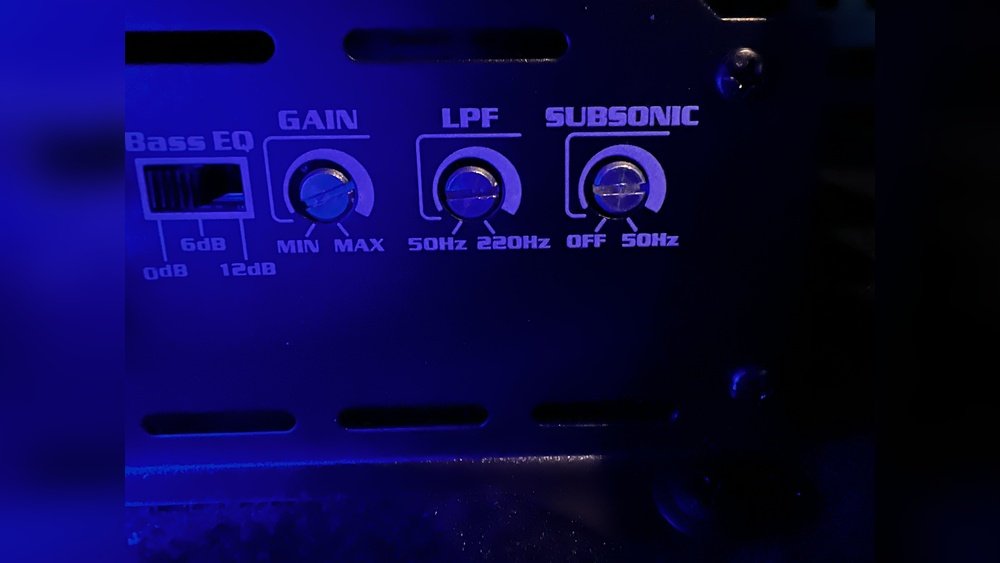
- Gain: Controls input level from your head unit to the amp. Not a volume knob.
- Bass Boost: Increases low frequencies (bass) by a set dB.
- Low Pass Filter (LPF): Lets only frequencies below a set point go to your subwoofer.
- High Pass Filter (HPF): Lets only frequencies above a set point go to your speakers.
- Subsonic Filter: Blocks ultra-low frequencies that can damage subwoofers.
Here’s a quick comparison of common Skar amp controls:
| Control | What It Does | Common Range |
|---|---|---|
| Gain | Sets amp input level | Min – Max |
| Bass Boost | Boosts bass frequencies | 0 – 12 dB |
| Low Pass Filter | Limits high frequencies to sub | 30 – 250 Hz |
| High Pass Filter | Limits low frequencies to speakers | 20 – 200 Hz |
| Subsonic Filter | Blocks very low frequencies | 10 – 50 Hz |
Take a few minutes to look at your amp and find these controls. Read the labels closely—they’re sometimes small.
Step-by-step: How To Tune A Skar Amp
Follow this order for best results:
1. Set Your Head Unit To Flat
- Turn off all bass, treble, loudness, or EQ boosts on your stereo.
- Volume should be at about 75% of maximum—not all the way up.
This gives a clean base signal for tuning.
2. Adjust Gain (input Sensitivity)
Getting the gain right is the most important step.
- Turn the gain knob on your Skar amp to minimum.
- Play a test tone (50Hz for sub, 1kHz for speakers) at 75% head unit volume.
- Slowly turn the gain up until you hear distortion, then back it down slightly.
If you have a multimeter, you can set gain more precisely:
- Find your speaker’s RMS wattage and impedance (Ohms). Example: 400W RMS at 2 Ohms.
- Calculate target voltage: Voltage = √(Power × Ohms). For 400W at 2 Ohms: √(400 × 2) = 28.28V.
- Connect multimeter to speaker outputs, play test tone, adjust gain until you reach target voltage.
This method reduces the risk of blowing your speakers.
3. Set The Filters
Filter settings depend on your system:
- Low Pass Filter (LPF): For subwoofers. Set to 80 Hz as a starting point. This means only sounds below 80 Hz go to your sub.
- High Pass Filter (HPF): For speakers. Set to 80-100 Hz so speakers only play higher sounds.
- Subsonic Filter: Set just below your sub’s tuning frequency (often 28-35 Hz). This blocks damaging deep bass.
Here’s a helpful filter range chart:
| Component | Starting LPF | Starting HPF | Subsonic Filter |
|---|---|---|---|
| Subwoofer | 80 Hz | Off | 28-35 Hz |
| Speakers | Off | 80-100 Hz | Off |
Adjust slightly up or down to match your gear and music style.
4. Fine-tune Bass Boost
- Start with bass boost at zero.
- Increase slowly if you want more bass punch.
- Never max out bass boost—it can cause distortion and damage.
If you need a lot of bass, it’s better to upgrade your subwoofer than over-use bass boost.
5. Test And Listen
Play several types of music. Listen for:
- Distortion: Crackling, buzzing, or popping means gain is too high.
- Bass tightness: Bass should be strong but controlled, not boomy.
- Speaker clarity: Vocals and instruments should be clear, not muffled.
If something sounds wrong, re-check your gain and filter settings.
Common Mistakes When Tuning A Skar Amp
Beginners often make the same errors. Avoid these to protect your system:
- Turning up gain too high: This does not make your music louder. It causes distortion and can blow your speakers.
- Using bass boost excessively: A little goes a long way. Too much stresses your sub.
- Wrong filter settings: Sending bass to small speakers or highs to subs wastes power and can damage components.
- Skipping the subsonic filter: Especially important for ported sub enclosures.
- Not using test tones: Music varies too much for accurate tuning by ear.
If you’re unsure, make small changes and listen carefully after each adjustment.
Practical Example: Tuning A Skar Rp-1200.1d For A Single Subwoofer
Let’s see how these steps look in a real setup:
- Subwoofer: Skar EVL-12 D2 (RMS 1250W, 2 Ohm)
- Amp: Skar RP-1200.1D (1200W RMS at 1 Ohm)
- Box tuning: 32 Hz (ported box)
Steps:
- Set head unit EQ to flat, volume at 75%.
- Gain at minimum. Play a 40Hz test tone.
- Use multimeter: Target voltage = √(1200W × 1Ω) = 34.64V.
- Slowly turn gain until multimeter reads 34.6V.
- Set LPF to 80 Hz.
- Set subsonic filter to 28 Hz.
- Bass boost off.
- Play music, listen, and fine-tune if needed.
This method protects your sub, matches amp power, and ensures clean bass.

Credit: www.reddit.com
Advanced Tuning Tips
If you want to go beyond the basics, try these:
- Use an oscilloscope to detect distortion (clipping) for even safer tuning.
- Experiment with LPF and HPF: Some people prefer LPF at 70 Hz or 100 Hz, depending on music style.
- Add a sound deadener in your car doors/trunk to reduce rattles and improve bass response.
- Check amp temperatures: Overheating can signal incorrect settings or poor installation.
Remember, every car and ear is different. Take your time to find your favorite sound.
Skar Amp Tuning: Quick Reference Settings
For those in a hurry, here’s a cheat sheet for starting points:
| Setting | Subwoofer (Mono Amp) | Speakers (4-Channel Amp) |
|---|---|---|
| Gain | Set with multimeter or by ear (stop before distortion) | Same as sub |
| LPF | 80 Hz | Off |
| HPF | Off | 80-100 Hz |
| Bass Boost | 0–3 dB (max) | Off |
| Subsonic | 28–35 Hz | Off |
Always adjust from these points based on your actual system and taste.

Credit: www.reddit.com
Skar Amp Tuning: Frequently Missed Insights
Many guides miss these two important points:
- Speaker location matters: Door, rear deck, or trunk installation changes how your amp should be tuned. For example, trunk subwoofers may need slightly higher LPF to compensate for sound loss.
- Every car is different: Even with the same amp and sub, a hatchback will sound bassier than a sedan because of cabin size and shape.
If you change cars or move your gear, re-tune your amp for the new setup.
When To Re-tune Your Skar Amp
You should check and re-tune if:
- You install new speakers or subs
- You change your car stereo (head unit)
- Your music sounds weak, distorted, or harsh
- You add soundproofing or change your car’s interior
Regular tuning keeps your system safe and sounding its best.
More Help And Resources
If you want to learn more about car audio tuning, visit the Car Audio Wikipedia page for deep explanations and links to expert forums.
Frequently Asked Questions
How Do I Know If My Skar Amp Is Tuned Correctly?
Listen for clear sound at high volumes with no distortion or rattling. Test with different music styles. If you hear buzzing, popping, or muddy bass, re-check your gain and filter settings.
Can I Tune My Skar Amp Without A Multimeter?
Yes, you can tune by ear, but using a multimeter is safer and more accurate. By ear, turn up the gain until you hear distortion, then back it down slightly. Always start with head unit EQ flat and filters set properly.
What Is “clipping” And Why Is It Bad?
Clipping happens when your amp tries to deliver more power than it can. The audio signal gets “cut off,” causing harsh distortion. Clipping can quickly blow speakers or subs. Tuning gain and using test tones prevent this.
How Often Should I Re-tune My Skar Amp?
Check your settings whenever you change speakers, subs, head unit, or music style. Also re-tune if your system sounds worse over time or after a repair.
Is Bass Boost Safe To Use On My Skar Amp?
Bass boost is safe in small amounts (1–3 dB). Avoid turning it up high, as this can cause distortion and damage your subwoofer. If you want more bass, consider adding a better sub or more power instead.
Tuning your Skar amp is the best way to enjoy your music and protect your gear. With these steps, you can get professional sound even if you’re a beginner. Take your time, make small changes, and enjoy the difference!

Credit: www.reddit.com