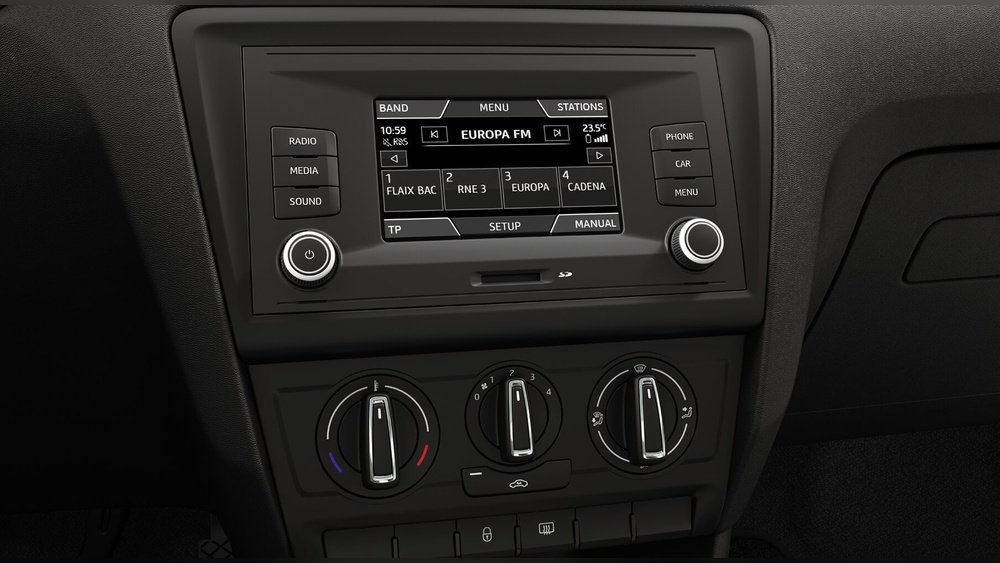
Why is There an SD Card Slot in My Car? Explained Simply
Many drivers notice a small, thin slot on their car’s dashboard or center console. It looks a lot like the slot you see on cameras or phones for memory cards. This is the SD card slot. If you’re wondering why your car has this feature, you’re not alone. The SD card slot in your car is more useful than it first appears, and it’s not just there for show.
Car technology is changing fast. Features that used to be found only in high-end vehicles, like navigation systems, music storage, or firmware updates, are now common in regular cars. The SD card slot is a quiet hero in this tech wave.
Let’s explore why your car has one, how to use it, and what beginners often miss about this small but powerful feature.
What Is An Sd Card Slot?
The SD card slot is a small opening designed to accept a Secure Digital (SD) card. SD cards are tiny memory devices that can store music, maps, pictures, and even software updates. The slot is usually located:
- Near the infotainment screen
- In the glove compartment
- On or near the dashboard
Many cars use standard SD cards, but some use microSD cards with adapters. Always check your car manual to see which type fits.
Main Uses Of The Sd Card Slot In Cars
1. Navigation Map Storage
Most factory navigation systems need a large amount of map data. Instead of storing it on a hard drive, many manufacturers use an SD card. The benefits include:
- Easy map updates: Replace the card with a newer one or update maps on your computer.
- Reliable access: Even if your car loses internet, maps are still available.
- Fast loading: Local storage means quick search results and smooth navigation.
Example: Volkswagen, Skoda, and Ford use SD cards for their navigation maps. If you remove the card, the navigation often stops working.
2. Music And Media Playback
You can load thousands of songs or playlists on an SD card. Many cars let you play music files directly from the card. This offers:
- No internet needed: Play music even in remote areas.
- No cables: No need to connect your phone with wires or Bluetooth.
- Large capacity: SD cards can store much more music than CDs or USB sticks.
Supported file types usually include MP3, WMA, and sometimes FLAC. Not all systems support every file type, so check your car’s manual.
3. System Software And Firmware Updates
Modern cars are like computers on wheels. Sometimes, the manufacturer releases updates for the infotainment system or navigation maps. The SD card slot lets you:
- Install updates easily: Download the update to an SD card and insert it into your car.
- Fix bugs or add features: Updates can improve performance or add new functions.
Example: Mazda and Hyundai often require SD cards for navigation system updates. Skipping updates can cause missing roads or software glitches.
4. Data Logging And Vehicle Diagnostics
Some advanced cars use the SD card slot for data logging. This means recording information about your car’s performance, such as:
- Fuel efficiency
- Engine diagnostics
- Trip history
This is mostly found in performance or fleet vehicles, but the slot allows mechanics to analyze issues quickly.
5. Digital Owner’s Manuals And Extra Content
A few manufacturers include digital manuals or video tutorials on an SD card. This saves space and keeps information up to date. You might also get:
- Wallpapers for the infotainment system
- Voice command packs in different languages
- Extra apps or themes

Credit: www.reddit.com
Which Cars Commonly Have Sd Card Slots?
Not every car has an SD card slot. It’s more common in vehicles with advanced infotainment systems. Here’s a quick look at popular brands:
| Brand | Models with SD Slot | Main Use |
|---|---|---|
| Volkswagen | Golf, Passat, Tiguan | Navigation, Music |
| BMW | 3-Series, 5-Series | Music, Map Updates |
| Ford | Focus, Escape | Navigation |
| Hyundai | Elantra, Tucson | Map Updates |
| Skoda | Octavia, Superb | Navigation, Music |
Even if your car is not listed, check your infotainment screen or manual. Many 2010s models added SD slots as standard.
Sd Card Vs. Usb Vs. Cd: What’s The Difference?
You may notice your car has a USB port, a CD player, and an SD card slot. How do these compare?
| Feature | SD Card | USB | CD |
|---|---|---|---|
| Storage Capacity | Up to 512GB+ | Up to 2TB+ | 700MB per disc |
| Update Maps | Yes | Sometimes | No |
| Music Playback | Yes | Yes | Yes |
| Firmware Updates | Yes | Sometimes | No |
| Durability | Very Good | Good | Poor |
SD cards are especially good for long-term storage and regular updates. USB is more flexible for connecting phones. CDs are becoming rare in new cars.

Credit: www.reddit.com
How To Use The Sd Card Slot In Your Car
If you want to use the SD card slot, follow these steps:
- Check your manual: Some cars only support specific card types (e.g., SDHC, max 32GB).
- Format the card: Use FAT32 or exFAT. NTFS is often not supported.
- Add files: Put music, maps, or update files in the correct folders.
- Insert the card: With the label facing up, gently slide the card into the slot.
- Select source: On your infotainment screen, choose SD as the source.
Tip: Safely remove the card when the car is off. Removing it while powered can corrupt data.
Example: Updating Navigation Maps
Suppose you want to update your maps in a Volkswagen Golf:
- Download the latest maps from the VW website.
- Copy the files to a blank SD card (check size limits).
- Insert the card into the slot.
- Follow on-screen instructions to install the update.
If the update fails, try a different SD card or check that it’s formatted correctly.
Common Beginner Mistakes
Many drivers make simple errors when using the SD card slot:
- Wrong card type: Using SDXC in a slot that only supports SDHC.
- Wrong format: NTFS or Mac OS Extended won’t work in most cars.
- Card too large: Some cars only read cards up to 32GB or 64GB.
- Removing card while on: Can lead to lost files or system errors.
- Misplacing original map card: Some cars need the original card to function.
Always keep your original navigation card safe. If you lose it, maps may stop working, and replacements can be expensive.
Sd Card Slot Security And Privacy
Using SD cards in cars raises some privacy questions. Here are a few things to remember:
- Stored data: Your music, trip logs, or contacts can be saved on the card.
- Data theft: If you sell your car, wipe the SD card to protect your information.
- Navigation cards: Some are locked to your car’s VIN (vehicle ID), so they won’t work in another car.
Pro Tip: Format or remove your SD card before selling or servicing your car.
The Future Of Sd Card Slots In Cars
The use of SD cards is changing. More cars now use cloud-based systems and over-the-air updates. However, SD slots are still valuable because:
- Not all areas have good internet: Offline maps are critical in rural regions.
- Reliability: SD cards are less likely to fail than hard drives or streaming services.
- User control: You can manage your own music and data.
Some luxury brands are removing SD slots in favor of wireless options, but for many drivers, the SD card slot remains a practical tool.

Credit: www.reddit.com
Real-world Examples
- Volkswagen Passat: Uses an SD card for both navigation and music. Without the card, the navigation system will not start.
- Hyundai Tucson: Owners download map updates to an SD card for installation.
- Skoda Octavia: Infotainment system reads SD cards up to 32GB for media playback.
In a 2022 survey, over 60% of European drivers with factory navigation systems reported using SD cards for map updates. This shows how common and useful the slot still is.
When Should You Use (or Not Use) The Sd Card Slot?
Use the SD card slot if:
- You want reliable, offline navigation maps.
- You have a large music collection and don’t want to use your phone.
- Your car’s manual or service center recommends SD cards for updates.
You might not need it if:
- You stream music via Bluetooth or Apple CarPlay.
- Your car updates maps and software over Wi-Fi.
- You don’t use the navigation system.
For most drivers, the SD card slot is a backup and a convenience feature.
How To Keep Your Sd Card Working Well
To make sure your SD card lasts and works smoothly:
- Use a quality card: Buy well-known brands (e.g., SanDisk, Samsung).
- Avoid extreme temperatures: Don’t leave the card in direct sun or freezing cold.
- Eject safely: Remove the card only when the system is off.
- Back up your data: Keep copies of important files on your computer.
- Check for errors: If the card fails to read, try reformatting on your PC (after backing up).
Hidden Benefits Most Drivers Miss
Here are two insights many beginners overlook:
- SD card slots provide a secure, private way to transfer data. Unlike cloud storage, your files are not sent over the internet.
- You can use the slot for custom experiences. For example, add your own wallpapers, voice packs, or even video clips (if supported).
Always read your car’s manual to see what’s possible. Each brand and model has unique features.
Frequently Asked Questions
What Type Of Sd Card Does My Car Need?
Most cars use standard SD or SDHC cards (up to 32GB). Check your manual for size and type. Some older systems do not support SDXC (over 32GB).
Can I Play Videos From The Sd Card In My Car?
Few cars allow video playback from SD cards, and only when parked. Check your infotainment menu. Playing videos while driving is usually blocked for safety.
Is It Safe To Leave The Sd Card In The Car All The Time?
Yes, but avoid extreme temperatures. Heat or cold can damage the card. If you park in direct sun often, remove the card when not in use.
How Do I Update My Navigation Maps Using The Sd Card?
Download updates from your car maker’s website, copy to the SD card, and insert it into your car. Follow on-screen prompts. For step-by-step help, visit Volkswagen’s navigation update page.
Can I Use The Same Sd Card For Both Music And Navigation?
Usually, no. Navigation cards often have special files and may be locked to your car. Use a separate SD card for music or personal files.
The SD card slot in your car is more than just a leftover from old technology. It’s a reliable, flexible way to store maps, music, and updates—giving you control even when you’re off the grid or want extra privacy. Now that you know how it works and what to avoid, you can make the most of this small but powerful feature every time you drive.