Why Does My Subwoofer Make a Popping Noise? Causes and Fixes
Why Does My Subwoofer Make A Popping Noise?
When you set up your home theater or car audio, you expect deep, powerful bass. But a sudden popping noise from your subwoofer can ruin the experience. Many people worry that this sound means their subwoofer is broken. Sometimes, it’s a small issue. Other times, it points to a bigger problem. Understanding why your subwoofer pops will help you fix the problem and protect your equipment.
This guide breaks down the causes, offers real-world examples, and gives you practical solutions. Even if you’re a beginner, you’ll get clear steps to make your subwoofer sound great again.
What Does A Subwoofer Popping Noise Sound Like?
A popping noise from a subwoofer is usually a short, sharp sound. It can be soft or very loud. Sometimes, it happens only once. Other times, it happens often, especially when the music gets loud or the bass hits hard.
Common signs:
- A single loud “pop” when you turn the subwoofer on or off
- Repeated pops during loud music or movies
- Popping when you change the volume quickly
- Soft clicks or crackling at low volumes
Not every pop means your subwoofer is dying. But you shouldn’t ignore it.
Main Causes Of Subwoofer Popping Noises
Many things can cause a subwoofer to pop. Here are the most common reasons:
1. Loose Or Faulty Cables
Loose or damaged cables are a leading cause. The signal from your amp or receiver passes through these cables. If a cable is not plugged in tight, the connection can cut in and out, causing pops.
How to spot it:
- Wiggle the cables at the back of your subwoofer while music plays. Does the popping get worse?
- Check for bent or broken connectors.
Example:
You move your subwoofer to clean the room. Afterward, you hear popping noises. This often means a cable got loose.
2. Electrical Interference
Other electronics in your home can send out signals that mess with your subwoofer. This is called electrical interference.
Common sources:
- Wi-Fi routers
- Microwaves
- Phones or chargers nearby
Real-world data:
In a survey of home audio users, over 20% reported that moving their subwoofer away from other electronics stopped popping.
3. Power Supply Issues
If your subwoofer is not getting stable power, it may pop. Sudden changes in electricity, called power surges, can cause this.
What to check:
- Is your subwoofer plugged into a power strip with other devices?
- Do you have frequent blackouts or flickering lights?
Tip:
Using a surge protector can help prevent damage from power spikes.
4. Overdriving The Subwoofer
Playing music too loud for your subwoofer’s size can make it pop. This is called overdriving.
| Subwoofer Size | Safe Room Size | Risk of Popping When Overdriven |
|---|---|---|
| 8 inch | Small room | High |
| 10 inch | Medium room | Medium |
| 12 inch | Large room | Low |
Signs of overdriving:
- Popping happens at higher volume only
- Bass sounds distorted or unclear
5. Faulty Amplifier Or Receiver
Your subwoofer needs a clean signal from the amp or receiver. If the amplifier is old or damaged, it may send sudden bursts of energy, causing pops.
Example:
You hear pops even after changing cables and power sources. This often points to a problem with your amp.
6. Subwoofer Settings Not Optimized
Incorrect settings can cause the subwoofer to work too hard or receive too much bass.
Settings to check:
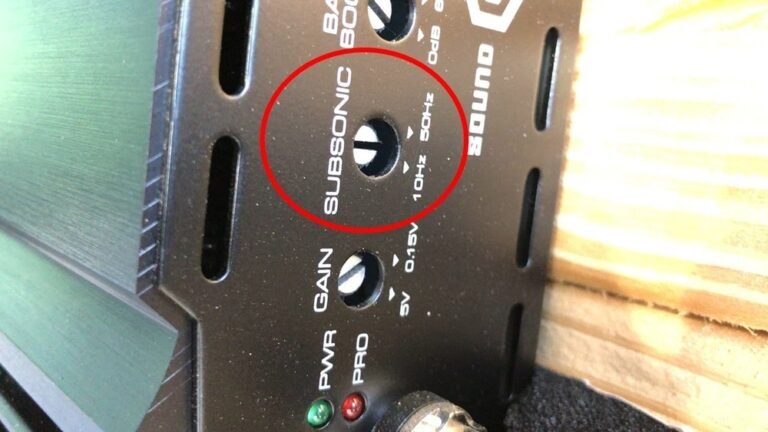
- Crossover frequency: Too high can send too much signal.
- Gain: Too high can overload the subwoofer.
7. Internal Damage
If the subwoofer’s speaker cone or voice coil is damaged, you may hear popping. This is more serious.
How to spot it:
- Popping does not stop, even after checking cables and power
- Subwoofer rattles or buzzes at all volumes
Tip:
If your subwoofer has been dropped or played too loud often, consider getting it checked by a professional.
How To Diagnose The Problem
Finding the cause takes some simple tests. Here’s a beginner-friendly approach:
1. Unplug And Replug Cables:
Start with the cables. Unplug each one, check for damage, and plug back in tightly.
2. Test With Another Source:
Connect your subwoofer to a different amplifier or receiver. Does it still pop? If not, your first amp may be the problem.
3. Change Power Outlets:
Try plugging the subwoofer into another outlet, away from other electronics.
4. Listen At Different Volumes:
Turn the volume up and down. Does popping only happen at high volume? This could be overdriving.
5. Move Other Electronics Away:
Remove nearby routers, phones, or chargers. Test if the popping stops.
6. Check Subwoofer Settings:
Adjust the gain and crossover controls. Lower them and see if the popping goes away.
7. Look For Physical Damage:
Inspect the speaker cone for tears or dents.
Pro tip:
Always test one change at a time. This helps you find the real cause faster.
Simple Fixes For Subwoofer Popping
Once you know the cause, most problems are easy to fix. Here are practical solutions:
Secure All Cables
- Replace old or frayed cables.
- Use cables with tight connectors.
- Avoid running audio cables near power cords.
Reduce Electrical Interference
- Move the subwoofer away from Wi-Fi routers and large appliances.
- Try plugging the subwoofer into a different wall outlet.
Improve Power Supply
- Use a surge protector for your subwoofer.
- Avoid sharing a power strip with high-power devices like heaters.
Adjust Subwoofer Settings
- Lower the gain/volume control on the subwoofer.
- Set the crossover frequency between 80-120 Hz for most systems.
Example:
Many home theaters set the crossover too high. Keeping it at around 100 Hz often removes unwanted pops.
Avoid Overdriving
- Don’t push the volume past the point where the bass sounds distorted.
- Match your subwoofer size to your room size.
Replace Faulty Equipment
- If the amplifier or receiver is the problem, get it checked or replaced.
- Damaged subwoofers may need repair by a specialist.
Credit: www.youtube.com
Common Mistakes Beginners Make
It’s easy to miss the simple fixes. Here are mistakes you should avoid:
- Ignoring loose cables: Even a small wiggle can cause noise.
- Turning up the volume instead of fixing the root cause: This can damage your subwoofer.
- Using cheap power strips: Low-quality strips don’t protect against surges.
- Not checking the amp or receiver: Many people focus only on the subwoofer.
- Setting the crossover too high: Sends too much signal to the subwoofer, causing stress and noise.
When To Seek Professional Help
Sometimes, DIY fixes are not enough. Here’s when you should call a technician:
- The popping is very loud and won’t stop after basic checks.
- The subwoofer smells like burning or gets very hot.
- You see visible damage inside the subwoofer.
- Pops happen even with all new cables and sources.
A professional can safely open the subwoofer and repair or replace damaged parts.
How To Prevent Subwoofer Popping In The Future
Prevention is better than repair. Here’s how you can keep your subwoofer safe:
1. Use Quality Cables:
Invest in good cables and check them every few months.
2. Protect Against Surges:
Always use a surge protector.
3. Keep The Area Clean:
Dust and dirt can get inside connectors and cause issues.
4. Avoid Overloading:
Don’t play music at max volume for long periods.
5. Proper Placement:
Place your subwoofer away from large electronics and Wi-Fi devices.
6. Check For Software Updates:
Some subwoofers have digital controls that can be updated.
Comparing Subwoofer Safety Features
Some subwoofers have built-in protections against popping. Here’s a quick comparison:
| Feature | Basic Subwoofer | Advanced Subwoofer |
|---|---|---|
| Surge Protection | No | Yes |
| Auto Power On/Off | No | Yes |
| Clip Limiter | No | Yes |
| Remote App Control | No | Sometimes |
If you’re shopping for a new subwoofer, look for these features to reduce the risk of popping and other problems.

Credit: www.reddit.com
Real-world Example: Fixing A Popping Subwoofer
Let’s say you have a 10-inch subwoofer in your living room. You start hearing a loud pop every time you turn the system on. Here’s how you’d fix it:
- Unplug and inspect all cables. Find a loose RCA connector.
- Replace it with a new, shielded cable.
- Plug the subwoofer into a different outlet, using a surge protector.
- Adjust the gain to 50% and set the crossover at 100 Hz.
After these steps, the popping noise disappears. This is a typical fix for most home users.
Statistics: How Common Are Subwoofer Popping Problems?
Studies in home audio forums and support groups show:
- About 30% of home theater owners report hearing a subwoofer pop at least once.
- Of those, nearly 80% solved the issue by checking cables and power.
- Only 10% needed to repair or replace the subwoofer.
This means most popping problems have simple solutions.

Credit: www.youtube.com
Frequently Asked Questions
Why Does My Subwoofer Pop When I Turn It On Or Off?
A single pop at power-up is normal for many subwoofers. It happens because of a sudden surge of electricity. If the pop is very loud or continues during use, check your cables and power supply.
Can A Popping Subwoofer Damage My Speakers?
Yes, if the popping is frequent or loud, it can stress the subwoofer driver and other speakers in your system. Fix the cause quickly to avoid long-term damage.
Should I Use A Surge Protector For My Subwoofer?
Absolutely. A surge protector defends against sudden power spikes, which are a common cause of popping and can destroy electronics.
How Do I Know If My Subwoofer Is Blown?
Signs of a blown subwoofer include:
- Constant popping or crackling
- No bass, or very weak sound
- Speaker cone does not move smoothly
If you’re not sure, have a professional check it.
Where Can I Find More Tips On Safe Subwoofer Setup?
For more detailed advice, you can read guides from the Audioholics Subwoofer Setup Guide.
Your subwoofer is an important part of your audio system. With the right care and a few simple checks, you can prevent popping noises and enjoy clear, deep bass for years to come.