How to Bypass Protection Mode on Amp: Simple Fixes That Work
When your car or home amplifier suddenly shuts down and shows a blinking light or no output, it’s likely in protection mode. This feature stops the amp from running to prevent damage. Many beginners panic when their amp won’t work, but the solution is often simple. If you want to know how to bypass protection mode on amp, this guide will help you understand the reasons, steps, and safety tips. You’ll learn not only how to reset your amp, but also how to stop protection mode from happening again.
What Is Protection Mode In Amplifiers?
Protection mode is a safety setting in most modern amps. It activates when the amp senses a problem such as:
- Overheating
- Short circuit
- Low voltage
- Speaker wire issues
- Faulty components
When protection mode turns on, the amp will:
- Shut down or limit output
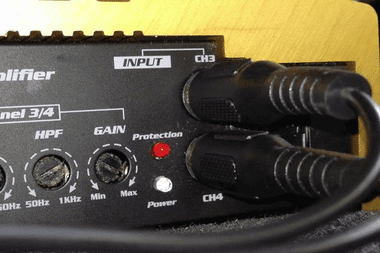
- Flash a warning light (often red or orange)
- Stop producing sound
This feature protects expensive parts inside the amp. If you bypass protection mode without fixing the cause, you risk permanent damage.
Common Causes Of Protection Mode
Before you try to bypass protection mode, it’s important to find out why your amp entered this state. Here are the most common reasons:
- Overheating
- Using the amp for too long
- Poor ventilation
- High ambient temperature
- Wiring Problems
- Loose or frayed speaker wires
- Incorrect speaker impedance
- Wires touching each other (short circuit)
- Power Issues
- Low battery voltage (common in cars)
- Faulty power supply
- Voltage spikes
- Speaker Issues
- Blown or damaged speakers
- Wrong speaker size or load
- Internal Failures
- Bad transistors or capacitors
- Defective circuit board
Non-obvious insight: Many beginners forget to check the speaker load. Using speakers with lower impedance than the amp supports (for example, 2 ohm speakers on a 4 ohm amp) can trigger protection mode instantly.
Can You Bypass Protection Mode Safely?
It’s possible to bypass protection mode, but never force the amp to operate if the cause isn’t fixed. Doing so risks fire or total failure. Always diagnose first.
Practical tip: Some amps have a physical reset switch or button. For others, the reset process is manual. Refer to your amp’s manual for model-specific instructions.
Step-by-step: How To Bypass Protection Mode On Amp
Follow these steps to safely bypass protection mode. Each step helps you find and fix common issues.
1. Turn Off The Amp And Disconnect Power
- Unplug the amp or turn off your car ignition.
- Wait for at least 1 minute. This allows internal circuits to reset.
2. Inspect Wiring
- Check all speaker wires and power cables.
- Look for cuts, frays, or loose connections.
- Make sure wires are not touching each other.
3. Check Speaker Impedance
Use a multimeter to measure speaker resistance.
- Most amps support 4 ohms speakers.
- If your speakers measure lower (e.g., 2 ohms), swap them for correct ones.
4. Test Voltage
- Use a voltmeter to check power supply voltage.
- Car amps need at least 12V DC.
- Home amps need steady 110V AC or 220V AC.
5. Allow Cooling
- If the amp feels hot, let it cool for 15–30 minutes.
- Clear dust from vents and fans.
- Ensure good airflow around the amp.
6. Reset The Amp
- If your amp has a reset button, press it.
- For manual reset, reconnect power after checking wires and cooling.
- Watch for lights: Green (normal), red (protection).
7. Test With One Speaker
- Connect only one speaker to the amp.
- Turn on and check if sound returns.
- If yes, add more speakers one by one.
8. Inspect Internal Parts (advanced)
- Open the amp only if you have basic electronics knowledge.
- Look for burnt parts, bulging capacitors, or broken solder joints.
- If you find damage, seek professional repair.
Example: In car audio, a common cause is a loose ground wire. Fixing the ground connection often restores the amp instantly.
Comparison: Different Types Of Protection Modes
Amplifiers use different protection methods depending on their design. Here’s a quick comparison:
| Type | Trigger | Reset Method | Common Devices |
|---|---|---|---|
| Thermal | Overheating | Cooling & power cycle | Car, Home |
| Electrical | Short circuit | Fix wiring, reset | Car, Pro Audio |
| Voltage | Low/high voltage | Check power supply | Home, Studio |
| Component | Internal failure | Repair/replace parts | All types |
Non-obvious insight: Some amps have “soft protection” that reduces output, while others have “hard protection” that fully shuts down. Know your amp’s behavior to avoid confusion.
Real-life Example: Car Amp Protection Mode
Let’s say your car amplifier stops working after loud music. The protection light turns red. Here’s what you should do:
- Turn off ignition and wait 1 minute.
- Check battery voltage (should be 12–14V).
- Inspect speaker wires behind the seat.
- Let the amp cool for 20 minutes.
- Reset the amp by reconnecting power.
- If still in protection, test with one speaker only.
Data: Over 50% of car amp protection cases are caused by wiring faults or low battery voltage. Only 20% involve internal failures.
Credit: how-to-bypass-protection-mode-on-amp.weebly.com
How To Prevent Protection Mode
Bypassing is only a temporary solution. Preventing protection mode saves time and money.
- Use correct speaker impedance.
- Ensure strong ground and power connections.
- Clean amp vents regularly.
- Avoid overloading the amp with too many speakers.
- Check for voltage stability.
- Use quality cables and connectors.
Example: Home theater amps often enter protection mode after power surges. Using a surge protector reduces the risk.
Amp Protection Mode Vs. Amp Failure
It’s easy to confuse protection mode with a dead amp. Here’s a quick comparison:
| Feature | Protection Mode | Amp Failure |
|---|---|---|
| Status Light | Red/Orange/Flashing | No light or blue |
| Sound Output | No sound, but amp powers on | No sound, amp does not power |
| Reset Possible | Yes | No |
| Typical Cause | Wiring, overheating, voltage | Blown fuse, damaged board |
Tip: If the amp powers on but doesn’t play sound and shows a red light, it’s likely in protection mode. If there’s no light at all, check the fuse.

Credit: www.youtube.com
Mistakes To Avoid When Bypassing Protection Mode
Many beginners make errors that can damage their amp further. Avoid these mistakes:
- Ignoring the root cause (never just reset without checking)
- Using the wrong speaker impedance
- Overlooking wire quality
- Skipping cooling time
- Not testing voltage
Practical tip: Never bypass protection mode by shorting pins or modifying circuits. This can cause fire or permanent damage.
When To Seek Professional Help
If you’ve followed all steps and your amp is still in protection mode, consider expert help. Signs you need a technician:
- Burnt smell inside amp
- Visible damaged parts
- Amp re-enters protection after reset
- No output after fixing wires and cooling
Fact: Repairs for internal failures often cost $50–$200, but prevent much bigger losses.
Tools To Diagnose Protection Mode
Having basic tools can make the process easier:
- Multimeter: For measuring voltage and impedance
- Wire stripper/cutter: For fixing connections
- Screwdriver: For opening amp case
- Cooling fan: For testing overheating issues
Example: Measuring speaker impedance with a multimeter helps spot mismatched loads instantly.
Quick Checklist For Beginners
If you’re new to amps, use this simple checklist:
- Turn off and cool amp
- Check all wires and connections
- Measure speaker impedance
- Test power supply voltage
- Reset amp and check lights
- Add speakers one at a time
- Seek help if needed

Credit: www.reddit.com
Frequently Asked Questions
Why Does My Amp Keep Going Into Protection Mode?
Your amp enters protection mode to guard against overheating, wiring faults, or low voltage. Check cables, speaker impedance, and power supply first. If issues continue, internal components may need repair.
Is It Safe To Bypass Protection Mode?
It’s safe only if you fix the root cause. Bypassing protection mode without finding the problem can damage your amp or cause fire. Always diagnose before resetting.
What Does The Protection Light Mean?
A red or orange light means the amp is in protection mode. This usually signals overheating, wiring issues, or voltage problems. Refer to your manual for specific color codes.
How Can I Check Speaker Impedance?
Use a multimeter to measure resistance. Most amps require 4 ohms speakers. If your speakers are lower, swap them to avoid triggering protection mode.
Where Can I Find More Information About Amp Protection?
For detailed explanations on amplifier protection, visit Wikipedia’s Audio Power Amplifier page.
Bypassing protection mode is simple once you understand the causes and steps. Always fix the root problem before resetting your amp. With careful checks and proper tools, you can enjoy clear sound again—and keep your amp safe for years to come.