How Do You Turn off a Pioneer Radio: Quick and Easy Steps
Most car owners use their Pioneer radio every day, but not everyone knows how to turn it off correctly. Sometimes, the power button is not obvious, or the radio stays on even after the car is switched off. If you’re new to using car audio systems or just bought a vehicle with a Pioneer radio, you might find the controls confusing. This guide explains every method in clear steps, gives real examples, and highlights common mistakes, so anyone can confidently power down their Pioneer radio.
Why Turning Off Your Pioneer Radio Matters
Many people think turning off a car radio is simple, but every model is a bit different. Here’s why learning the right method is important:
- Saves battery: Leaving the radio on can drain your car’s battery, especially if the engine is off.
- Prevents distraction: A radio that stays on can distract drivers when starting the car next time.
- Protects the system: Properly turning off the radio helps avoid glitches or software errors.
Some drivers discover their car battery is dead just because the radio stayed on overnight. So knowing how to power down your Pioneer radio can save money and trouble.
Understanding Pioneer Radio Models
Pioneer makes many types of car radios. The shutdown method can vary by model, so it helps to know which one you own. Most Pioneer radios fit into these categories:
- Single DIN: Slim radios with a basic display and buttons.
- Double DIN: Larger units, often with a touchscreen.
- Touchscreen (AVH, DMH, or NEX series): Modern radios with advanced features like Bluetooth, Apple CarPlay, and Android Auto.
Check your car dashboard or manual for the exact model number. If you see “AVH-” or “DMH-” on the display, you probably have a touchscreen model.
Key Differences Between Pioneer Models
Here’s a quick comparison of the main types:
| Type | Common Features | Turn Off Method |
|---|---|---|
| Single DIN | Physical buttons, simple display | Power/Source button |
| Double DIN | More buttons, larger display | Power/Source button |
| Touchscreen | Touch controls, advanced features | On-screen or physical button |
Knowing your model helps you use the right shutdown method.
Standard Ways To Turn Off A Pioneer Radio
Let’s look at the basic steps to turn off most Pioneer radios. These steps cover 90% of models found in cars today.
Using The Power Or Source Button
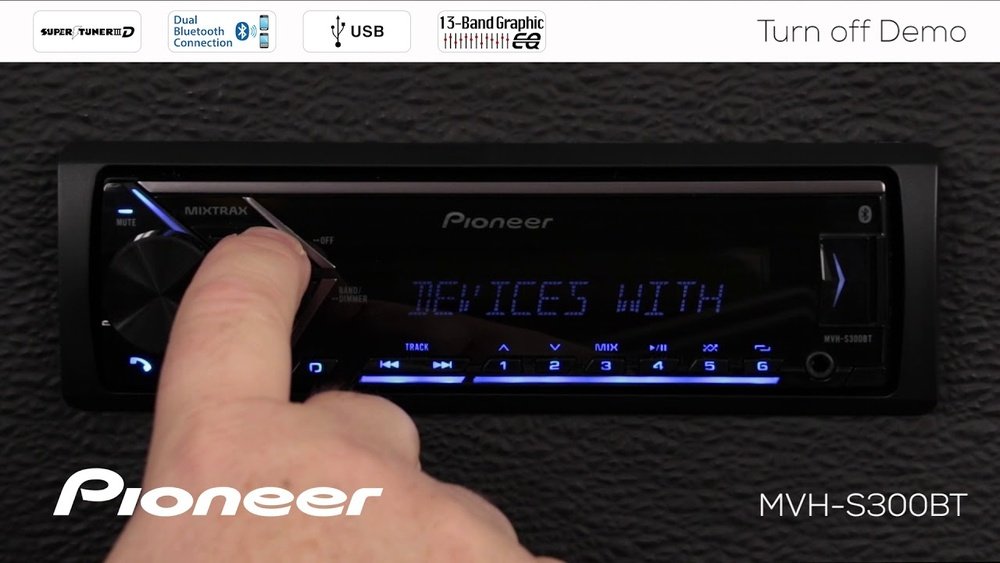
Most Pioneer radios have a Power or Source button marked as “SRC” or a circle with a line. Here’s how to use it:
- Locate the button: It’s usually at the top left or right of the radio face.
- Press and hold: Press and hold the button for 2-3 seconds.
- Wait for the display to go dark: The radio will turn off, and the screen will go blank.
Common beginner mistake: Quickly tapping the button only switches modes (like from FM to AUX), not turning off the radio. Make sure to hold it down.
Touchscreen Model Shutdown
On touchscreen models (like AVH or DMH series), the process changes slightly:
- Find the Home/Menu button: This is often a physical button below the screen or an icon on the screen.
- Tap and hold: Press and hold the icon or button until a menu appears.
- Select “Power Off” or “Turn Display Off”: Tap the correct option to shut down the unit.
Some models only turn off the display but keep audio running. For a full shutdown, look for “Power Off,” not just “Display Off. ”
Using The Car’s Ignition
Some Pioneer radios are wired to turn off with the car ignition:
- Turn the key to OFF: The radio will power down automatically.
- Push start button cars: When you press the start/stop button to turn off the engine, the radio should turn off too.
If your radio stays on after the car is off, it may be wired directly to the battery (always-on). In this case, you must use the radio’s own power button.
What If The Radio Won’t Turn Off?
Sometimes, the radio stays on even after you follow the steps. Here’s how to troubleshoot:
- Check the wiring: If installed incorrectly, the radio may keep getting power.
- Reset the unit: Some Pioneer radios have a small reset button. Use a pen tip to press it.
- Consult your manual: Look for “power save” or “standby” settings in the menu.
If the radio still won’t turn off, ask a car audio professional for help. Leaving the radio on can drain your battery in a few hours.

Credit: www.youtube.com
Special Features That Affect Power Off
Some Pioneer radios include features that confuse first-time users:
Demonstration Mode
Many units enter a demo mode when not used. This mode runs lights and sounds, making it look like the radio is still on.
- How to exit: Go into the radio’s settings, find “Demo Mode,” and set it to “OFF.”
Standby Vs. Full Power Off
Touchscreen models often have both Standby and Power Off:
- Standby: The display turns off, but Bluetooth and other features stay active.
- Full Power Off: The radio stops all functions.
To avoid battery drain, always choose full power off when parking for long periods.
Step-by-step Example: Turning Off A Pioneer Avh-z5250bt
Let’s use a real model as an example. The Pioneer AVH-Z5250BT is a popular touchscreen radio.
- Press and hold the Home button: Located below the screen.
- Wait for the menu: After 2 seconds, a menu appears.
- Select “Power Off”: Tap this on the screen.
- Screen goes dark: The unit is now fully off.
If you only tap the Home button, the screen changes mode but does not turn off. Holding is key.
Pioneer Radio Remote Control Shutdown
Some Pioneer radios come with a small remote. You can use this to turn off the unit:
- Locate the Power button: Usually at the top.
- Press and hold for 2 seconds: The radio will shut down.
This is useful if you can’t reach the radio easily from your seat.
Table: Pioneer Radio Shutdown Methods By Model
Here’s a summary to help you quickly find the right method for your model:
| Model Series | Shutdown Method | Notes |
|---|---|---|
| DEH Series | Press and hold SRC/OFF | Physical button only |
| MVH Series | Press and hold SRC/OFF | Some units have a Display Off mode |
| AVH/DMH Series | Hold Home/Menu, select Power Off | Touchscreen models |
| FH Series | Press and hold SRC/OFF | Double DIN, physical button |
| SPH Series | Hold Home/Menu, select Power Off | Touchscreen, app-enabled |
Check your model number on the radio face or in your car manual.
Advanced Settings: Power Save And Timer Modes
Some Pioneer radios have settings that control how and when the unit powers off.
- Power Save: Automatically turns off the radio after a set time with no activity.
- Timer Mode: Shuts down the radio after a preset time, even if the car is on.
To access these:
- Press the Menu or Settings button.
- Find Power Save or Timer.
- Set your preferred time (e.g., 10 or 30 minutes).
These features are useful if you often forget to turn off the radio manually.
Real-life Example: When Power Off Fails
A common story: Maria installed a new Pioneer DMH-1500NEX. She followed the manual, but the radio stayed on after she left her car. The installer had connected the radio’s power wire to a constant 12V source, not the ignition. She had to go back and ask them to change it to the accessory (ACC) wire. After fixing the wiring, the radio now turns off with the car ignition, saving her battery.
This example shows that correct installation is as important as knowing the button sequence.
Important Tips For New Pioneer Radio Users
- Read your manual: Each model has unique steps and menus.
- Practice when parked: Try turning your radio off before driving, so you’re not distracted on the road.
- Check display settings: “Display Off” is not the same as “Power Off.”
- Test with ignition off: Make sure the radio actually shuts down when the car is off.
- Ask about wiring: If you got the radio installed at a shop, confirm if it’s wired to the ignition or battery.
Common Mistakes And How To Avoid Them
- Tapping instead of holding: Always hold the power/source button for a few seconds.
- Confusing standby with power off: Look for “Power Off” in menus, not just “Standby.”
- Ignoring demo mode: Turn off demo mode to avoid unwanted lights and sounds.
- Assuming all radios are the same: Even within Pioneer models, controls can differ.

Credit: www.shutterstock.com
When To Seek Professional Help
If your Pioneer radio:
- Stays on after car is off
- Does not respond to power button
- Shows strange lights or sounds after shutdown
It may be a wiring or software issue. Visit a certified car audio shop or the place where you bought the radio.
For more technical details, you can visit the official Pioneer website.
Frequently Asked Questions
Why Does My Pioneer Radio Stay On When My Car Is Off?
This usually means the radio is wired directly to the battery, not the ignition. You may need to change the wiring so it’s connected to the accessory (ACC) wire. Some models also have a “power save” or “timer” feature that needs to be set.
How Do I Turn Off The Display Only, But Keep The Music Playing?
Most Pioneer touchscreen radios have a “Display Off” option in the menu. This turns off the screen but keeps audio playing. Look for “Display Off” or “Dimmer” in the settings.
Can I Use The Remote To Turn Off My Pioneer Radio?
Yes, many Pioneer radios come with a remote. Press and hold the power button on the remote for 2 seconds to turn off the unit. This is handy if the radio is hard to reach.
What’s The Difference Between Standby And Power Off?
Standby mode turns off the display but keeps Bluetooth, clock, or USB charging active. Power Off shuts down all functions. For saving your battery, always use Power Off if parking for long periods.
Where Can I Find My Pioneer Radio’s Model Number?
Usually, the model number is printed on the radio’s face or shown on the main menu screen. You can also check the car’s manual or the original box if you still have it.
Turning off a Pioneer radio is simple when you know your model and the right steps. Whether you use the power button, the touch menu, or your car’s ignition, following these clear instructions ensures your radio and battery stay safe.
If you have trouble, check your wiring or ask a professional for help. With these tips, you can use your Pioneer radio confidently and avoid common problems.
Credit: www.passportbmw.com