How to Tune a Car Stereo for the Best Sound: Expert Tips
Tuning your car stereo can completely change how you experience music while driving. A great sound system makes songs clearer, deeper, and more exciting. But many people simply install their car stereo and leave all settings at default. The truth is, factory settings rarely get the best out of your car audio.
The good news? You don’t need to be a professional to tune your car stereo for the best sound. With a few simple steps, you can make your music sound much better—whether you love bass-heavy hip hop, smooth jazz, or energetic pop.
This guide explains everything you need to know. You’ll learn what each setting does, how to adjust them step by step, and what mistakes to avoid. By the end, you’ll understand how to create a car audio experience that fits your taste, your car, and your daily drive.
Why Tuning Matters For Car Stereos
A car is not a perfect place for listening to music. There are many challenges:
- Road noise from the engine, tires, and wind
- Different speaker locations (some near your feet, some high on doors)
- Reflections from glass and hard surfaces
- Factory settings designed for “average” listeners, not your preferences
Because of these factors, even an expensive sound system can sound dull or harsh if not tuned correctly. Tuning your car stereo can:
- Make voices and instruments clearer
- Add punch and depth to the bass
- Reduce harsh, painful high notes
- Balance the sound for your position (usually the driver’s seat)
Small adjustments can produce a big difference in sound quality.
What You Need Before You Start
Before tuning your car stereo, gather these items:
- User manual for your car stereo (for button locations and menus)
- A variety of music tracks you know well (different genres, vocals, instruments)
- Quiet place (parked car with the engine off)
- Optional: A smartphone decibel meter app for checking levels
For advanced tuning, some people use an RTA (Real-Time Analyzer), but it’s not required for beginners.
Key Car Stereo Settings Explained
Understanding basic audio settings helps you tune with confidence. Here’s what each main setting does:
Equalizer (eq)
The EQ lets you control how much bass, middle, and treble you hear.
- Bass: Low frequencies (kick drum, bass guitar)
- Mid: Middle frequencies (vocals, piano)
- Treble: High frequencies (cymbals, “air” in music)
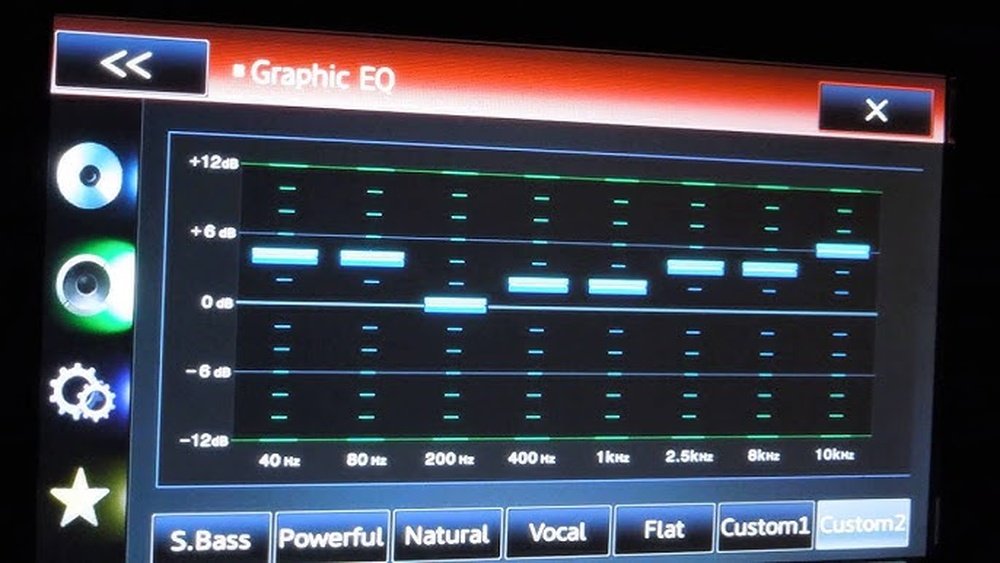
Most basic stereos have “Bass,” “Mid,” and “Treble” sliders. Advanced stereos may have more detailed EQ bands (e. g. , 60Hz, 250Hz, 1kHz, 4kHz, 16kHz).
Balance And Fader
- Balance: Left/right speaker volume. Center is equal.
- Fader: Front/rear speaker volume. Center is equal.
Adjusting these settings helps put the music “in front of you” instead of just all around.
Loudness
The loudness button boosts bass and treble at low volume. It’s useful for quiet listening but can sound muddy at higher volumes.
Crossover And Subwoofer Controls
If your system has a subwoofer, you may see:
- Crossover: Sets which frequencies go to the subwoofer vs. main speakers
- Subwoofer Level: Adjusts subwoofer loudness
Setting these correctly avoids boomy or weak bass.
Step-by-step: How To Tune Your Car Stereo
Follow these steps for the best results. Each car and stereo is different, so take your time.
1. Reset All Settings To Default
Start from a blank slate. Find the “reset” option in your stereo menu or set all EQ, balance, and fader controls to the middle/zero.
- This prevents old, unwanted settings from affecting your sound.
2. Set Balance And Fader
Sit in the driver’s seat (or your main listening position).
- Adjust balance so sound feels centered, not too much left or right.
- Adjust fader so sound feels like it’s coming from the front dashboard, not the back seat.
Example: In most cars, you want slightly more sound from the front speakers for a “stage” effect.
3. Adjust Volume First
- Play your favorite song at a normal listening level.
- Don’t set volume too high, as it can cause distortion.
4. Tune The Equalizer (eq)
If your stereo has only Bass/Mid/Treble:
- Set all to zero (center position).
- Play a well-recorded song.
- Increase “Bass” until it sounds full but not boomy.
- Adjust “Treble” until cymbals and vocals are clear but not sharp.
- Use “Mid” to bring out vocals or make sound smoother.
If your stereo has a multi-band EQ:
- Adjust each frequency band by small amounts (1-2 steps at a time).
- Example:
- 60Hz–100Hz: Bass thump
- 250Hz–500Hz: Warmth/body of music
- 1kHz–4kHz: Vocals, guitars
- 8kHz–16kHz: Clarity, “air”
Tip: Less is more. Extreme EQ settings often sound worse in a car.
5. Fine-tune With Different Songs
Test your changes with different types of music:
- Pop, rock, hip hop, jazz, classical
- Male and female vocals
- Songs with strong bass and others with gentle sounds
This helps avoid a sound that is only good for one type of music.
6. Adjust Loudness And Other Features
- If you listen at low volume, try the “Loudness” button.
- If you add an external amplifier, check for “Bass Boost” or “Sound Enhancement” features. Use these carefully; too much can hurt clarity.
7. Set Subwoofer And Crossover (if You Have One)
- Set the crossover frequency (often 80Hz–120Hz is best).
- Adjust subwoofer level so bass is strong but not overpowering.
- Play a bass-heavy song and listen for rattles or distortion—reduce subwoofer level if needed.
8. Sit In Different Seats
Ask a friend to sit in the passenger seat. Make small adjustments if needed, but remember: tuning for the driver’s position is usually best.
9. Listen While Driving
Test your settings with the car moving. Road noise can change how music sounds, especially at highway speeds.
- You may need to slightly increase bass or treble for clarity when driving.
10. Save Your Settings
If your stereo allows, save your favorite EQ and balance/fader settings as a preset. This lets you return to your ideal sound with one button.
Example: Simple Car Stereo Tuning
Let’s say your car stereo has basic controls: Bass, Mid, Treble, Balance, and Fader.
- Set all EQ controls to zero.
- Balance and fader to center.
- Play “Shape of You” by Ed Sheeran.
- Increase Bass by +2 for a fuller sound.
- Increase Treble by +1 for vocal clarity.
- Leave Mid at zero for a natural sound.
If you notice the sound is too sharp, reduce Treble back to zero.
Practical Data: Common Eq Settings For Beginners
Every car and listener is different, but here are example starting points:
| EQ Band | Suggested Setting | Music Type |
|---|---|---|
| Bass (60–100Hz) | +2 | Pop, Hip Hop |
| Mid (250–1000Hz) | 0 | All |
| Treble (10kHz–16kHz) | +1 | Jazz, Classical |
Remember: use these as a starting point and adjust for your taste.
Credit: eliteautogear.com
Common Mistakes And How To Avoid Them
Even with the best intentions, beginners often make a few common errors:
- Too much bass or treble: This can cause distortion or harshness, especially at high volumes.
- Setting all EQ bands high: Over-boosting every band makes music sound muddy.
- Ignoring speaker quality: Even the best tuning can’t fix poor or broken speakers.
- Tuning for one song only: Test with several songs to find a balanced sound.
- Not considering road noise: Settings that sound great when parked may be too weak on the highway.
Comparing Factory Presets Vs. Manual Tuning
Many car stereos offer “Rock,” “Pop,” or “Jazz” presets. How do these compare to manual tuning?
| Feature | Factory Preset | Manual Tuning |
|---|---|---|
| Sound Balance | General | Personalized |
| Music Fit | Limited (for one style) | Flexible (fits your taste) |
| Learning Curve | Easy | Requires time |
| Result Quality | Average | Best possible |
Manual tuning always gives you more control and better sound for your unique car and listening style.
Credit: business.walmart.com
How Car Size And Speaker Quality Affect Tuning
Not all cars or stereos are created equal. Here’s how different factors influence your tuning:
- Small cars: Sound waves bounce more, so you may need less bass.
- Large SUVs: Bigger spaces often require more bass and treble boost.
- Premium speakers: Respond better to small EQ changes.
- Factory speakers: May need more EQ adjustment for clear sound.
For example, if you drive a compact car with standard speakers, a flat EQ (all at zero) often works better than heavy adjustments.
Pro Tips For Advanced Tuning
If you want to go deeper:
- Try a sound test CD with frequency sweeps to check for rattles or weak spots.
- Use a decibel meter app to measure left/right speaker levels.
- Avoid extreme settings—subtle changes produce the most natural sound.
- Check your speaker wires and connections if you hear buzzing or distortion.
If you upgrade speakers or add an amplifier, repeat the tuning process for best results.
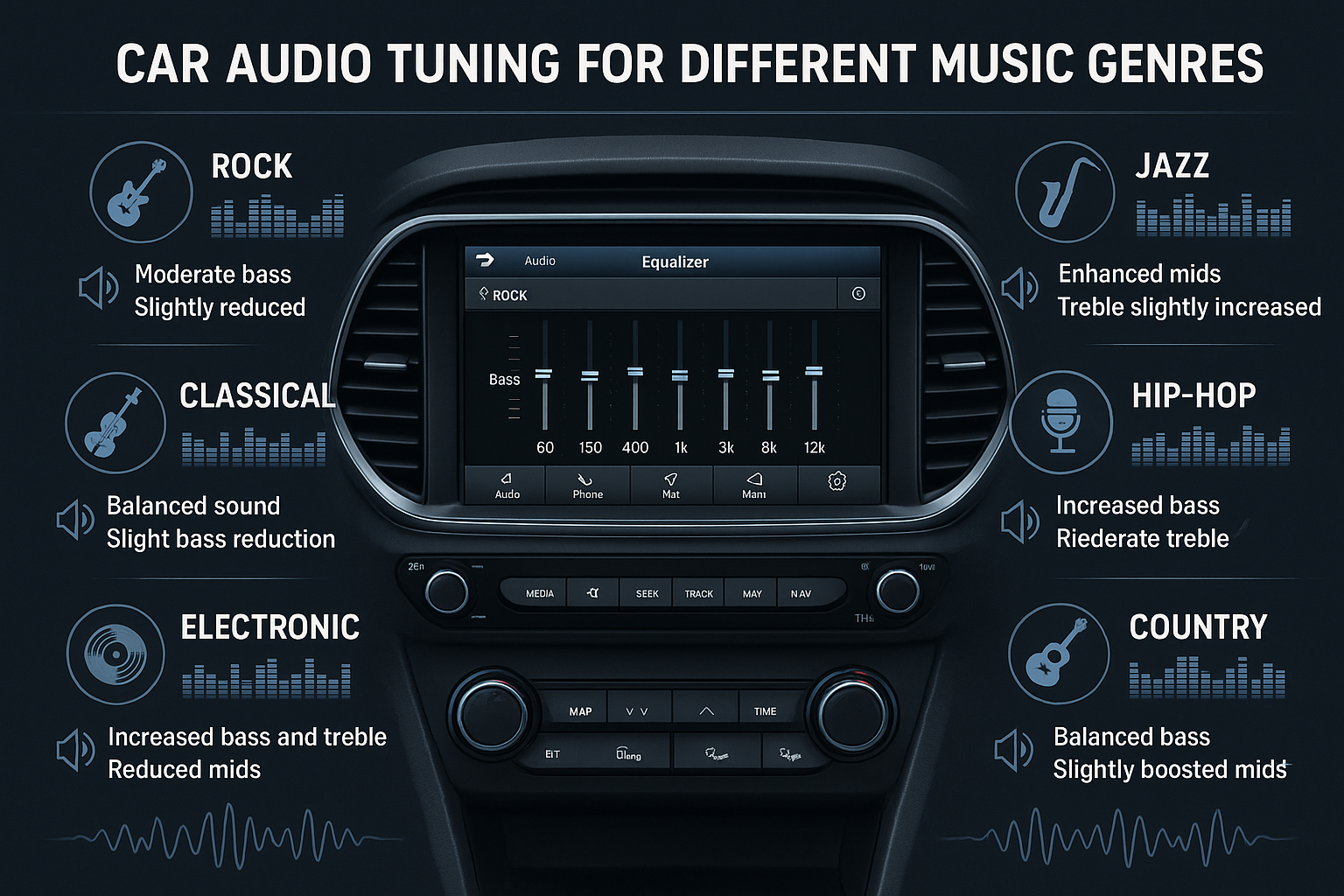
Example: Tuning For Different Genres
Different music styles need different EQ settings. Here’s a quick example:
| Music Genre | Bass | Mid | Treble |
|---|---|---|---|
| Rock | +2 | +1 | 0 |
| Classical | 0 | 0 | +2 |
| Hip Hop | +3 | 0 | -1 |
You can save different EQ presets if your stereo allows it—one for each genre you love.
Non-obvious Insights Most Beginners Miss
- Tuning at high volume hides problems. Always tune at a normal listening level. At high volume, your ears are less sensitive to detail, and distortion can sneak in.
- Speaker placement matters as much as EQ. Sometimes moving a speaker or checking for a blocked speaker grill makes a bigger difference than any EQ adjustment.
When To Upgrade Equipment
No amount of tuning can fix broken or poor-quality speakers. If you notice:
- Crackling or rattling at any volume
- Weak bass even after tuning
- Muffled vocals
…it may be time to upgrade your speakers or add a small amplifier for better results. For more on car audio upgrades, visit the Car audio Wikipedia page.
Frequently Asked Questions
What Is The Best Eq Setting For Car Stereo?
There is no single “best” EQ setting. Start with all bands at zero, then boost bass and treble slightly (+1 or +2) as needed for your car, music, and taste. Always tune with different types of music.
Should I Use The Loudness Feature?
Use loudness when listening at low volume. It boosts bass and treble, making music sound fuller. Turn it off at high volume to avoid distortion.
How Often Should I Retune My Car Stereo?
Retune your stereo whenever you change speakers, add a subwoofer, or if your music tastes change. Also, check settings after a battery change, as some stereos reset to default.
Can I Use A Phone App For Tuning?
Yes, apps like decibel meters or simple EQ analyzers can help check levels. However, always trust your ears first—what sounds good to you is most important.
Does Adding A Subwoofer Require Special Tuning?
Yes. Set the crossover around 80–120Hz. Adjust the subwoofer level so the bass is powerful but not overpowering. Test with different songs for best results.
Tuning your car stereo is worth the effort. A few minutes of careful adjustment can bring new life to your music and make every drive more enjoyable. Keep experimenting until you find the perfect sound for you.

Credit: www.youtube.com