2006 Honda Civic Stereo Code: Unlock Your Radio Fast
If you own a 2006 Honda Civic, you might have seen the words “Enter Code” on your car’s stereo. This leaves many owners confused—especially if you’ve never dealt with it before. Losing music and radio functions can be frustrating, but the good news is that getting your stereo code back is usually simple if you know where to look and what steps to follow.
This guide explains, in clear and simple terms, what the 2006 Honda Civic stereo code is, why you need it, and how to retrieve and enter it. You’ll find beginner-friendly tips, data tables, examples, and answers to the most common questions. By the end, you’ll know exactly how to unlock your Civic’s audio system without stress.
What Is The 2006 Honda Civic Stereo Code?
The stereo code is a unique five-digit number that unlocks your Honda’s radio. Honda introduced this feature to prevent theft. If your car battery is disconnected or dies, or the radio is removed, the stereo system locks itself. When powered back on, it asks for the code.
- Purpose: Anti-theft protection
- Typical length: 5 digits (numbers only)
- When required: After battery change, jump start, or stereo removal
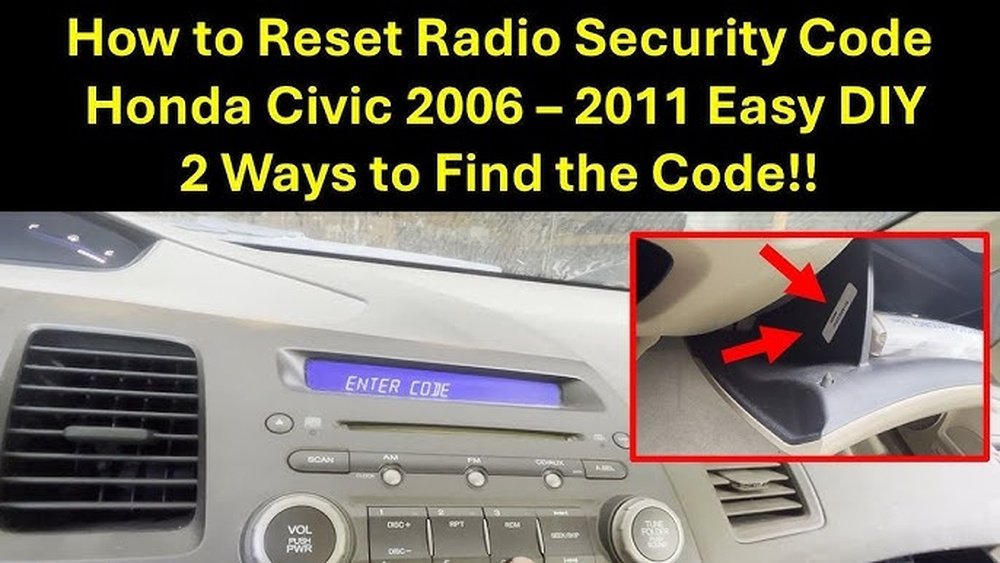
Without the code, your stereo will not work. You’ll see a message like “CODE” or “ENTER CODE” on the display.
Why Does The Stereo Ask For A Code?
Honda cars use stereo codes as a security measure. This feature protects your car stereo from theft. If someone steals the stereo, they can’t use it without the code.
You might need to enter the code after:
- Replacing your car battery
- Jump-starting the car
- Removing or replacing the stereo
- A dead battery event
Many first-time Honda owners are surprised by this, but it’s a standard feature across many Honda models.
Where To Find Your Stereo Code
For most 2006 Honda Civics, you can locate the code in a few places:
- Owner’s Manual Packet: Look for a small card labeled “Anti-Theft Radio Code.” Sometimes, the code is written on a sticker inside your glove box or owner’s manual.
- Glove Compartment or Center Console: Check for a sticker with a 5-digit code.
- Honda Dealership: If you can’t find the code, your local dealership can help. They may need your VIN and radio serial number.
- Online Honda Code Retrieval: Honda offers an online tool to get your code. You’ll need your car’s VIN and radio serial number.
Pro tip: Take a photo of your code once you find it, and keep it in your phone for future use.
How To Retrieve The Radio Serial Number
If you don’t have your stereo code, you’ll need your radio serial number. Here’s how to find it for the 2006 Civic:
- Check the Display: With the radio off, hold the “1” and “6” preset buttons. While holding them, turn the radio on. The screen will show an 8-digit serial number.
- On the Unit: Sometimes, the serial number is on a sticker on the side or back of the stereo. This requires removing the unit.
Write down the serial number accurately, as you’ll need it to get the code.
Steps To Retrieve Your 2006 Honda Civic Stereo Code
Follow these steps if you need to unlock your radio:
- Get your vehicle identification number (VIN).
- You can find it on the dashboard near the windshield or on your registration documents.
- Find the radio serial number.
- Use the radio button trick above.
- Visit the official Honda code retrieval site:
- Honda Radio Code Retrieval
- Enter your VIN, serial number, and contact info.
- Receive your code.
- It will appear on the screen or be sent via email.
- Enter the code using your radio’s preset buttons.
- Press each number in your code. The stereo should unlock and work normally.
How To Enter The Stereo Code
Entering your code is easy:
- Turn on your car (accessory mode is fine).
- The stereo screen will say “CODE.”
- Use the radio preset buttons (1–6) to enter the 5-digit code.
- The radio will unlock if you enter the correct code.
Example: If your code is 25341, press 2, 5, 3, 4, 1 in order.
If you enter the wrong code 10 times, the system may lock. In this case, leave the radio on for one hour (car running or in accessory mode), then try again.

Credit: www.youtube.com
Common Mistakes And How To Avoid Them
Many Civic owners make these mistakes the first time:
- Guessing the code: Too many wrong attempts can lock the stereo for longer.
- Mixing up numbers: Double-check the serial number and code before entering.
- Forgetting the code location: Keep a backup photo or note in your phone.
- Not using the official site: Avoid unofficial websites, which may not be safe.
Extra tip: If you’re stuck, a Honda dealer can help retrieve the code, but they may charge a fee if you don’t have your details.
Example: Real-world Scenario
Imagine you replaced your battery, and now your stereo screen says “CODE.” You check your glove box—no luck. You find your VIN on your insurance card. You follow the button trick (hold “1” and “6,” then power on the radio) and see “S/N: 12345678.” You go to Honda’s official code site, enter your VIN and serial number, and receive code 45713. You enter it using the preset buttons, and your music returns.
Many Civic owners have followed this exact process and solved the problem in under 10 minutes.

Credit: www.estelarfm.com.ec
Data Table: Where To Find Your Stereo Code
Here’s a summary of the most common places you’ll find your code:
| Location | Details | Frequency |
|---|---|---|
| Owner’s Manual | Sticker/card inside manual packet | Very Common |
| Glove Box | Sticker with 5-digit code | Common |
| Online Retrieval | Honda’s official website | Common if manual is lost |
| Honda Dealership | Bring VIN and serial number | Less common, but always works |
Comparison: Standard Vs Premium Stereo Codes
Some 2006 Civics have upgraded sound systems. The process for retrieving codes is the same, but the serial number location can vary.
| Stereo Type | Serial Number Location | Code Entry Method |
|---|---|---|
| Standard AM/FM/CD | On-screen (using buttons) | Preset buttons |
| Premium/Navigation | On radio unit or by button sequence | Preset buttons or touchscreen |
What If You Can’t Retrieve The Code?
If you tried everything and still can’t get your code, here’s what you can do:
- Contact Honda support: They can help if you provide proof of ownership.
- Visit a dealership: Bring your car’s VIN, registration, and driver’s license.
- Radio replacement: If the stereo was replaced with an aftermarket unit, you may not need a code.
Note: Aftermarket radios do not use Honda’s anti-theft codes.
Data Table: Required Information For Code Retrieval
To speed up the process, have these details ready:
| Detail | Where to Find | Why Needed |
|---|---|---|
| VIN | Dashboard, registration | Confirms your vehicle |
| Radio Serial Number | Display or radio unit | Identifies your stereo |
| Contact Info | Your phone or email | For verification |
Non-obvious Insights For Beginners
Many new Civic owners do not realize:
- The code never changes: Once set, your 2006 Civic’s stereo code will always be the same unless the radio is replaced.
- You can enter the code with the car in accessory mode: There’s no need to run the engine—just turn the key to “ACC” so the radio has power.
These small details save time and prevent confusion, especially when you’re in a hurry.
Security Tips
Keep your code safe. Do not share it with others unless necessary. If your car is ever sold, pass the code to the new owner. This helps them avoid radio lock problems.
Credit: www.walmart.com
Frequently Asked Questions
How Do I Get My 2006 Honda Civic Stereo Code For Free?
You can get your code for free by checking your owner’s manual, glove box, or using Honda’s official online code retrieval. You’ll need your VIN and radio serial number.
What If I Enter The Wrong Code Too Many Times?
If you enter the wrong code 10 times, the stereo will lock. Leave the radio on for an hour (car in accessory mode), then try again. If still locked, contact a Honda dealer.
Can I Use The Same Code If I Change My Battery Again?
Yes. The code is tied to your specific stereo. If you disconnect the battery again, simply re-enter the same code.
What If I Bought My Car Used And Don’t Have The Code?
You can still retrieve the code using your car’s VIN and the radio’s serial number through the official Honda website or a dealership.
Does Every 2006 Honda Civic Need A Stereo Code?
Yes, all factory radios in the 2006 Civic require a code if power is lost. Aftermarket stereos do not use this system.
Unlocking your 2006 Honda Civic’s stereo may seem stressful, but with the right information, you can do it yourself in just a few minutes. Always keep your code handy and use official Honda resources to stay safe. For more details, check out Honda’s official radio code retrieval page. Enjoy your music again—worry-free.