How to Set the Equalizer for Best Sound: Expert Tips
Setting the equalizer for the best sound can feel confusing, especially if you are new to audio. But with the right steps, anyone can improve their music, movies, or podcasts. Equalizer (EQ) settings let you control the sound by boosting or cutting certain frequencies.
This makes your music sound clear, powerful, and suited to your taste. In this guide, you will learn how to set the equalizer for the best sound, with simple instructions and examples even beginners can follow.
What Is An Equalizer And Why Does It Matter?
An equalizer is a tool that lets you change the volume of specific sound frequencies. Sound is made up of different frequencies, from low bass to high treble. By changing these, you can:
- Make voices clearer
- Reduce harshness
- Boost bass for more impact
- Fix poor audio from old recordings
Most music players, phones, cars, and home theaters have built-in EQ settings. Knowing how to use them helps you get the best sound for your ears and your room.
Understanding Basic Frequency Bands
Every equalizer works with frequency bands. These bands represent parts of the sound range:
- Sub-bass (20–60 Hz): The deepest bass, felt more than heard.
- Bass (60–250 Hz): Kick drums, bass guitars, warmth.
- Low-mid (250–500 Hz): Body of vocals and instruments.
- Midrange (500 Hz–2 kHz): Most vocals, guitars, pianos.
- Upper mid (2–4 kHz): Presence, sharpness, clarity.
- Treble (4–6 kHz): Detail, sibilance (“S” sounds).
- Brilliance (6–20 kHz): Air, sparkle, high-end shimmer.
A basic EQ might have 3 bands (bass, mid, treble). Advanced ones have 5, 10, or more. More bands mean more control, but also more complexity.
Example: 5-band Eq Settings
Here’s how a typical 5-band EQ divides the sound:
| Band | Frequency Range | Common Uses |
|---|---|---|
| Bass | 60–250 Hz | Add warmth or punch |
| Low-mid | 250–500 Hz | Fullness of sound |
| Mid | 500 Hz–2 kHz | Clarity for vocals |
| Upper-mid | 2–4 kHz | Presence, detail |
| Treble | 4–20 kHz | Brilliance, air |
Choosing The Right Equalizer Setting For Your Needs
There is no single “best” EQ setting for everyone. The right setting depends on:
- Music genre (rock, jazz, classical, hip-hop)
- Type of speakers or headphones
- Room size and shape
- Personal taste
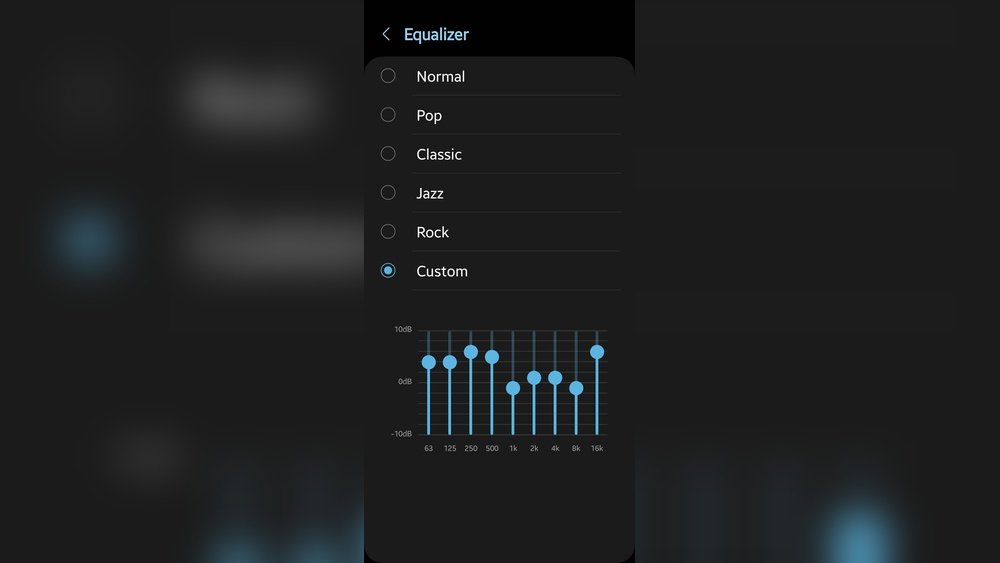
Most devices offer EQ presets, such as Rock, Pop, Jazz, or Classical. These are good starting points. But for the best sound, custom settings are often better.
Example: Preset Vs. Custom Settings
| Preset | Typical Changes | Best For |
|---|---|---|
| Rock | Boosts bass and treble | Drums, electric guitars |
| Jazz | Boosts mids, light bass | Sax, piano, vocals |
| Pop | Boosts vocals, smooth bass | Modern songs, vocals |
| Custom | User choice | Personal preference |
Step-by-step: How To Set The Equalizer For Best Sound
Follow these easy steps to set your EQ for the best possible sound.
1. Start Flat
Set all EQ bands to zero (no boost or cut). This is called a flat setting. Listen to a song you know well. This is your “reference point.”
2. Identify What’s Missing Or Too Strong
Ask yourself:
- Is the bass too weak or too boomy?
- Are the vocals clear or muffled?
- Is the treble harsh or dull?
Play different music types. Notice what feels off.
3. Make Small Changes
Increase or decrease one band at a time. Use steps of 2–3 dB (decibels). Big changes can make the sound unnatural.
- If bass is weak, boost the 60–250 Hz band slightly.
- If vocals are lost, raise the 500 Hz–2 kHz area.
- If music sounds sharp, lower the 4–6 kHz band.
Test changes with music, podcasts, and movies.
4. Avoid Common Mistakes
- Don’t boost all bands – this can cause distortion.
- Avoid deep “V” shapes (high bass and treble, low mids). It can hide vocals and details.
- Don’t set everything to the maximum – less is often more.
5. Save Your Favorite Settings
Most apps and devices let you save custom EQ settings. Save different profiles for music, movies, or games.
Practical Eq Examples For Different Uses
Here are simple, beginner-friendly EQ settings for common needs:
Music
- Pop: Slight bass boost, raise mids for vocals, gentle treble.
- Rock: Boost bass and treble, mild cut in the mids.
- Classical: Flat or slight boost in upper mids and treble for detail.
- Hip-Hop: Strong bass boost, mild cut in mids, smooth treble.
Movies
- Dialogue Focus: Boost 1–3 kHz for clear voices.
- Action Scenes: Raise bass for impact, boost treble for detail.
Podcasts
- Voice Clarity: Boost 500 Hz–2 kHz, reduce deep bass.
Gaming
- Shooter Games: Boost 2–6 kHz for footsteps and details.
- Adventure Games: Balanced, with slight bass and treble boost for immersion.
How Room And Speakers Affect Eq
Your room and speakers change how you hear sound. For example:
- Small rooms often boost bass naturally.
- Large rooms may lose bass and echo more.
- Cheap speakers may lack detail.
- High-end headphones usually need less EQ.
Try listening in different places. Adjust EQ to fix problems caused by your space or gear.
Example: Room Size Vs. Eq Needs
| Room Size | Common Problems | EQ Tips |
|---|---|---|
| Small Room | Too much bass | Cut bass slightly |
| Large Room | Echo, thin sound | Boost bass, reduce treble |
| Car | Harsh treble, boomy bass | Lower treble, balance bass |

Credit: www.wikihow.com
Advanced Tips For Better Equalizer Settings
For those who want to go further, here are some advanced but easy-to-follow tips:
- Use Reference Tracks: Listen to high-quality songs you know well. Compare your EQ changes to the original.
- Avoid Extreme Settings: More than +/-6 dB is usually too much.
- Test with Different Volumes: Some frequencies sound different at low vs. high volume.
- Check with Several Songs: Don’t base EQ on just one track.
- Use Quality Files: Low-quality MP3s can sound worse if you boost treble or bass too much.
Non-obvious Insights For Beginners
Many beginners miss these useful points:
- Your ears get tired. After a few minutes, you may not notice small changes. Take breaks when adjusting EQ.
- Different devices need different EQ. Settings that sound good on headphones may not work on car speakers.
- Room acoustics matter. Furniture, curtains, and even where you sit change how sound reaches your ears.
How To Use Graphic Vs. Parametric Equalizers
You may see two main types of EQs:
- Graphic equalizers: Have fixed bands (like sliders at set frequencies). Easy for beginners.
- Parametric equalizers: Let you pick exact frequency, volume, and width. More flexible, but more complex.
For most people, a graphic EQ is enough. If you try a parametric EQ, start with presets and make only small changes.
Common Mistakes To Avoid
Many people make these errors:
- Boosting all frequencies: This makes music louder but not clearer.
- Ignoring midrange: Mids carry voices and instruments. Cutting them too much can make sound empty.
- Using EQ for bad speakers: EQ can help, but can’t fix very poor speakers or headphones.

Credit: www.reddit.com
How To Test And Compare Your Eq Settings
It’s important to test your settings. Here’s how:
- Play a song you know well.
- Switch between flat and your custom EQ.
- Listen for improvements: Clearer vocals, less harshness, better bass.
- Ask a friend to listen too. Fresh ears can spot problems you miss.
If you want to learn more about sound frequencies, the Wikipedia Equalization page offers more technical detail.
Frequently Asked Questions
What Is The Best Equalizer Setting For Bass?
For strong bass, boost the 60–120 Hz band by 2–4 dB. But avoid boosting too much, as it can make music muddy or distort. Always test with different songs to find the right balance.
Should I Use Presets Or Custom Eq Settings?
Presets are a good start, especially for beginners. But custom EQ lets you adjust sound for your room, speakers, and music taste. Try both and decide what sounds better to you.
Why Do Vocals Sound Muffled In My Music?
Muffled vocals often mean the midrange (500 Hz–2 kHz) is too low. Try boosting this range slightly. If you use a preset, switch to one that favors vocals, like “Pop” or “Podcast.”
Can Equalizer Settings Damage My Speakers Or Headphones?
Extreme EQ boosts (over +6 dB) can push speakers or headphones too hard, causing distortion or even damage at high volume. Stay within moderate changes, and keep the total volume at safe levels.
How Do I Reset My Equalizer To Default?
Most devices and apps have a reset or “flat” option in the EQ settings. This returns all bands to zero. If not, move each slider to the middle or zero position manually.
Setting your equalizer is a skill anyone can learn. Start simple, listen carefully, and adjust slowly. With a little practice, you’ll enjoy music, movies, and games at their best—every time you press play.

Credit: mobileaudioconcepts.com.au