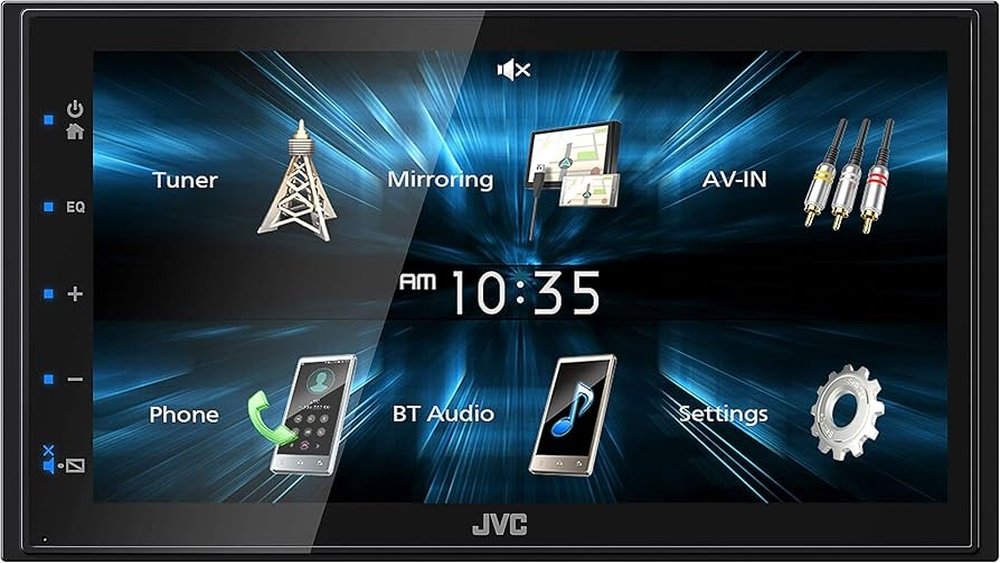
Jvc Kw M150Bt Bluetooth Car Stereo: Ultimate Audio Upgrade
The world of car audio is full of choices. For many, finding a car stereo that is simple, modern, and easy to use is not always easy. One device that stands out is the JVC KW M150Bt Bluetooth Car Stereo. This stereo is known for its user-friendly design, great features, and reasonable price. If you are new to car audio upgrades or just want to understand if this unit fits your needs, this article will help you. We will break down the key features, explain how it works, and compare it to similar products. You will also find practical tips for getting the most out of the JVC KW M150Bt.
What Is The Jvc Kw M150bt Bluetooth Car Stereo?
The JVC KW M150Bt is a double-DIN car stereo head unit. It is designed for people who want a modern sound system in their car without a complicated setup. Here are some things you should know:
- It has a 6.75-inch touchscreen display.
- It supports Bluetooth for hands-free calling and music streaming.
- It works with both Android and iPhone devices.
- It does not play CDs but focuses on digital media.
This stereo is a good choice for those who want to upgrade from a basic factory radio to something with more features but not too complex.
Key Features Explained
When you look at a new car stereo, you want to know what makes it special. Here are the main features of the JVC KW M150Bt and why they matter.
1. Touchscreen Display
- 6.75-inch clear resistive touchscreen lets you control music, calls, and settings easily.
- Icons are big and bright, making them easy to tap while driving.
- The screen is not as sharp as some expensive models, but it is very readable.
2. Bluetooth Connectivity
- Connect your phone with Bluetooth for hands-free calling and wireless music streaming.
- You can pair up to five devices at once (two active for calls/music, three for music only).
- This is helpful if more than one person wants to play music.
3. Smartphone Integration
- Works with Android devices using USB (Android Open Accessory 2.0).
- Supports iPhone/iPod music playback and charging via USB.
- Not compatible with Apple CarPlay or Android Auto, but you can still play music and make calls.
4. Audio Customization
- Includes a 13-band equalizer and several sound presets.
- Lets you change the sound to match your car and music taste.
- You can adjust bass, treble, and other settings from the touchscreen.
5. Expandability
- Has a rear-view camera input (camera not included).
- Includes two pairs of 2.5V preamp outputs for adding external amplifiers.
- Supports a rear USB input for music from flash drives.
6. Media Playback
- Plays music from USB drives, smartphones, and Bluetooth devices.
- Supports common audio formats like MP3, WMA, and FLAC.
How To Install The Jvc Kw M150bt
Installing a car stereo can be simple if you follow the right steps. Here is a beginner-friendly explanation:
- Disconnect the car battery before you begin.
- Remove the old stereo using proper tools (usually a trim removal kit).
- Connect the JVC stereo wiring harness to your car’s harness using a wiring adapter.
- Secure the new stereo in the dash with the included brackets.
- Plug in the antenna, USB, and other connections.
- Reconnect the battery and test the stereo.
Tips:
- Use a wiring adapter for your car model to avoid cutting wires.
- If you are not confident, ask a professional installer for help.
- You may need a dash kit if your car’s opening is not the standard double-DIN size.
User Experience And Interface
The JVC KW M150Bt is made for easy use. Here’s what to expect:
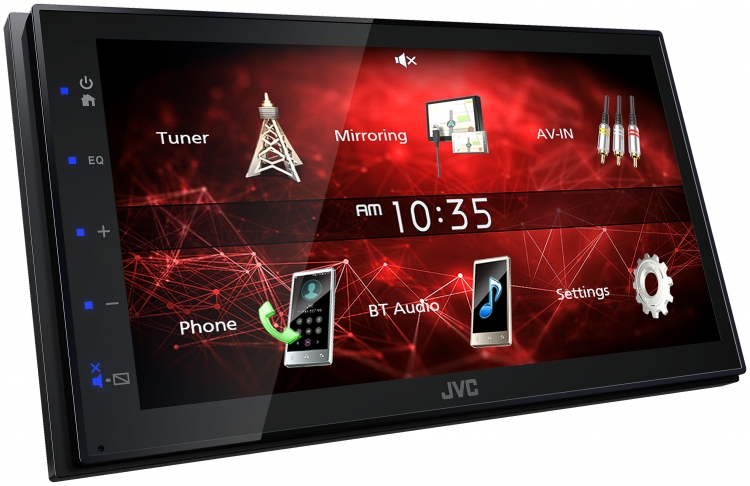
- The main menu has large, colorful icons for radio, USB, Bluetooth, and settings.
- Swiping and tapping are quick, even for beginners.
- Simple navigation means less distraction when driving.
- The display works well in sunlight, but fingerprints may show up.
- Bluetooth pairing is fast. Your phone will connect automatically after the first setup.
Non-obvious insight: Many users do not realize you can customize the background image on the home screen. This small touch can make the unit feel more personal.
Credit: www.jvc.com
Audio Quality And Customization
Sound quality is important in any stereo. Here’s how the KW M150Bt performs:
- It delivers clear sound with good bass and treble for most factory and aftermarket speakers.
- The 13-band equalizer lets you shape your music. For example:
- Boost bass for hip-hop or EDM.
- Add treble for podcasts or audiobooks.
- You can save your favorite sound setting as a preset.
Example: If you switch between rock and jazz, save two different EQ settings and switch with one tap.
Hidden tip: The “loudness” setting can make music sound richer at low volumes, but turn it off at high volume to avoid distortion.
Comparing The Jvc Kw M150bt To Other Stereos
To help you see how the KW M150Bt stands out, here is a quick comparison with two popular models in the same price range.
| Feature | JVC KW M150Bt | Pioneer DMH-1500NEX | Kenwood DMX120BT |
|---|---|---|---|
| Screen Size | 6.75″ | 7″ | 6.8″ |
| Bluetooth | Yes | Yes | Yes |
| Apple CarPlay/Android Auto | No | Yes | No |
| CD/DVD Player | No | No | No |
| Camera Input | Yes | Yes | Yes |
| Price Range | $$ | $$$ | $$ |
As you can see, the JVC KW M150Bt is focused on Bluetooth and digital playback, with a simple interface and affordable price. It does not have advanced features like CarPlay, but this keeps it easy for beginners.
Who Should Buy The Jvc Kw M150bt?
This stereo is best for:
- Drivers who want Bluetooth calling and music.
- People who do not need CD playback or advanced apps.
- Beginners looking for an easy upgrade from factory radios.
- Anyone who wants to add a backup camera in the future.
Not ideal for: If you want built-in navigation, DVD playback, or Apple CarPlay, you should look at higher-end models.
Pros And Cons
Every product has strengths and weaknesses. Here is a balanced look:
Pros:
- Easy to use, even for beginners.
- Good sound quality with customizable settings.
- Reliable Bluetooth connection for calls and music.
- Supports rear-view camera input.
- Modern design fits most cars.
Cons:
- No support for Apple CarPlay or Android Auto.
- No CD player (only digital sources).
- Limited video playback options.
- The touchscreen may not be as sensitive as high-end models.
Practical Examples: Everyday Use
Scenario 1: You drive to work daily and want to answer calls without touching your phone. With the KW M150Bt, you can see who is calling on the screen and answer with a tap.
Scenario 2: Your family takes road trips, and everyone wants to play their own music. Up to five devices can pair with the stereo, so switching between playlists is easy.
Scenario 3: You park in tight spots and want a backup camera. This stereo is ready for a camera input, making upgrades simple.
Non-obvious insight: If you use voice assistants (like Siri or Google Assistant), you can access them through the Bluetooth connection, even though there’s no built-in CarPlay/Android Auto. Just press your phone’s voice button after connecting.
Common Mistakes To Avoid
- Skipping the wiring adapter: Always use a wiring harness for your car’s make and model to avoid cutting factory wires.
- Forgetting firmware updates: Check JVC’s website for possible updates. Updated firmware can fix bugs and add features.
- Ignoring sound settings: Many beginners leave the sound on default. Try the EQ presets for better audio.
- Overloading USB drive: Use a USB drive with less than 64GB and organize music in folders for smoother playback.

Credit: www.amazon.com
Real-world User Ratings
Many users share their experiences online. Here’s a summary of what they say:
- Most people give the KW M150Bt 4 to 4.5 stars out of 5.
- They like the simple controls and clear sound.
- Some wish for more advanced features.
- Touchscreen responsiveness is good for the price.
Example review: “I installed the JVC KW M150Bt in my 2011 Civic. The Bluetooth pairs quickly, and calls are clear. My wife loves the USB for her playlists. It’s much better than the old radio, and setup took less than an hour.”
Cost And Value For Money
The JVC KW M150Bt is usually priced between $120 and $180 in the US. What makes it a good value:
- It offers the core features most drivers want.
- No hidden fees or required subscriptions.
- You can use it with your current speakers and upgrade later.
Tip: Watch for sales or bundle deals that include a wiring harness or dash kit.
Credit: www.pawnamerica.com
Installation Accessories You Might Need
Depending on your car, you may need extra items:
- Double-DIN dash kit: Matches the stereo to your car’s dashboard.
- Wiring harness adapter: Connects the stereo without cutting wires.
- Antenna adapter: For some car models.
- Backup camera: If you want to add this feature.
Example: For a 2015 Toyota Corolla, you’ll need a specific dash kit and wiring harness. Many retailers list compatible kits for your car.
Jvc Kw M150bt Vs. Smartphone Streaming
Some wonder if they need a new stereo when they can use their phone for music. Here’s a side-by-side look:
| Feature | KW M150Bt | Phone Only |
|---|---|---|
| Hands-free Calling | Yes | No (unless using car’s system) |
| Sound Quality | Better (direct connection to speakers) | Depends on car speakers |
| Easy Controls | Touchscreen, steering wheel buttons | Small screen, not safe to use while driving |
| Charging Phone | Yes (via USB) | Drains battery faster |
Using a dedicated car stereo like the JVC KW M150Bt is safer and often sounds better than just playing music from your phone.
Where To Buy And What To Check
You can find the JVC KW M150Bt at:
- Major electronics stores (Best Buy, Crutchfield, Walmart)
- Online retailers (Amazon, eBay)
- Car audio specialty shops
When buying:
- Make sure the product is new and sealed.
- Check that all accessories (wiring harness, mounting hardware) are included.
- Ask about the return policy and warranty.
For more detailed specifications and user guides, visit the official JVC website.
Frequently Asked Questions
How Do I Connect My Phone To The Jvc Kw M150bt?
Turn on Bluetooth on your phone, select “KW-M150Bt” in the Bluetooth menu, and confirm the pairing code. After pairing, your phone will connect automatically when you start the car.
Can I Use Steering Wheel Controls With This Stereo?
Yes, but you may need a separate steering wheel control adapter depending on your car model. Check compatibility before buying.
Does The Jvc Kw M150bt Play Videos?
It can play video files (like MP4) from a USB drive, but only when the car is parked. This is for safety reasons.
What Is The Power Output Of The Kw M150bt?
It has a built-in amplifier that delivers 22 watts RMS x 4 channels (about 50 watts peak per channel). This is enough for most factory and aftermarket speakers.
Is It Possible To Update The Firmware?
Yes. Download the latest firmware from the JVC website, put it on a USB drive, and follow the update instructions in the manual.
Upgrading your car stereo can make driving safer and more enjoyable. The JVC KW M150Bt Bluetooth Car Stereo is a great option if you want clear sound, easy controls, and reliable Bluetooth. It is not the most advanced stereo, but for most drivers, it offers everything you need at a fair price.
If you take time to install it properly and explore its features, you will get more value from your daily drive.