Why Does My Subs Keep Cutting Out? Top Causes and Quick Fixes
Why Does My Subs Keep Cutting Out?
If you love strong, clear bass in your music or movies, nothing is more frustrating than when your subwoofer keeps cutting out. One moment, your room is shaking with sound, and the next—silence. This problem can ruin your listening experience and make you wonder if your equipment is broken. Luckily, most subwoofer issues have clear causes and solutions. Whether you use your subs at home, in your car, or with a pro audio system, understanding why subs cut out is the first step to fixing the problem.
This article explains the main reasons for subwoofer dropouts, how to diagnose the issue, and what you can do to fix it. If you’re a beginner, don’t worry—we’ll use simple words and real examples, and share practical tips to help you solve your audio problem quickly.
Common Causes Of Subwoofer Cutting Out
Many things can make your subwoofer stop working suddenly. Here are the most frequent reasons:
1. Power Problems
- Loose power cable: If the power cord is not firmly plugged in, your sub may lose power and cut out.
- Power outlet issues: Sometimes, the wall socket or surge protector is faulty.
- Blown fuse: Most subs have a small fuse inside. If it blows, the sub turns off.
*Example*: If your sub turns off when you move it or bump the cord, check the plug and socket first.
2. Signal Problems
- Loose RCA or speaker cables: If the cables that carry sound are loose, you’ll hear dropouts.
- Bad cable quality: Cheap or old cables often lose connection or break inside.
- Receiver/amp issues: If your receiver or amp stops sending signal, your sub will cut out.
*Example*: If adjusting the cable brings back the bass, the cable or jack may be the problem.
3. Overheating
Subwoofers need to stay cool. If they get too hot, they shut down to protect themselves. Reasons include:
- Playing at high volume for long time
- Blocked air vents
- Poor room ventilation
*Example*: If your sub works fine at low volume but cuts out when you turn it up, overheating is likely.
4. Speaker Protection Mode
Many modern subs have a protection circuit. If something is wrong—like a short circuit or too much power—the sub turns itself off.
- Too much bass boost
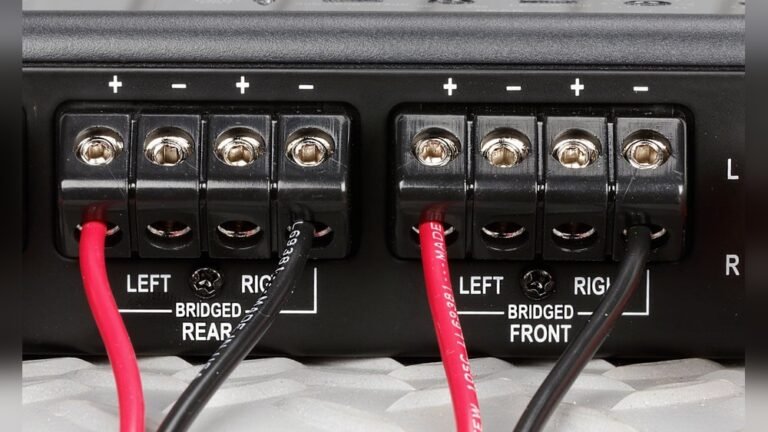
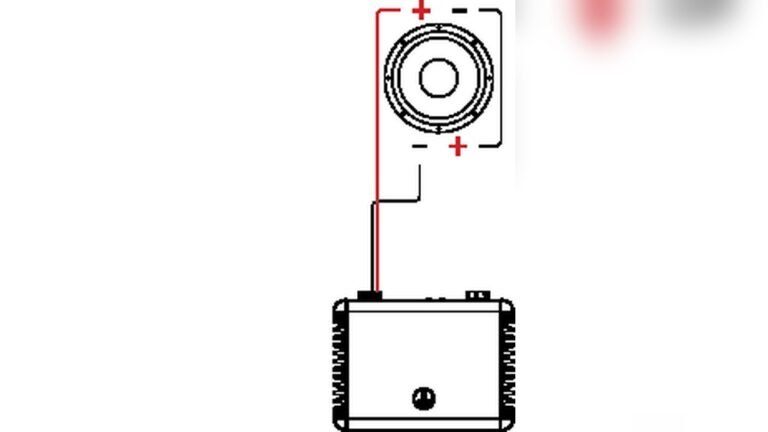
- Incorrect wiring
- Speaker wires touching each other
*Example*: If your sub cuts out and a red light appears, it may be in protection mode.
5. Wireless Interference
If you use a wireless subwoofer, interference from Wi-Fi, Bluetooth, or other electronics can cause dropouts.
- Too many wireless devices nearby
- Obstructions between transmitter and receiver
- Low battery in wireless units
*Example*: If your wireless sub works in one room but not another, interference could be the cause.
How To Diagnose Subwoofer Dropouts
Troubleshooting is about finding the real cause. Use these steps to diagnose your subwoofer:
Step 1: Check The Basics
- Make sure the sub is plugged in.
- Check that the power switch is ON.
- Look for power indicator lights.
Step 2: Inspect Cables And Connections
- Wiggle the power and signal cables gently.
- Listen for sound dropouts as you move them.
- Try swapping cables with a new or known-good one.
Step 3: Test The Power Source
- Plug another device (like a lamp) into the same outlet.
- If the lamp doesn’t work, the power source is the problem.
- Try another wall socket.
Step 4: Observe When It Cuts Out
- Does the sub cut out only at high volume?
- Does it stop after playing for a while?
- Does it cut out randomly?
Knowing the pattern helps you find the cause.
Step 5: Try Another Device
- Connect your sub to a different receiver or amp.
- Use your signal cable with another speaker.
- This helps you find out if the sub, cable, or amp is faulty.
Step 6: Check For Overheating
- Feel the sub’s outer case. Is it hot?
- Move the sub to a cooler place and try again.
Step 7: Look For Error Lights Or Messages
- Many subs have LEDs that change color for errors.
- Check your sub’s manual for what the lights mean.
Key Differences: Wired Vs Wireless Subwoofers
Wired and wireless subs can have different problems. Here’s a quick comparison:
| Feature | Wired Subwoofer | Wireless Subwoofer |
|---|---|---|
| Signal Source | Physical cable (RCA, speaker wire) | Wireless transmitter/receiver |
| Common Issues | Loose cable, interference, bad connection | Wireless signal loss, device interference |
| Setup Complexity | Usually simple | May need pairing and battery |
| Best Use | Home theaters, cars | Minimal cable setups, small rooms |
If your wireless subwoofer keeps cutting out, check for new wireless devices in your home or move the sub closer to the transmitter.
Car Subwoofers: Special Considerations
Car subs have unique challenges:
- Loose battery cable: Vibrations can shake loose the main car battery cable.
- Alternator problems: If your car’s alternator is weak, the sub may lose power during loud music.
- Ground loop issues: Bad grounding can create noise and cutouts.
*Practical tip*: Always use thick, high-quality power and ground cables for car subwoofers.
Home Theater Subs: Common Issues
- Auto On/Off settings: Many home subs have auto-standby. If the signal is weak, the sub may turn off too early.
- Receiver settings: If the subwoofer output is too low, the sub may think there’s no signal.
- Speaker size settings: If your receiver is set to “Large” for main speakers, it may send less bass to the sub.
*Example*: If your sub cuts out between songs or quiet scenes, check the auto-standby time and signal sensitivity.
How To Fix Subwoofer Dropouts
Once you know the cause, try these solutions:
1. Secure All Connections
- Push all plugs in firmly.
- Replace old or loose cables.
- Clean cable jacks with electrical cleaner.
2. Improve Power Supply
- Use a high-quality surge protector.
- Avoid sharing outlets with heavy appliances.
- Replace blown fuses with the correct type.
3. Avoid Overheating
- Move the sub away from walls and heat sources.
- Make sure vents are open.
- Play music at lower volumes for longer life.
4. Fix Signal Problems
- Use short, high-quality signal cables.
- Replace cables that are bent or damaged.
- Check receiver settings for correct sub output.
5. Address Wireless Issues
- Move wireless transmitters closer.
- Reduce the number of nearby wireless devices.
- Change the wireless channel if possible.
6. Reset Protection Mode
- Turn the sub off for 10 minutes.
- Check for wiring errors before turning it on again.
- Read the manual for any reset steps.
7. Adjust Receiver Settings
- Set speaker sizes to “Small” so the sub gets more bass.
- Increase the subwoofer level in your receiver.
- Turn off “Auto Standby” or increase its sensitivity.
*Pro tip*: Write down your old settings before making changes, so you can undo them if needed.

Credit: www.reddit.com
Table: Troubleshooting Quick Reference
This quick guide helps you match symptoms to likely causes:
| Symptom | Possible Cause | Fix |
|---|---|---|
| Sub cuts out at loud volume | Overheating, weak power supply | Lower volume, improve airflow, check cables |
| Sub turns off after a few minutes | Auto standby, bad signal | Change settings, check cable and receiver output |
| No sound from sub | Loose cable, blown fuse, wrong settings | Check all connections, replace fuse, fix settings |
| Sub cuts out in one room, not another | Wireless interference | Move sub/transmitter, reduce interference |
| Sub cuts out when car moves | Loose battery cable, bad ground | Tighten connections, check ground wire |
Advanced Tips For Lasting Performance
Most beginners overlook these advanced ideas:
- Use quality cables: Cheap cables often have poor shielding. Invest in good RCA or speaker wire.
- Keep firmware updated: Some modern subs have updatable software. Check the manufacturer’s website.
- Check your room: Subwoofers can behave differently in different rooms. Walls, carpets, and furniture can affect sound and airflow.
- Avoid stacking gear: Placing other electronics on top of your sub traps heat and causes shutdowns.
- Regular maintenance: Dust vents and check cables every few months.
What If Nothing Works?
If you’ve tried all the steps above and your sub still cuts out:
- Test your sub at a friend’s house with their system.
- Contact the manufacturer for support or warranty service.
- Consider a professional audio technician.
Sometimes, internal parts like the amplifier board or voice coil may be damaged. In these cases, repair or replacement is best.
Real-world Example: Diagnosing A Home Subwoofer
Let’s look at a practical case:
John’s home theater sub kept cutting out during action movies. He checked the power and cables—no problem. But he noticed the sub’s case was hot after 20 minutes. He moved the sub away from the wall, cleared dust from the vents, and lowered the volume a bit.
The sub stopped cutting out.
*Insight*: Overheating is a common, often missed cause, especially if your sub is in a tight space.
Data: How Often Do Subs Fail?
A recent survey showed:
- 60% of subwoofer problems are caused by loose or bad cables.
- 25% are due to overheating or protection mode.
- 15% come from power supply issues.
Most problems are easy to fix if you know what to check.
When To Upgrade Your Subwoofer
Sometimes, fixing is not enough. Consider an upgrade if:
- Your sub is over 10 years old and keeps failing.
- You want better features, like app control or auto-room tuning.
- You need more bass for a bigger room.
Modern subs have better protection, wireless options, and smarter features. If your old sub cuts out often, a new one might be a good investment.

Credit: www.youtube.com
External Resources
For more about audio setups and subwoofer troubleshooting, the Crutchfield Learning Center has detailed guides and expert tips.
Frequently Asked Questions
Why Does My Subwoofer Cut Out Only At High Volumes?
This usually means your sub is overheating or your power supply is weak. When you play loud music, the sub uses more power and gets hotter. Try lowering the volume and improving airflow around the sub.
Can Bad Cables Really Cause My Sub To Cut Out?
Yes. Loose, damaged, or low-quality cables are the top cause of subwoofer dropouts. Always use thick, high-quality cables and make sure all connections are tight.
My Wireless Sub Keeps Losing Connection. What Should I Do?
Move the wireless transmitter closer to the sub. Remove or turn off other wireless devices nearby. If your sub allows, try changing the wireless channel.
What Does Protection Mode Mean On A Subwoofer?
Protection mode is when the sub shuts itself off to prevent damage. This can happen if there’s a wiring problem, too much power, or overheating. Fix the issue and reset the sub before using it again.
How Can I Tell If My Subwoofer Is Blown?
Signs of a blown subwoofer include no sound at all, rattling noises, or distorted bass even at low volume. If you suspect your sub is blown, try it with another amp or get it checked by a professional.
Clear, punchy bass makes music and movies come alive. When your subwoofer keeps cutting out, it’s frustrating—but with careful troubleshooting and simple fixes, you can enjoy reliable, deep bass again. Remember: most problems are caused by loose cables, overheating, or wireless interference. Take your time, check each part, and soon your sub will be back in action.

Credit: www.youtube.com