Why Does My Subwoofer Cut in And Out: Expert Troubleshooting Guide
Why Does My Subwoofer Cut In And Out?
A subwoofer adds powerful, deep bass to your music or home theater. But nothing is more frustrating than when your subwoofer starts to cut in and out. The bass disappears, then comes back—sometimes randomly. For beginners, this is confusing and can make your whole sound system feel unreliable.
If you’re searching for a clear answer, you’re not alone. Subwoofer issues are common, and most problems have simple solutions. This article will help you find out why your subwoofer cuts in and out, with easy explanations, practical examples, and direct advice. Whether you use your subwoofer for movies, music, or gaming, you’ll learn how to fix the problem and enjoy deep bass with confidence.
How A Subwoofer Works (beginner-friendly Explanation)
A subwoofer is a special speaker made for low-frequency sounds—the deep rumbles and thumps in music and movies. It works by turning electrical signals into sound, using a built-in amplifier and a large speaker cone. Most subwoofers connect to an AV receiver or an audio amplifier.
Typical subwoofer system:
- Subwoofer driver: The speaker that moves air to create bass
- Amplifier: Boosts the signal power
- Inputs/outputs: Cables that connect to your receiver or stereo
- Power supply: Provides electricity
When everything works, you get a smooth, powerful bass. But if there’s a problem in any part, the subwoofer might cut in and out.
Main Reasons Why Subwoofers Cut In And Out
Let’s look at the most common causes. Each can happen with home theater, car, or computer subwoofers.
1. Loose Or Faulty Connections
A subwoofer needs steady connections for both audio and power. If a cable is loose, damaged, or dirty, the signal can drop.
- RCA cable not fully plugged in
- Speaker wire frayed or pinched
- Power cord loose at the wall or subwoofer
- Dirty connectors causing poor contact
Example: Many users find that simply pushing the RCA cable firmly into the subwoofer input fixes the problem. Over time, connectors get loose, especially if the subwoofer is bumped or moved.
2. Power Supply Issues
Subwoofers need enough power to run. If there’s a problem with the power cord, outlet, or internal electronics, the subwoofer may turn off and on.
- Loose plug in the wall socket
- Tripped circuit breaker
- Overloaded power strip
- Internal fuse blown
Check if the subwoofer’s power light goes off when the bass stops. If yes, power is likely the issue.
3. Signal Loss From Source Device
The signal comes from a receiver, soundbar, or car stereo. If that device has a problem, the subwoofer gets no signal.
- Receiver set to wrong input
- Audio cable unplugged from receiver
- Receiver firmware glitch
Tip: Test with another device (like a smartphone or different receiver) to see if the subwoofer works.
4. Subwoofer Settings And Controls
Many subwoofers have auto-on or energy-saving settings. These turn the subwoofer off when there’s no signal, then back on when bass is detected. But if the setting is too sensitive, the subwoofer might cut out during quiet parts.
- Auto-on threshold too high
- Volume/gain set too low
- Crossover frequency incorrect
Some subwoofers allow you to disable auto-on or adjust the sensitivity.
5. Overheating
If a subwoofer gets too hot, it may shut down to protect itself. This is more common with powered subwoofers or those in small, enclosed spaces.
- Blocked vents
- Placed near heaters or direct sunlight
- Running at high volume for long periods
Allow the subwoofer to cool and check if it works again. If so, improve airflow or lower the volume.
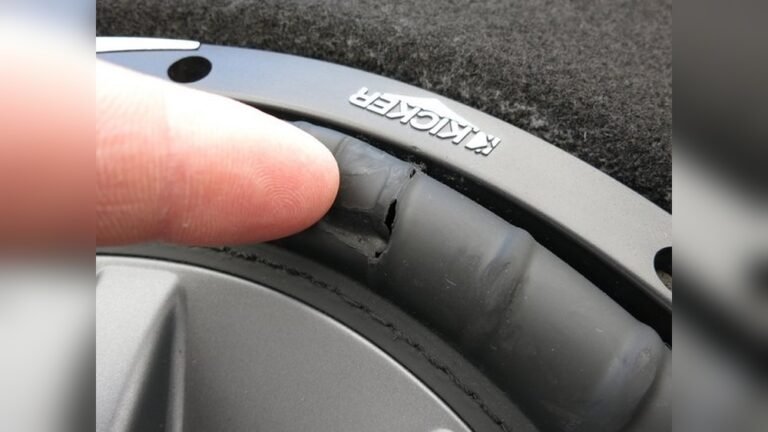
6. Faulty Subwoofer Components
With age or heavy use, internal parts can fail.
- Amplifier board has a broken solder joint
- Voice coil is damaged
- Driver cone is torn
These problems often need a repair shop to diagnose.
7. Interference From Other Devices
Wireless subwoofers (Bluetooth or Wi-Fi) can lose connection due to interference.
- Wi-Fi routers nearby
- Microwaves in use
- Other wireless speakers operating at the same frequency
Try moving the subwoofer or router, or switching wireless channels.
How To Diagnose The Problem
Solving a subwoofer that cuts in and out is easier if you work step by step.
Basic Troubleshooting Steps
- Check all cables: Unplug and re-plug every cable, including power and signal.
- Try another outlet: Plug the subwoofer into a different wall socket.
- Test with a different source: Use a phone or different receiver to send music to the subwoofer.
- Listen for patterns: Does the problem happen only at low volume, or randomly?
- Check settings: Look at receiver and subwoofer controls (volume, crossover, auto-on).
Using Table Data For Quick Comparison
The table below gives a clear comparison of common causes and how to check them:
| Problem Area | What to Check | Typical Fix |
|---|---|---|
| Audio cables | Loose/damaged connectors | Reseat or replace cables |
| Power supply | Power light, wall outlet | Try new outlet, check fuse |
| Source device | Receiver output, settings | Use another source |
| Subwoofer settings | Auto-on, volume, crossover | Adjust settings |
| Overheating | Warm to touch, location | Improve airflow, lower volume |
| Wireless interference | Other devices nearby | Move devices, change channel |
Practical Examples And Data
Let’s look at real situations beginners face:
- Example 1: John notices his subwoofer only cuts out during quiet scenes in movies. He checks the auto-on setting and finds the sensitivity is too high. Lowering the threshold keeps the subwoofer on, and the problem stops.
- Example 2: Maria’s subwoofer stops working whenever she uses a hair dryer. She discovers both devices are on the same circuit. After plugging the subwoofer into another outlet, the bass is steady.
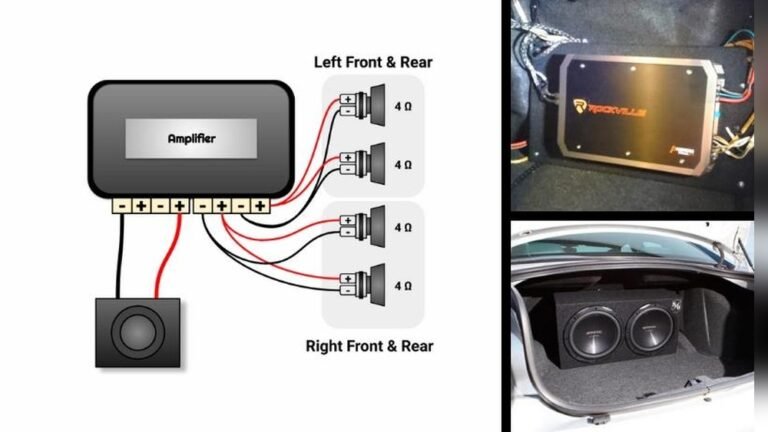
- Example 3: A car subwoofer in a hot climate shuts down after 10 minutes. The user installs a small fan and moves the amp for better airflow—now the music never cuts out.
Statistics: According to audio forums and manufacturer support sites, over 50% of subwoofer cut-out issues are caused by loose or faulty cables. Power supply problems account for about 20%, and auto-on settings cause about 15%.

Credit: www.reddit.com
How To Fix A Subwoofer Cutting In And Out
Here’s a simple action plan for beginners:
1. Inspect And Reseat All Cables
- Unplug every cable and plug it back in firmly.
- Look for bent pins, frayed wires, or loose connectors.
- Use a new cable if unsure.
2. Test Power And Outlets
- Plug the subwoofer into a different wall outlet.
- Avoid using cheap power strips or extension cords.
- Check the power light for flickering.
3. Adjust Subwoofer And Receiver Settings
- Turn off auto-on or lower its sensitivity.
- Set the volume/gain to at least 50%.
- Adjust crossover to match your main speakers (usually 80Hz is a good start).
4. Try A Different Audio Source
- Connect a phone or MP3 player directly to the subwoofer (if possible).
- If the problem goes away, the issue is with your receiver or source device.
5. Improve Airflow
- Move the subwoofer away from walls, heaters, or sunlight.
- Check for blocked vents and clean dust from grills.
6. Check For Wireless Interference
- For wireless subs, move routers or microwaves away.
- Switch to a wired connection if possible.
7. Look For Internal Faults
If none of the above work, the subwoofer may need professional repair. Common signs:
- Burning smell
- Rattling or buzzing sounds
- No sound at all, even with good power and signal
Common Beginner Mistakes (and How To Avoid Them)
Many new users make simple errors that lead to cut-out problems.
- Not pushing cables in all the way: Cables can look connected but may not make full contact.
- Using old or low-quality cables: Cheap cables break easily or have poor shielding.
- Ignoring auto-on settings: Some think the subwoofer is broken when it’s just in standby.
- Placing subwoofer in a closed cabinet: This traps heat and causes shutdowns.
- Not checking both ends of a cable: Sometimes the problem is at the receiver, not the subwoofer.
When To Call A Professional
You should seek expert help if:
- The subwoofer still cuts out after trying all fixes above.
- You hear strange noises like popping or humming.
- There is no power light, even with a new outlet and cord.
- You smell burning or see smoke.
A technician can test the amplifier, driver, and connections inside the subwoofer. Many problems can be fixed, but sometimes it’s better to replace the unit if repairs cost more than half the price of a new subwoofer.
Comparing Subwoofer Types: Wired Vs. Wireless
Some users want to know if their subwoofer type is more likely to cut out. Here’s a quick comparison:
| Subwoofer Type | Common Cut-Out Causes | Best Fixes |
|---|---|---|
| Wired | Loose cables, power supply | Check cables, outlets |
| Wireless | Signal interference, pairing issues | Move devices, reset pairing |
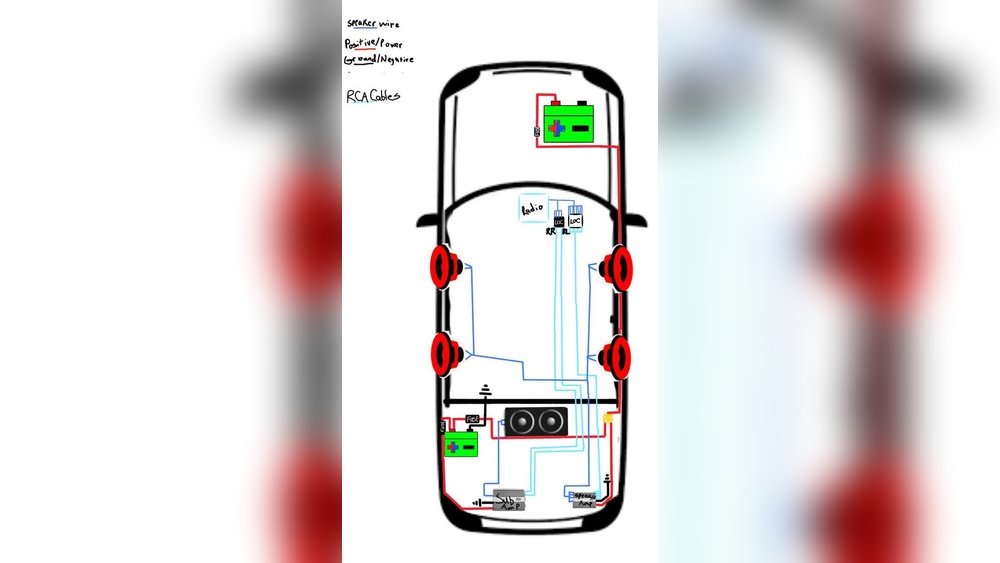
| Car Subwoofer | Overheating, battery issues | Improve airflow, check wiring |
Insight: Wireless subwoofers are more sensitive to interference from Wi-Fi and other electronics. Wired subwoofers are more affected by cable and power problems.

Credit: www.youtube.com
How To Prevent Future Cut-outs
Prevention saves you time and money. Here’s how to keep your subwoofer working smoothly:
- Use good quality cables and check them every few months.
- Plug into a surge protector to guard against power spikes.
- Keep the subwoofer in a cool, ventilated spot.
- Update your receiver’s firmware as recommended.
- For wireless models, keep away from routers and microwaves.
Non-obvious Insights Beginners Miss
- Auto-On Sensitivity: Many subwoofers default to a high auto-on threshold. Lowering this makes the subwoofer more responsive and prevents cut-outs during quiet music or movies.
- Power Supply Matching: Using a power supply with the wrong voltage or amperage (especially with car or portable subwoofers) can lead to random shut-offs. Always check the manual for the correct specs.
Where To Find Reliable Help
If you’re still stuck, check your subwoofer’s manual or support website. Many brands have troubleshooting guides or forums. For a deeper look at subwoofer technology and tips, the Wikipedia Subwoofer page is a solid resource.
Frequently Asked Questions
Why Does My Subwoofer Only Cut Out At Low Volume?
When the volume is low, the auto-on circuit might not detect enough signal to stay active. Try increasing the subwoofer’s input sensitivity or disabling the auto-on feature if possible.
Can A Faulty Receiver Cause My Subwoofer To Cut In And Out?
Yes. If the receiver’s subwoofer output is loose, dirty, or malfunctioning, the subwoofer may lose signal. Test the subwoofer with another audio source to rule this out.
How Do I Know If My Subwoofer Is Overheating?
A subwoofer that feels hot to touch, shuts off after long use, or is in a poorly ventilated area may be overheating. Improve airflow and reduce volume to help.
Is It Better To Use Wired Or Wireless Subwoofers To Avoid Cut-out Problems?
Wired subwoofers are generally more reliable because they are not affected by wireless interference. However, high-quality wireless models work well in most homes if placed away from other electronics.
What’s The Best Way To Clean Subwoofer Connectors?
Turn off and unplug the subwoofer. Use a dry microfiber cloth or contact cleaner spray on all cable ends and sockets. Avoid using water or abrasive materials.
A subwoofer that cuts in and out is a common but fixable problem. By checking cables, power, settings, and your room setup, you can often solve the issue in minutes. With the right steps, your system will deliver smooth, deep bass for years to come.

Credit: www.youtube.com