Why is There an SD Card Slot in My Car? Explained Simply
Why Is There An Sd Card Slot In My Car
Modern cars have many small features that surprise new owners. One of these is the SD card slot. You may notice it near your car’s dashboard, infotainment system, or inside the glove box. At first, it seems odd—why would a car need an SD card slot? Is it just for music, or does it do more? Many people ignore this feature, but understanding it can help you get more from your vehicle.
Let’s explore why your car has an SD card slot, how you can use it, and what benefits it brings. This guide uses simple English and clear examples, so even if you are new to cars, you’ll find answers easily.
What Is An Sd Card Slot In A Car?
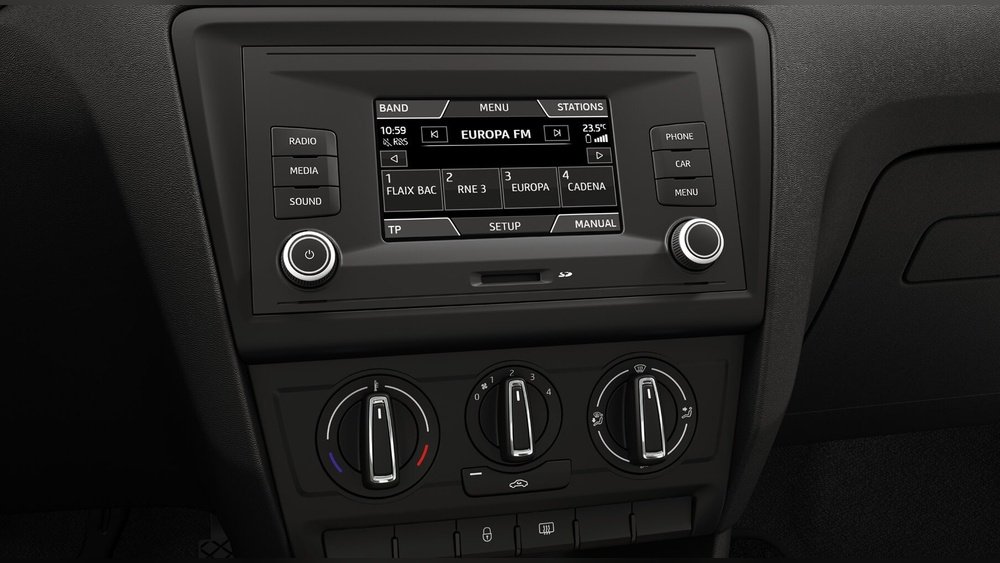
An SD card slot is a small opening in your car’s multimedia system where you can insert an SD card. SD cards are tiny storage devices, like the ones used in cameras or phones, that hold digital files.
Most SD card slots in cars support standard SD cards (up to 32GB) or SDHC cards (up to 64GB). Some luxury vehicles may also support SDXC (larger capacity). The slot is usually found:
- On the dashboard, near the radio
- Inside the glove compartment
- Near the navigation or infotainment controls
The SD card slot connects directly to the car’s central computer or multimedia system. This allows you to access files stored on the card.
Why Do Cars Have Sd Card Slots?
Car manufacturers add SD card slots for several reasons. Here are the main uses:
1. Navigation Map Updates
Many cars with built-in GPS navigation use SD cards to store map data. The card holds maps and navigation software. When roads change, you can update the maps by replacing the SD card or uploading new files.
- Example: Volkswagen, BMW, Toyota, and Ford often use SD cards for map updates.
- Without an SD card, the navigation system may show outdated maps or miss new roads.
Updating maps is simple:
- Remove the SD card from your car.
- Download the latest map files from the car manufacturer’s website.
- Copy files to the SD card using your computer.
- Insert the card back into the car.
This keeps your navigation accurate and reliable.
2. Music And Media Storage
The SD card slot lets you play music files from an SD card. You can store hundreds or thousands of songs in MP3, WAV, or other formats. This is useful if you want to avoid streaming or using your phone.
- Benefits:
- No need for internet or Bluetooth
- Easy access to personal playlists
- Better sound quality than radio
Some cars also let you view photos or play videos (while parked), especially in luxury models.
3. System Diagnostics And Updates
SD cards can be used by mechanics or car owners to update car firmware, run diagnostics, or install new features.
- Software updates: Sometimes, car makers release firmware updates for the multimedia system. These are delivered on SD cards.
- Diagnostic tools: Mechanics insert SD cards to read error codes or repair systems.
This is more common in high-end vehicles or those with advanced electronics.
4. Storing Driving Data
Certain cars, especially fleet vehicles or taxis, use SD cards to save driving data:
- Trip logs
- Fuel usage reports
- GPS tracking
This helps owners monitor vehicle use or analyze driving habits.
5. Customizing Car Settings
In some cars, SD cards let you save custom settings:
- Equalizer presets
- Navigation favorites
- Seat positions
When you change the SD card, your personal settings load automatically.
How To Use The Sd Card Slot In Your Car
Understanding how to use the SD card slot is easy. Here’s a step-by-step approach for beginners:
Prepare Your Sd Card
- Choose the correct SD card type. Most cars accept SD or SDHC, up to 32GB or 64GB.
- Format the card using your computer (usually FAT32 format).
- Add files: Place your music, map updates, or other files in the main directory.
Insert The Sd Card
- Find the slot in your car.
- Gently insert the card. Do not force it.
- The car’s system should recognize the card automatically.
Access Files
- On the car’s screen, select “Media,” “Navigation,” or “Settings.”
- Browse files and start playback or updates.
Remove The Card
- Only remove the SD card when the car is off or when prompted.
- Avoid removing while files are being read or written.
Sd Card Slot Vs. Other Media Inputs
Many cars have USB ports, CD players, or Bluetooth. How does the SD card slot compare? Here’s a quick comparison:
| Feature | SD Card Slot | USB Port | Bluetooth |
|---|---|---|---|
| Storage Capacity | Up to 64GB | Varies (often higher) | Depends on phone/device |
| Reliability | Very stable | Stable | May drop connection |
| Music Quality | High (lossless) | High | Sometimes compressed |
| Updates (Maps/Firmware) | Easy | Possible, but less common | Not supported |
| Ease of Use | Simple | Simple | Requires pairing |
SD cards are especially good for storing map updates and large music libraries. USB ports are flexible, but may be used for charging or connecting phones. Bluetooth is best for quick streaming, but quality may suffer.

Credit: www.reddit.com
Common Car Models With Sd Card Slots
Not all cars have SD card slots. Here are some popular models that include them:
- Volkswagen Golf, Passat, Tiguan
- BMW 3 Series, 5 Series
- Toyota Camry, Corolla
- Ford Focus, Escape
- Audi A4, Q5
In most cases, the SD card slot is part of the infotainment system. Some models use it only for maps, while others allow music playback.
Practical Benefits Of Using The Sd Card Slot
Many beginners overlook the advantages of using the SD card slot. Here are some practical benefits:
- Large Storage: SD cards can hold thousands of songs or detailed maps, more than a CD or USB stick.
- Offline Access: No need for internet—great for long trips or remote areas.
- Easy Updates: Map and software updates are simple, without dealer visits.
- Personalization: Save your settings, favorites, or playlists.
- Low Risk of Data Loss: SD cards are durable and less likely to fail compared to hard drives.

Credit: www.reddit.com
Limitations And Common Mistakes
While SD card slots are useful, there are a few limitations and mistakes beginners often make:
- Wrong Card Type: Not all SD cards work. Check your car’s manual for supported types and sizes.
- Improper Formatting: If the card is not formatted correctly (usually FAT32), your car may not read it.
- Corrupted Files: Avoid copying files with unsupported formats or corrupted data.
- Removing While Active: Never remove the SD card when files are being accessed. This can damage the card or system.
- Ignoring Updates: Using old map data can lead to wrong directions.
Real-life Example
Imagine you drive a 2018 Volkswagen Passat. Your navigation system asks for a map update. You visit Volkswagen’s website, download the latest maps to your SD card, and insert it back. In minutes, your system shows new roads and places.
Or, you want to listen to your favorite songs. You load MP3 files onto a 32GB SD card, insert it, and enjoy hours of music without needing your phone.

Credit: www.reddit.com
Sd Card Slot: Data Security And Privacy
Some beginners worry about data security. Here’s what you should know:
- SD cards are not connected to the internet, so hacking risk is low.
- Always remove your SD card if you sell the car or leave it for service.
- Store your SD card safely to protect personal data.
Sd Card Slot Usage Statistics
Recent surveys show that about 35% of car owners use the SD card slot regularly, mostly for music and map updates. Among luxury car owners, usage rises to 60%. The main reasons are convenience and offline access.
| Car Owner Type | SD Card Slot Usage (%) |
|---|---|
| General Car Owners | 35% |
| Luxury Car Owners | 60% |
| Fleet Operators | 50% |
Tips For Beginners
If you are new to using SD card slots in your car, keep these tips in mind:
- Check your car manual for supported card types and maximum size.
- Format the card before use (FAT32).
- Organize files in folders for easy access.
- Keep a backup of important files.
- Remove the card when not needed to prevent accidental loss.
Frequently Asked Questions
Why Can’t My Car Read My Sd Card?
Most cars need SD cards formatted in FAT32. If your card is larger than 64GB or uses NTFS, it may not work. Also, check for file compatibility—most systems support MP3, WAV, or JPEG.
Can I Use The Sd Card Slot For Video Playback?
Some cars support video playback from SD cards, but often only when parked. Check your car’s infotainment manual for supported formats and safety rules.
Is It Possible To Update Maps Without An Sd Card?
Many cars require the SD card slot for map updates. If your system uses internal memory, updates may be possible through USB or dealer service, but SD cards are faster and easier.
Can I Store Personal Data Like Contacts Or Settings?
Yes, in some vehicles, you can save contacts, favorites, or custom settings on the SD card. This is useful if you share the car or want to transfer settings.
Are Sd Card Slots Becoming Less Common In New Cars?
In recent years, USB and wireless solutions are growing. However, SD card slots remain popular for navigation and offline media, especially in European and Asian car models.
Final Thoughts
The SD card slot in your car is more than a simple connector. It offers a reliable way to store and update navigation maps, play music, manage car settings, and run diagnostics. By understanding its uses and avoiding common mistakes, you can enhance your driving experience.
Whether for entertainment or accurate directions, the SD card slot is a practical feature that many owners overlook.
For more details about SD card technology and compatibility, visit Wikipedia. With the right approach, your car’s SD card slot can become a tool for convenience, personalization, and reliable performance.